
I hear this from firm owners regularly: "How would I even know if ChatGPT is sending me clients? Where does that appear in my reports? Do I need to buy separate software?"
Some have bought separate dashboards. They did not need to. Your existing analytics already captures this data � you just need to know where to look and how to read it.
Across accounting and tax firms tracked through LovedByAI in early 2026, the numbers stand out from every other professional services category:
Watch: Is AI Sending Me Traffic? — free tool demo
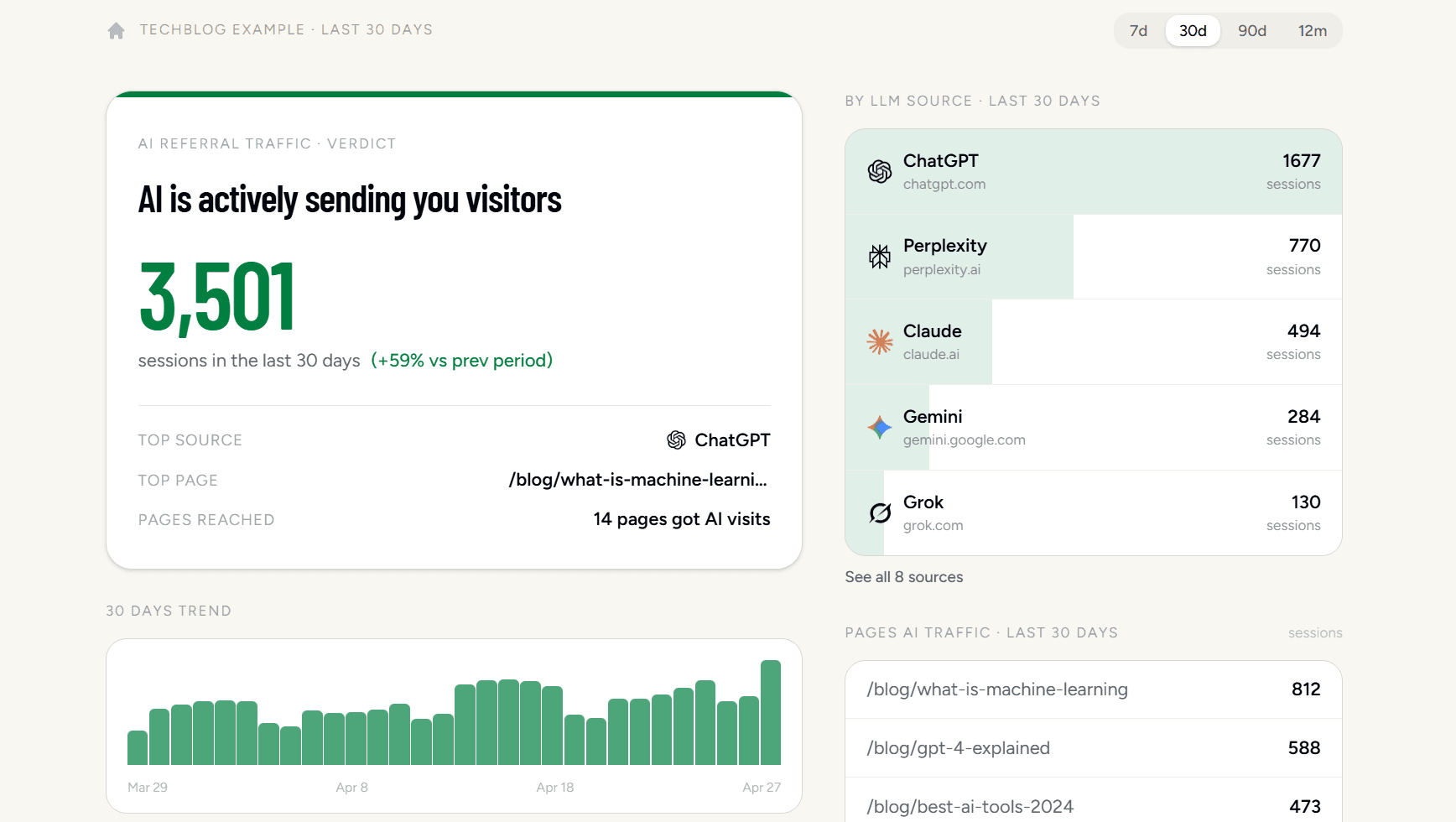
Is AI Sending Me Traffic? is a free tool that connects to your Google Analytics in 30 seconds and shows exactly which AI platforms — ChatGPT, Perplexity, Claude, Gemini, and more — are already sending you visitors. No manual digging in GA4 required.
Check if AI is already sending you clients
Before buying any tool or restructuring any page, run this five-minute check. Many accounting and tax firms are already receiving quiet AI referral traffic without their owners realizing it.
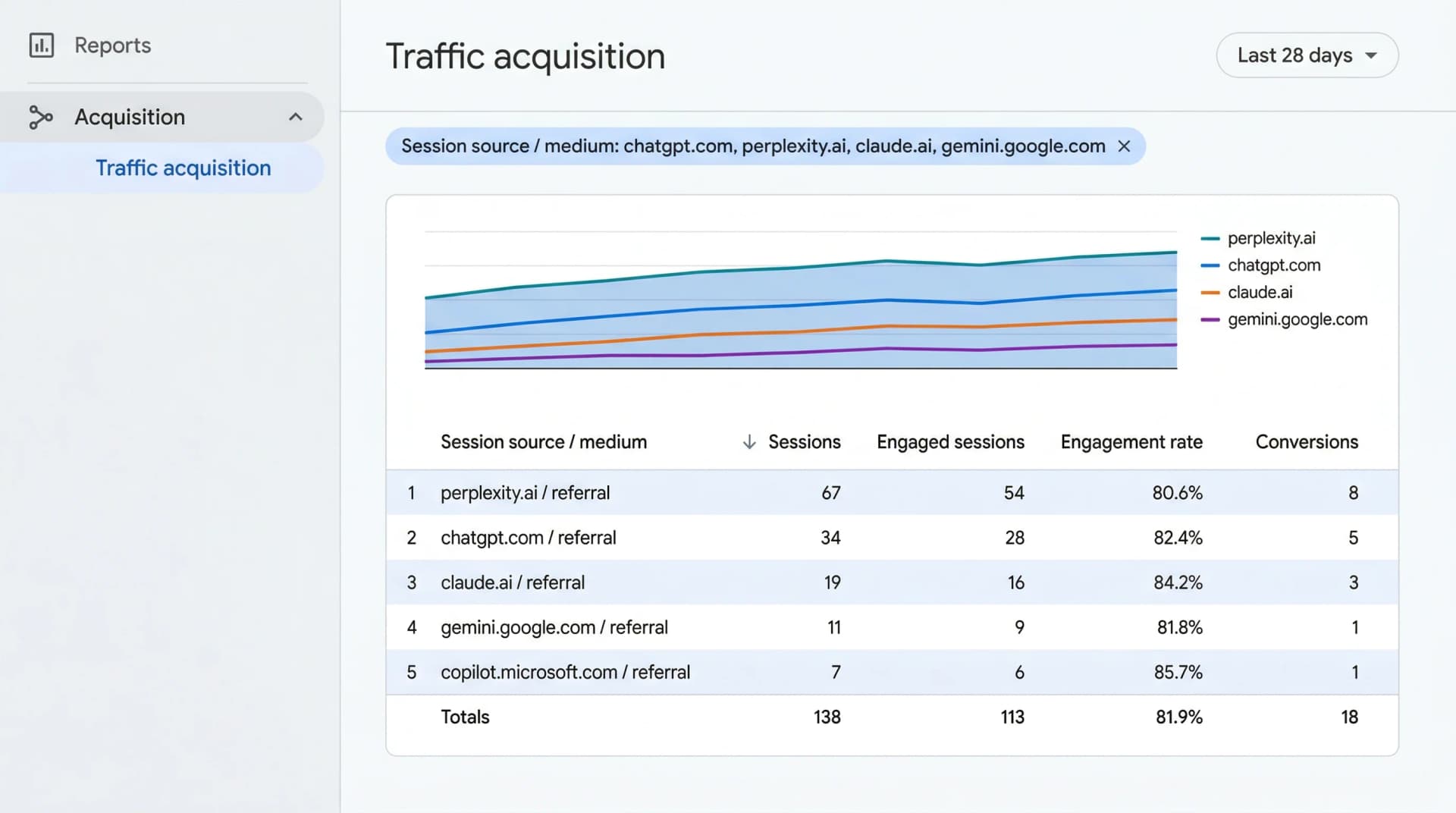
Step 1: Open your traffic source report. In GA4, go to Reports ? Acquisition ? Traffic Acquisition. Change the primary dimension to "Session source / medium" using the dropdown at the top of the table.
Step 2: Filter for AI platforms. Click the search bar above the table and paste in this filter:
chatgpt|perplexity|gemini|claude|openai
If any rows appear, AI tools are already sending prospective clients to your site.
Step 3: Save a permanent AI channel. Go to Admin ? Data Display ? Channel Groups ? Create new channel group. Name it "AI Search" and set the rule: Source contains chatgpt|perplexity|claude|gemini. Save it. This channel now appears alongside Organic Search in every future report.
Which AI platforms appear in GA4 � and as what
| AI Platform | Session source in GA4 | Medium |
|---|---|---|
| ChatGPT (web) | chatgpt.com | referral |
| Perplexity | perplexity.ai | referral |
| Claude | claude.ai | referral |
| Gemini (web) | gemini.google.com | referral |
| Bing Copilot | copilot.microsoft.com | referral |
| ChatGPT mobile app | often absent | direct |
The dark traffic problem
Chat referrals from mobile AI apps arrive without any referrer header. GA4 counts them as direct traffic � indistinguishable from someone typing your URL directly. The 121 referrals-per-site figure above is the floor, not the ceiling.
How to spot hidden AI traffic: Watch your Direct bucket for unexplained spikes on specific service pages � your R&D tax credit page or payroll FAQ, for example. If Direct jumps on a page that rarely gets typed-in visits, AI is likely responsible. Cross-reference with monthly intake form submissions to see if inquiries track the same pattern.
How can you tell if an AI referral actually requested a consultation?
Session counts are vanity. Consultation requests are what matter. Once your AI Search channel is live, wire it to conversion tracking so you know whether those visits led to an inquiry.
Set up a consultation-request event
In GA4, go to Admin ? Events and find the event tied to your contact form submission or booking confirmation page. Mark it as a Key Event (formerly a Conversion). Filter your Conversions report by the AI Search channel to see how many prospective clients are moving from an AI recommendation to a submitted form.
Add a self-reported attribution field
Because mobile AI apps strip referrer data, self-reported intake is often more accurate than your analytics. Add a "How did you hear about us?" dropdown to your intake form with explicit options: Google Search, ChatGPT, Perplexity, Claude, Referral, Other. Match those responses against your GA4 Direct traffic monthly.
Review AI-referred clients as a separate cohort
Pull a 90-day cohort of all inquiries sourced to AI Search. Compare average engagement time, pages per session, and conversion rate against your Organic Search cohort. Accounting firm owners consistently find that AI referrals arrive on specific tax planning or advisory pages � not the homepage � because AI has already answered the prospect's general question and sent them to the specific page that addresses their situation.
Why your analytics is missing most of your AI traffic
Even with the channel group configured, you are not seeing the full picture. Three structural gaps cause under-counting.
Mobile apps strip the referrer header
When a prospective client taps a link inside the ChatGPT iOS or Android app, the operating system does not pass a referrer header. GA4 records the session as Direct. There is no configuration change that fixes this � it is a privacy feature of mobile operating systems.
AI chats behave like dark social
AI conversations are private. When someone copies a URL from a Claude response and opens it in a new tab, that visit arrives with no referrer data � identical to a link shared in a private message. This is why Direct traffic spikes on specific non-branded service pages are often AI-sourced.
Google Search Console is blind to AI traffic
Search Console only reports traffic that passes through Google's own index. ChatGPT, Perplexity, and Claude operate independently. A prospective client referred by Perplexity will never appear in your Search Console data, regardless of how you configure it.
Not seeing AI traffic? Here is what to fix
If your GA4 AI Search channel shows zero visits after two weeks, work through these three layers before concluding AI is not a viable channel for your practice.
1. Check whether measurement is broken
Visit Google Tag Assistant and run your homepage URL. Confirm the GA4 tag fires on your key service pages. Next, open your /robots.txt file in a browser and check whether GPTBot, ClaudeBot, or PerplexityBot are blocked � if they are, AI crawlers cannot read your pages and will not cite you. Finally, ask ChatGPT to recommend a CPA in your city specializing in your niche and see whether your firm appears.
2. Improve your on-page signals
Add AccountingService and FAQPage schema markup to your practice area pages. Without this structured data, AI models parse your marketing copy rather than reading verified facts about your specialty and location. Restructure page headings around the specific questions your ideal clients ask AI � "How do R&D tax credits work for software startups?" rather than "Corporate Tax Planning Services." LovedByAI audits exactly these gaps and surfaces the highest-priority fixes.
3. Build off-page authority AI models recognize
AI models draw from trusted directories and publications during training. Verify or claim your listing on AICPA, your state CPA society, and NATP with consistent name, address, and specialty. Contribute a bylined article to a local business publication or accounting trade outlet � even one external citation can meaningfully shift how frequently AI systems mention your firm when the relevant question is asked.
Conclusion
If you want to know whether ChatGPT and Perplexity are sending prospective clients to your practice, your existing analytics already has the answer � it just needs to be filtered correctly. The five-minute GA4 check at the top of this article is the fastest way to establish your baseline.
Accounting firms see the highest AI referral rates of any tracked professional service category. That 121-referrals-per-site figure compounds over time � but only if you can see it and act on it.
For a complete guide to AI SEO strategies for Accountants GEO, browse our Accountants GEO page.
