
AI assistants are rapidly functioning as new search engines, but if you are not actively tracking those clicks, your most valuable new leads are likely hiding in your analytics dashboard as generic "Direct" traffic. To measure the real business impact of your AI Visibility, you need a clear tracking strategy using UTM for AI traffic.
UTMs (Urchin Tracking Modules) are simple text tags added to the end of your URLs that tell your analytics tools exactly where a visitor originated and why they clicked. While traditional SEO relies on search engines passing referral data automatically, AI platforms like ChatGPT, Claude, and Perplexity often strip this data away for privacy reasons. This means the traffic you earn through Generative Engine Optimization (GEO) goes uncredited.
Whether you are building custom GPTs, optimizing a WordPress site for AI citations, or feeding documentation to large language models, tagging your target URLs gives you back your data. Clean tracking proves your discoverability efforts are actually working. In this guide, we will explore how to structure these tracking parameters, where to place them, and how to confidently measure the visitors arriving from AI platforms without relying on guesswork.
Why is tracking AI traffic different from traditional search?
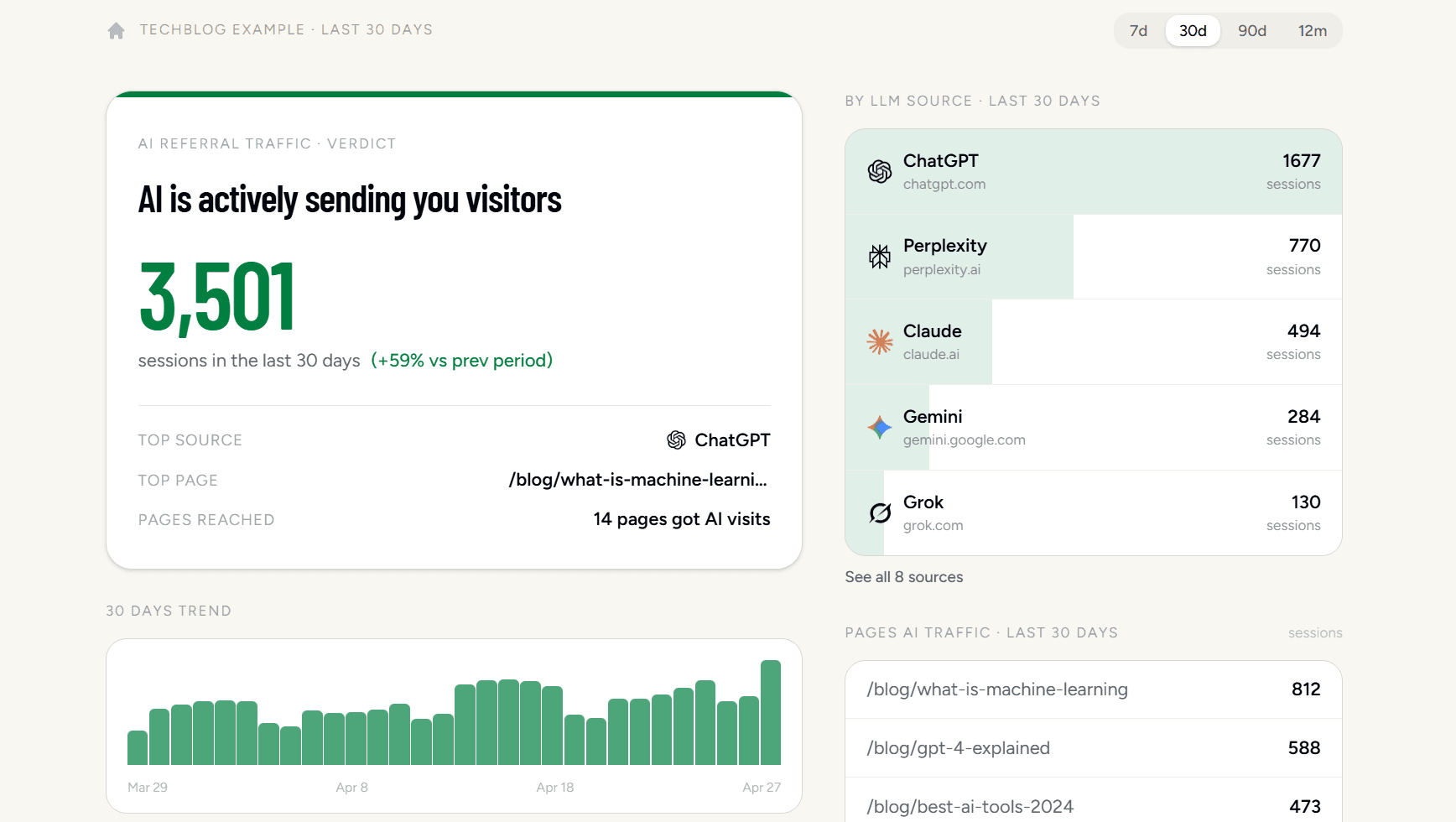
Before building a UTM strategy, confirm AI is actually sending you traffic. Is AI Sending Me Traffic? connects to your Google Analytics in 30 seconds and shows a real breakdown by AI source - ChatGPT, Perplexity, Claude, Gemini, and more.
Traditional search engines pass along clear tracking data when a user clicks your link, but AI assistants usually strip this information away. When a potential customer asks ChatGPT or Claude for a local service recommendation and clicks through to your website, the AI platform rarely sends a "referrer" signal. A referrer is simply a piece of background data telling your website where a visitor just came from. Without it, your analytics platform is completely blind to the source of the visit, meaning you could be winning valuable AI recommendations without ever knowing it. To see if this blind spot affects your business right now, open your website traffic reports and look for recent, unexplained spikes in visitors.
Because tools like Google Analytics cannot see that the click originated inside an AI chat interface, they automatically dump the visit into your "Direct" traffic bucket. Direct traffic is the default catch-all category for visitors who supposedly typed your exact URL into their browser or used a bookmark. For a small business owner, a sudden jump in people perfectly typing out a long, complex service page URL is highly unlikely. It usually means dark traffic - visits from apps, private messages, or AI tools that hide their origin. You can start uncovering this pattern by segmenting your direct traffic to isolate visits that land deep inside your site rather than on your homepage.
The real business cost of untracked AI discoverability is making bad marketing decisions based on an incomplete picture. If your new pricing guide gets cited by an AI assistant and generates five qualified sales calls, but your analytics dashboard shows zero search traffic, you might wrongly conclude the content was a waste of money. You cannot confidently invest in the content that drives revenue if you cannot see what is actually working. Before you spend another dollar on content creation, export a list of your high-value pages that receive the most unexplained direct traffic so you know exactly where to apply proper tracking links first.
How do tracking parameters work for AI assistants?
Tracking parameters - often called UTM codes - are simply short text tags added to the end of a web address that act as digital nametags for your links. When an AI assistant strips away standard referral data, these attached tags force your analytics platform to recognize exactly where the visitor came from. For a business owner, this means the difference between seeing a mysterious spike in "Direct" website visitors and knowing for a fact that Claude just sent you three qualified leads. The two most important tags are the source (utm_source), which tells you the specific platform like ChatGPT or Perplexity, and the medium (utm_medium), which groups the type of traffic. To get started, take the URL of your primary service page and prepare to add these simple text strings to the end of it.
Consistency is what makes this tracking data useful for your business. If you use "chatgpt" today and "openai" tomorrow, your analytics reports will split the data, making it impossible to see the total impact of AI on your revenue. Create a standardized naming convention right now and stick to it. Use utm_medium=ai_chat or utm_medium=generative_engine for the broad category, and set the utm_source to the exact name of the assistant, like utm_source=claude. You can use Google's Campaign URL Builder to generate these links instantly without writing any code. Create a simple spreadsheet documenting your chosen names so anyone on your team sharing links follows the exact same format.
You cannot force an AI to use your tagged links when it crawls your website organically, but you have complete control over the links you feed directly into these systems. Place your newly tagged URLs inside your custom GPT instructions, enterprise AI knowledge bases, and any direct prompts you use to test how AI platforms summarize your brand. If you maintain a directory profile or a data feed that AI companies actively scrape for local business data, update your website links there to include your new AI-specific tags. By strategically placing these URLs where AI systems consume your information, you guarantee that a portion of your AI-driven discovery translates into measurable business metrics.
What steps should you take to capture AI referrals today?
You can start capturing AI referral data immediately by seeding your tagged URLs into the external platforms and code elements that AI engines already trust. If you wait for AI companies to voluntarily pass standard referral data, you will remain blind to the customers they send you.
Start by updating your external citations and brand profiles. Generative AI systems scrape authoritative databases like Yelp, Crunchbase, and niche industry directories to confidently answer user questions. When an AI cites your business from these sources, it usually passes along the exact link it found there. Log into your top three external directory profiles today and replace your standard website link with a tagged version, such as your domain followed by ?utm_source=industry_directory&utm_medium=ai_citation`. This ensures any AI scraping that specific profile grabs a trackable link.
Next, weave your tracking strategy into your structured data. Structured data - frequently written as JSON-LD - is simply a standardized code dictionary that translates your website's text into a machine-readable format. When you define your company using Organization schema, you can point the main URL property to a UTM-tagged link. This hands AI crawlers a pre-packaged, trackable destination to use when they reference your brand.
Here is how that looks in your code:
{
  "@context": "https://schema.org",
  "@type": "Organization",
  "name": "Your Business Name",
  "url": "https://yourwebsite.com/?utm_source=schema&utm_medium=ai_citation"
}
You can manually update your JSON-LD script block using a free WordPress header plugin, or you can check your site to see if your current schema is missing or broken before making changes.
Finally, monitor this incoming data in your analytics dashboard. Without a dedicated view, these highly qualified AI leads will just blend into your overall campaign traffic. Open your traffic acquisition report in Google Analytics 4 and create a filter for the exact utm_medium you established. Save this custom report to your main navigation bar. Check it weekly to see exactly which AI mentions are turning into booked appointments or sales, so you know exactly where to focus your marketing efforts next.
How will measurement evolve with Generative Engine Optimization?
The future of measurement is shifting from counting website clicks to tracking brand citations across different chat interfaces, which is why a growing category of AI search visibility tools now monitor your mentions and share of voice directly inside ChatGPT, Claude, and Perplexity. Classic search engine optimization and Generative Engine Optimization are not opposing forces. They are deeply connected because AI platforms constantly pull data from traditional search indexes like Bing and Google. If your site has broken links or loads too slowly, an AI crawler will abandon it just as quickly as a traditional search bot. For your business, this means fixing your classic SEO foundation is the fastest way to become visible to AI. Log into Google Search Console today and fix any pages marked as "Not indexed" so both traditional and AI crawlers can actually read your service pages.
As new AI search platforms launch, trying to manually generate a unique tracking link for every single tool will exhaust your team. Instead of chasing every new interface, focus on tracking the broad categories of traffic. Set up a standard tracking template for all your external PR releases, knowledge base articles, and directory listings. When a new platform like Claude updates its system, you will automatically capture that referral data under your broader AI category. Create a shared document with these standard links and require anyone publishing content for your business to use them.
Tracking matters, but overloading your website with complex redirect scripts can actively block AI from understanding your content. AI crawlers need high content clarity, which means they prefer clean, straightforward website code. If you use multiple tracking URLs for the same service page, you risk confusing the systems about which page is the real one. Protect your site by implementing a canonical tag (a hidden code snippet in your website's <head> section that tells bots which URL is the official master copy). If you use WordPress, you can set this master link using a free SEO plugin. That way AI engines always cite your preferred page without getting lost in your tracking parameters.
How to Build and Deploy a Tracked Link for AI Platforms
When AI assistants cite your website, standard analytics platforms often miscategorize that traffic as direct or generic referral. To accurately measure your discovery across these tools, you need to append UTM parameters - short text codes added to URLs that tell analytics exactly where a click originated.
Here is how to configure and deploy a tracked link specifically for AI platforms.
Step 1: Identify your target URL Choose the specific landing page or homepage you want AI systems to cite as your official source.
Step 2: Define your tracking variables
Select a clear source (like chatgpt or perplexity) and a consistent medium (like ai_chat). Keeping these naming conventions uniform prevents messy data in your analytics reports.
Step 3: Generate the tagged link
Use a standard tool like the Google Campaign URL Builder to securely append these parameters to your URL. Your final link will look something like this: https://your-site.com/?utm_source=chatgpt&utm_medium=ai_chat
Step 4: Test the link Test the newly generated link by pasting it into a private browser window. Open your analytics real-time report to ensure the tags register properly before you deploy them.
Step 5: Inject into structured data and profiles Deploy the tracked URL into your external brand profiles, knowledge bases, and your organization's structured data references. Structured data, often written in JSON-LD format, is code that helps machines understand your site entities.
For WordPress users, you can inject this tracked URL into your Organization schema using wp_json_encode in your theme's functions.php file:
function add_ai_tracked_organization_schema() {
    $schema = array(
        '@context' => 'https://schema.org',
        '@type'    => 'Organization',
        'name'     => 'your brand',
        'url'      => 'https://your-site.com/?utm_source=ai_knowledge_base&utm_medium=ai_chat'
    );

    echo '';
    echo wp_json_encode( $schema );
    echo '';
}
add_action( 'wp_head', 'add_ai_tracked_organization_schema' );
Warning: Watch out for internal tracking
Never place UTM-tagged links inside your own website's internal navigation or <a> tags. If a visitor clicks an internal UTM link, your analytics platform will start a brand new session and overwrite how that user originally found you. Only use tracked links on external platforms, AI training sets, and outbound PR materials.
