
I hear this from agency owners regularly: "How do I even know if ChatGPT is sending me leads? Where would that show up in my analytics? Do I need a separate tool for this?" A few have gone ahead and bought third-party tracking platforms just to find out. They did not need to. AI referrals already appear in your existing analytics account � you just need a filter to surface them.
The quick answer: AI referrals show up as chatgpt.com, perplexity.ai, and claude.ai under referral sources in your analytics. A five-minute filter reveals your baseline immediately.
Across insurance and financial services sites monitored through LovedByAI in 2026, ChatGPT accounts for over 70% of identified AI referrals, and AI bots now make up 39.1% of all web bot traffic � roughly equal to traditional search engine crawlers. According to BrightEdge's 2025 research, organic and AI-driven channels now drive 53% of all trackable web traffic, more than paid advertising and social combined. Before you optimize anything, you need a baseline. Here is exactly how to get one.
Watch: Is AI Sending Me Traffic? — free tool demo
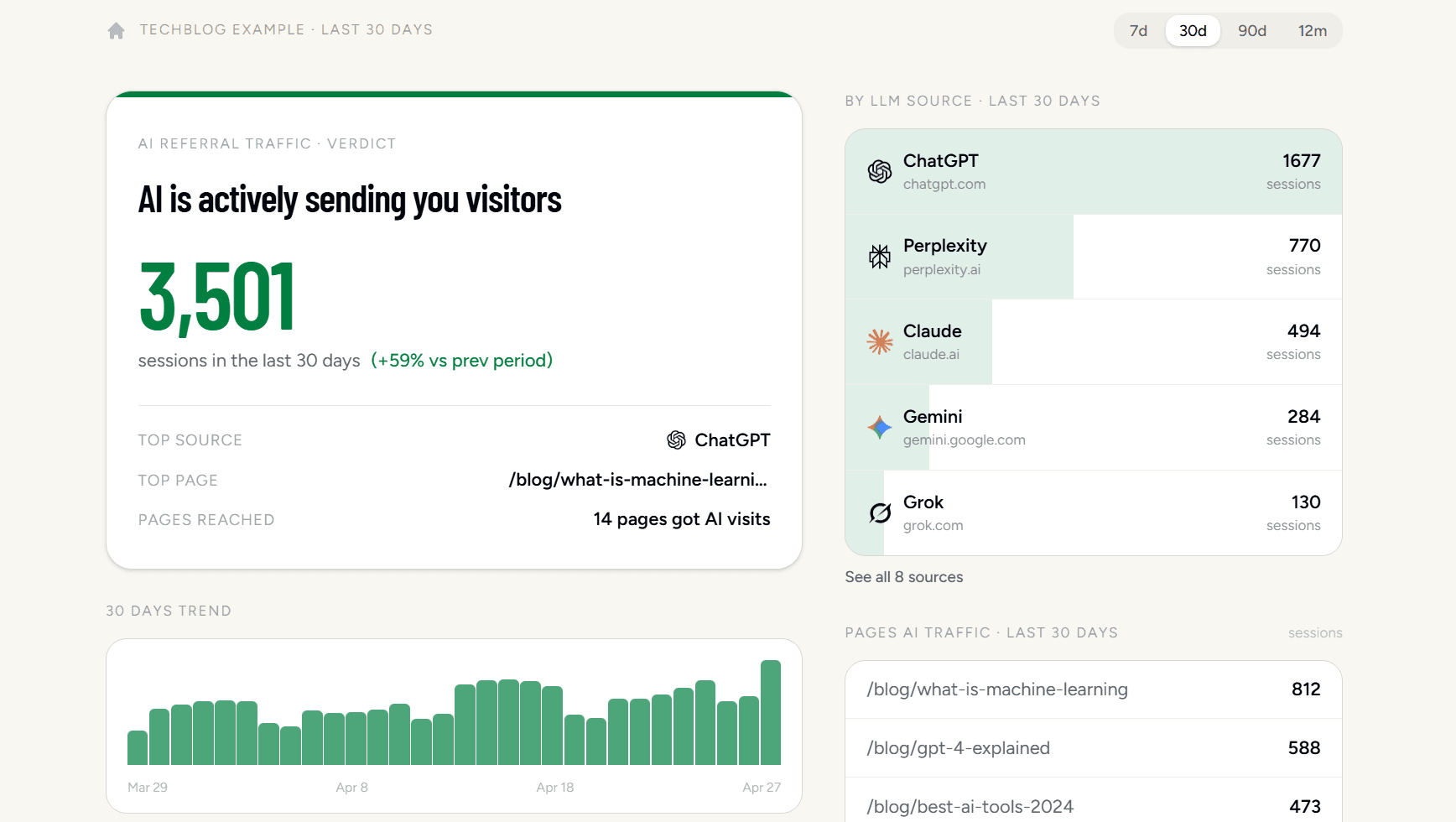
Is AI Sending Me Traffic? is a free tool that connects to your Google Analytics in 30 seconds and shows exactly which AI platforms — ChatGPT, Perplexity, Claude, Gemini, and more — are already sending you visitors. No manual digging in GA4 required.
Check if AI is already sending your agency leads
Before changing a single page, run this five-minute check.
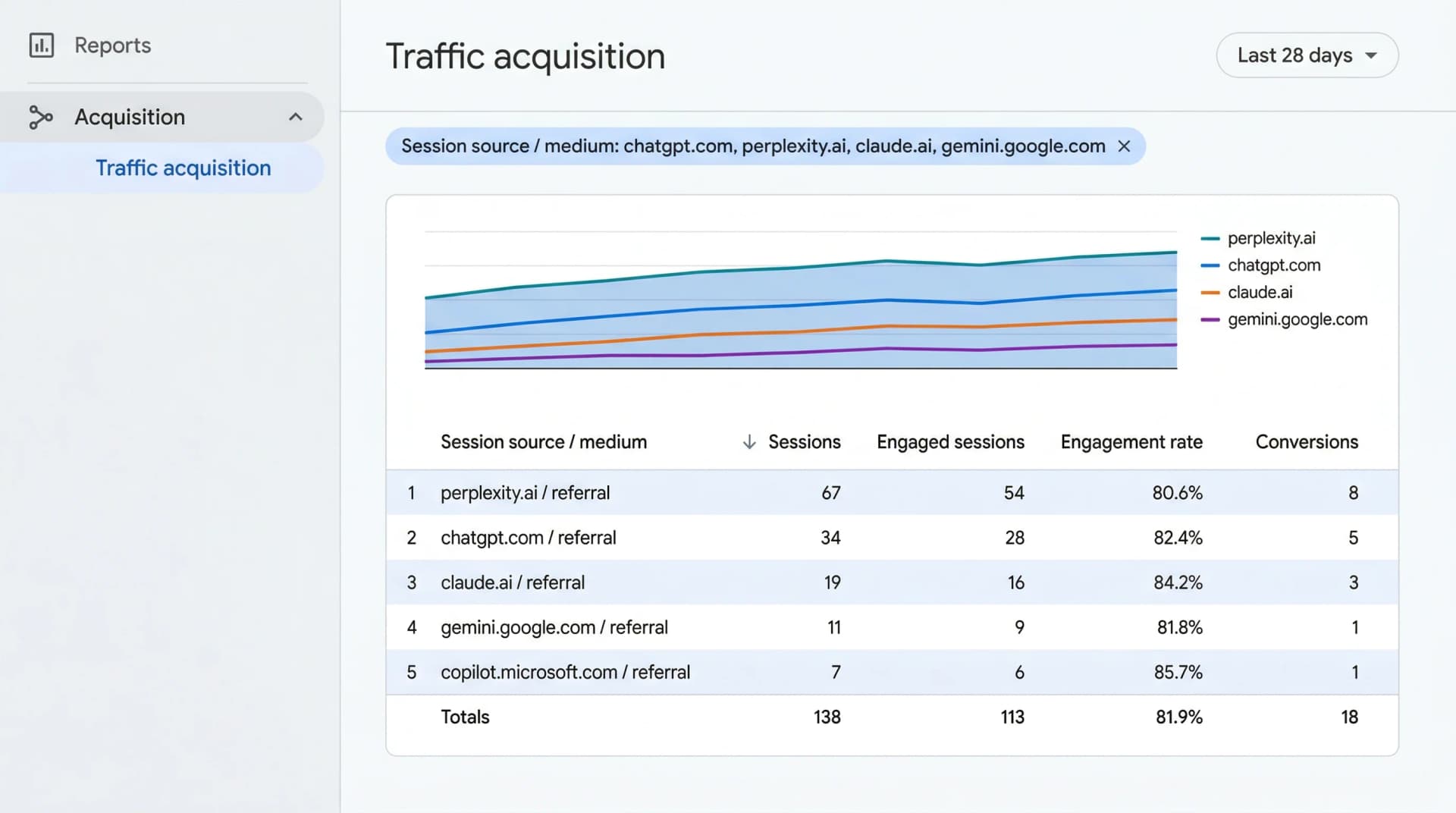
Step 1: Open your traffic source reportIn GA4, go to Reports ? Acquisition ? Traffic Acquisition. Change the primary column from "Session default channel group" to Session source / medium. This exposes every domain currently sending visitors to your site.
Step 2: Filter for AI platformsIn the search bar above the table, paste this exact string:
chatgpt|perplexity|gemini|claude|openai
If rows appear for chatgpt.com, perplexity.ai, or claude.ai � AI is actively sending you visitors right now.
Go to Admin ? Data Display ? Channel Groups. Create a new group called "AI Search" with the condition: Session source matches regex chatgpt|perplexity|gemini|claude|openai. AI traffic will now appear as its own row in every standard report alongside Organic Search and Paid.
Which AI platforms appear in GA4 � and as what
| AI Platform | Session source | Medium |
|---|---|---|
| ChatGPT (web) | chatgpt.com | referral |
| Perplexity | perplexity.ai | referral |
| Claude | claude.ai | referral |
| Google Gemini | gemini.google.com | referral |
| Microsoft Copilot | copilot.microsoft.com | referral |
| ChatGPT (iOS / Android app) | (not present) | direct |
The dark traffic problem
The last row is the critical one. When a prospect taps a link inside the ChatGPT mobile app, the app strips the referrer header before the request reaches your site. GA4 sees that visit as "Direct" � identical to someone who typed your URL from memory.
Your AI filter shows you the floor, not the ceiling. Your real AI traffic is higher.
How to spot hidden AI traffic: Watch your Direct bucket for sudden spikes on deep, specific pages � like a "commercial liability FAQ" or "what does business interruption insurance cover?" If a buried page jumps from 2 to 50 direct sessions in a week without a campaign behind it, an AI platform is almost certainly citing it.
How can you tell if an AI referral actually requested a quote?
Traffic is a vanity metric. Quote requests are the business metric. Here is how to close the loop.
Set up a quote request conversion event
In GA4, go to Admin ? Events. Find or create the event that fires when a prospect reaches your quote confirmation page. Mark it as a Key Event.
Once active, the Key Events column in your Traffic Acquisition report will show exactly how many AI visitors requested a quote � not just arrived. If Perplexity sends 40 visitors and zero convert, the issue is your quote page, not Perplexity.
If your quoting software does not support a custom redirect to a thank-you page, check whether it offers a GA4 integration or webhook � most modern insurance platforms do.
Add a self-reported attribution field
No tracking system is perfect. Mobile apps always strip referrer data. Add a required "How did you hear about us?" dropdown to your contact or quote form, with an explicit option for "AI Search (ChatGPT, Claude, etc.)"
Agencies combining GA4 tracking with intake attribution consistently find their actual AI-driven lead count is 2�3x higher than GA4 reports alone.
Review AI-referred leads as a separate cohort
After 90 days of clean data, compare AI-referred leads to organic search leads. AI tools answer specific coverage questions � "which insurance agency near me handles commercial umbrella policies?" � so the prospects who click through tend to ask about specific, higher-margin coverage. If confirmed by your CRM, that changes where you invest your content time.
Why your analytics is missing most of your AI traffic
Mobile apps strip the referrer header
When a prospect taps a link inside the ChatGPT or Claude mobile app, a privacy layer removes the HTTP referrer before the request reaches your server. GA4 receives the visit without source data and classifies it as Direct. This is by design, not a bug � you cannot configure your way out of it.
AI chats behave like dark social
Prospects share AI responses. A business owner asks Claude to compare two local agencies, screenshots the answer, and forwards it to their partner. That person visits your site from the screenshot link � GA4 records zero origin. This "dark social" pattern is growing as AI chat becomes a primary research tool.
Google Search Console is blind to AI traffic
Search Console tracks impressions and clicks from Google Search only. It reports zero data for traffic from Claude, Perplexity, or ChatGPT � those tools operate entirely outside Google's tracking ecosystem. If Search Console is your primary dashboard, you have a significant blind spot for an increasingly large channel.
Not seeing AI traffic? Here is what to fix
Zero AI referrals does not automatically mean zero citations. Work through these three layers in order before rewriting any content.
1. Check whether measurement is broken
Half of "no AI traffic" cases turn out to be a tracking issue, not a visibility issue:
- GA4 tag: Open your site in an incognito window and run Google Tag Assistant. Confirm the tag fires on your key service pages. Caching plugins and theme updates routinely break tracking with no warning.
- Robots.txt: Visit
yourdomain.com/robots.txtin your browser. Rules blockingGPTBot,ClaudeBot, orPerplexityBotactively bar those AI systems from your content. - Quick test: Open an incognito window and ask ChatGPT: "Best business insurance agency in [your city]." Do you appear? If not, continue below.
2. Improve your on-page signals
AI tools do not read your site the way humans do. They extract structured facts. Vague coverage descriptions give them nothing citable.
Schema markup: Add InsuranceAgency schema to your agency page and FAQPage schema to any page with coverage Q&As. This tells AI tools your specialty, location, carriers, and hours in machine-readable format � no inference required.
Question-driven content: Rewrite vague headings like "Commercial Lines" into prospect questions � "What does general liability insurance cover for contractors?" or "How much does workers' comp cost for a restaurant?" AI tools are answer engines: they need you to supply the answer, not just the category name.
LovedByAI audits your site for exactly these gaps � which questions prospective clients are asking AI tools, and whether your pages answer them in a citable format. It replaces the guesswork of manual schema audits with a prioritized list of high-impact fixes.
3. Build off-page authority AI models recognize
AI systems do not only read your website � they cross-reference the broader web to verify you as a legitimate, active agency:
- Directory listings: Your agency must be complete and accurate on TrustedChoice, your state insurance department's licensee directory, and major review platforms like Google and Yelp. Name, address, phone, and license number must match your website exactly.
- Google Business Profile: List your specific markets served � commercial, personal lines, specialty � using the same language as your website. AI tools frequently cross-reference GBP data when generating local recommendations.
- Reviews: Review count and recency are trust signals AI models weight heavily. Actively request reviews from clients on Google and Yelp after each policy renewal or new placement.
Conclusion
Setting up GA4 to measure AI search referrals takes five minutes and gives your agency a concrete baseline. Once you can see the data, you move from guessing to deciding.
If AI traffic is growing, double down on the content types those platforms already cite. If the numbers are flat, check measurement first � then address the structured data gaps keeping your agency invisible.
For a complete guide to AI SEO strategies for insurance agencies, browse our Insurance Agencies GEO page.
