

Every few weeks I hear from a firm owner who is paying for a separate tool just to see whether ChatGPT or Perplexity is actually sending them clients. I understand why it sounds like data you would need to hunt for. It is not. Your Google Analytics 4 account already captures this. You just need to know which filters to apply.
AI referrals are still a small share of most firms' traffic today, but the share is growing quickly, and the visitors who click through from an AI response tend to arrive with much stronger intent than a cold organic search visit. Setting this up takes about fifteen minutes.
How to Build an AI Search Traffic Report in GA4
Before you invest more time optimizing for AI visibility, you need a baseline. You need to know whether AI search engines are already driving prospective clients to your site.
By default, Google Analytics 4 groups AI traffic inconsistently. Some visits register as referrals, others disappear into the direct bucket. To see clearly how many sessions and conversions are coming from AI tools, you need a custom filter. Here is how to build it:
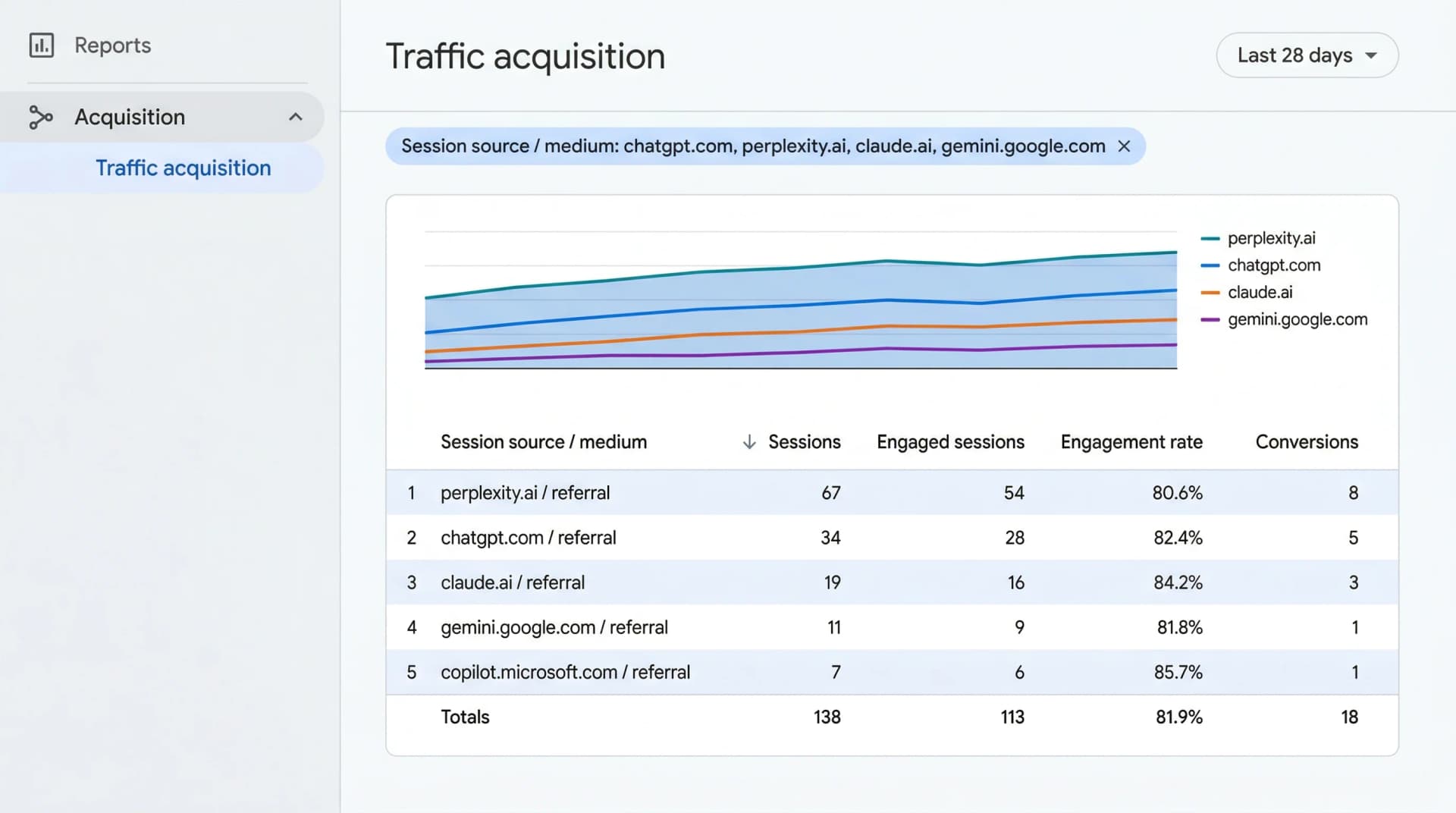
- Log into your GA4 property and navigate to Reports, then Acquisition, then Traffic acquisition.
- Click the Add filter button at the top of the report.
- Set the dimension to Session source and choose contains to catch traffic from the full domain including any subdomains.
- Enter the known AI referral domains. The most common ones for legal queries are listed in the table below.
- Click Apply to see how many sessions, engaged sessions, and conversions your firm is currently receiving from these platforms. Focus on the conversions column to see whether AI visitors are completing your contact form.
| AI Platform | How it appears in GA4 | Medium |
|---|---|---|
| ChatGPT (web) | chatgpt.com | referral |
| Perplexity | perplexity.ai | referral |
| Claude | claude.ai | referral |
| Gemini (web) | gemini.google.com | referral |
| Bing Copilot | copilot.microsoft.com | referral |
| ChatGPT mobile app | often absent | direct |
The mobile app row is the one that surprises most people. When someone uses the ChatGPT or Perplexity iOS or Android app to find your firm and taps a link, the app often strips the referrer data entirely before the visit registers in your analytics. That session shows up as direct traffic, the same category used when someone types your address manually. This gap is covered in more detail in the section below.
Once you have applied the filter, save it as a named custom report so you do not have to rebuild it each month.
What to watch out for
Your custom report shows a minimum baseline, not the complete picture. A meaningful share of real AI-referred visits will land in your direct traffic bucket because mobile app sessions strip referrer data before reaching your analytics.
If you see a sudden spike in direct visitors landing deep on a specific practice-area page, one that does not align with any paid campaign or email you sent, that pattern is often a signal of AI-sourced traffic that lost its label in transit. It is worth investigating before dismissing as noise.
Why measuring AI traffic is harder than tracking organic search
Traditional SEO reporting assumes Google categorizes visitors neatly as organic. AI platforms do not cooperate with that assumption.
When a potential client clicks a standard Google result, the referrer path is clear and preserved in your analytics. When an AI generates a response and cites your firm, the click to your site frequently drops the origin data, especially from mobile apps. This means your practice could already be receiving high-quality consultations from AI tools that are completely invisible in your standard organic reports.
Stop looking at the organic search bucket to measure AI results. Focus on referral sources and unexplained patterns in your direct traffic on specific service pages instead.
The other difference is scale. AI search is a qualification engine, not a traffic hose. Platforms try to answer legal questions directly in the conversation, so users only click through when they are genuinely ready to act. You will not see thousands of visits from AI. A month where Perplexity sends twelve visitors and four of them submit an intake form is a channel working well. Measure AI success by lead quality rather than raw volume.
How to connect AI traffic to actual consultation bookings
Traffic numbers alone do not tell you whether AI search is worth the investment. You need to know whether those visitors are requesting consultations.
The cleanest approach is to capture the referral source directly in your intake form. Add a hidden field to your consultation request form. A hidden field is a form input the visitor cannot see, but which automatically records where they came from. Open your form builder (WPForms, Gravity Forms, or whichever tool you use) and add a field configured to capture the referring URL. When a prospect submits, you will see exactly which platform sent them.
Relying solely on referrer data is still risky because AI platforms often strip it before the visit reaches your site. For links you control, such as a firm profile on an AI-powered legal directory or a custom GPT you manage, always use tracked URLs. Use Google's Campaign URL Builder to attach UTM parameters like utm_source=chatgpt-profile to those links. Update any directory profile links to use tracked URLs today. The next click will record the source correctly, regardless of what the app does to the referrer header.
To close the loop fully, connect the form's referral field to your practice management software. If your intake team receives twenty AI-sourced consultations but none sign a retainer, the channel is not helping your business the way it looks in the numbers. Getting referral source data into Clio, MyCase, or whatever you use for client records lets you run a report next quarter showing exactly how much revenue originated from AI search.
What if you are not seeing any AI traffic at all?
Zero AI visitors in your report does not automatically mean the channel is failing. Three things are worth ruling out first.
Check your analytics tag. Theme updates and caching plugins frequently strip the analytics tracking code from your pages. If that tag is not firing correctly, every visitor is invisible. Use Google Tag Assistant to confirm the tag is active on your key service pages before drawing any conclusions.
Check whether AI crawlers can reach your content. Add /robots.txt to the end of your firm's domain in a browser. If you see rules blocking GPTBot, ClaudeBot, or PerplexityBot, you are telling those AI systems to skip your content. Review the robots.txt documentation from Google Search Central to understand how to adjust these rules safely.
Recalibrate your volume expectations. AI search referrals are typically a small fraction of total traffic for service businesses right now. If your site handles two hundred sessions a month, ten to fifteen AI visits is a reasonable starting baseline, not a signal that the channel is broken. Track the trend across several months before drawing conclusions.
If those checks pass and you are still seeing nothing, the more likely explanation is that AI engines do not currently consider your site authoritative enough to cite. That is a content and structure problem, not an analytics problem. Both the on-page and the off-page sides of this matter.
On-page: giving AI engines something worth citing
AI systems pull answers directly from the text on your pages. If your practice area pages are written as brochures — "We are a full-service firm serving clients across the metro area" — they offer nothing for an AI to quote in response to a specific question.
Restructure each practice area page around the questions prospective clients actually ask. If you handle family law, think about what someone types into ChatGPT before they call a firm: "How long does divorce take in Texas?" or "Do I need a lawyer to file for child custody?" If your content answers those questions in clear, direct sentences, AI engines have something to cite. If it does not, they will cite someone else who does.
Structured data markup also matters. Adding proper Schema.org markup — specifically LegalService, FAQPage, and LocalBusiness — gives AI crawlers explicit signals about what your firm does, where you practice, and who you serve. Most firms have none of this in place, which makes their pages genuinely harder for AI systems to interpret accurately.
Some tools audit exactly these gaps: which questions your prospective clients are asking AI engines, and whether your current pages answer them in a citable way. LovedByAI does this analysis and surfaces the specific content changes most likely to improve how AI systems describe your firm when someone asks a relevant question.
Off-page: building the authority AI models recognize
AI systems do not only read your site. They are trained on and continue to pull from the same corpus of trusted sources that built their knowledge: news articles, legal directories, bar association publications, review platforms, and expert Q&A sites.
If your firm is consistently cited in those places — accurate name, address, phone, and practice areas — AI models build a more confident representation of what your firm does. If that information is missing, inconsistent across platforms, or primarily lives only on your own site, AI engines have weaker evidence to work from and are more likely to simply not cite you.
Practical steps on this side:
- Verify that your firm's listing is complete and accurate on every major legal directory (Avvo, Justia, FindLaw, Martindale).
- Ensure your Google Business Profile uses the same practice area language you use on your site.
- Identify publications in your city that cover local legal topics and consider contributing commentary or getting quoted — even a single trusted citation can meaningfully increase how often AI systems mention your firm in context.
There is no single switch. But firms that do both the on-page structure work and the off-page authority work tend to start seeing AI referral traffic within a quarter. Once that baseline appears in your custom GA4 report, you have data to optimize against rather than guessing.
Conclusion
Measuring AI search traffic in GA4 does not require a separate paid tool. It requires setting up a custom filter so that referral visits from platforms like ChatGPT, Perplexity, Claude, and Gemini are clearly visible in one dedicated report. Once those filters are in place, you have a real baseline and can start making informed decisions about where to invest your visibility work.
For more on AI search for Law Firms, browse our related content on the Law Firms AI SEO page.
