

The law firms that ChatGPT recommends to potential clients are rarely the oldest or the most prestigious in their market. They are the ones whose websites give AI tools a clean, structured map of who they are and what they do.
Over the past year, I have sat across the table from dozens of managing partners who are frustrated that a newer, smaller competing firm is constantly cited by AI tools while their own established practice is ignored. They usually assume their competitor has discovered a secret AI marketing trick or is paying for placement.
The reality is much less mysterious. AI platforms like ChatGPT and Gemini look for specific structured data (like Article schema and clear entity definitions) to understand what your firm does and who you serve. If your competitors are using a schema plugin to feed this exact data to AI crawlers, and your site relies only on traditional visual text, the AI will confidently recommend them over you.
Showing up in AI answers is not about writing prompts or buying ads. It is about making your existing expertise easy for a large language model to parse and cite. In this guide, we will look at exactly why AI search engines favor certain law firms, what structural gaps are holding your site back, and the concrete steps you can take to fix them.
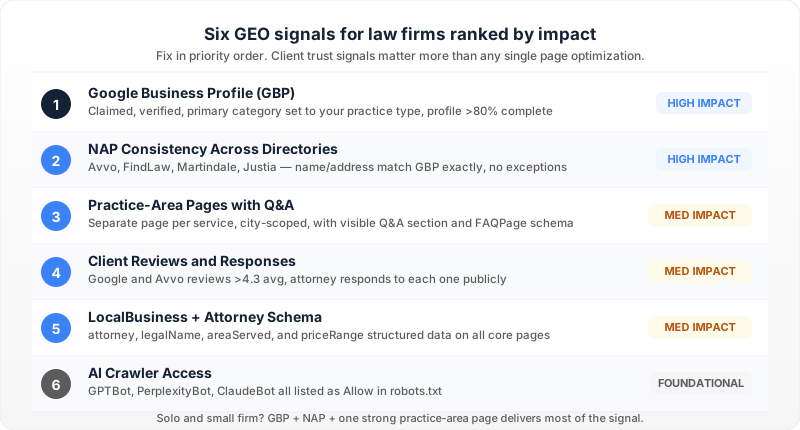
Why does ChatGPT cite some law firms and ignore others?
ChatGPT and other AI tools do not browse the web like a human looking for a well-designed homepage. They cite the law firms that provide the clearest, most structured data connecting their specific attorneys to specific legal services. If your competitor shows up and you do not, it is usually because their website is easier for a machine to read. Check your site's underlying code to see if you are giving AI engines a clear map of your practice.
The biggest hurdle is the gap between having a website and being a recognized entity. An entity is just a digital concept that a machine understands as a real-world thing, like a specific person, law firm, or geographic area, rather than just a collection of words. Traditional search engines might index your digital brochure, but AI search treats your firm like a database entry. If an AI cannot firmly connect the entity of "Jane Doe" to "Chicago Personal Injury," it will not recommend your firm. You can start fixing this immediately by updating your attorney biography pages to explicitly state their name, exact practice areas, and physical office location in plain text.
Why paying for traditional SEO is not always enough
Many law firms spend heavily on traditional marketing and wonder why it does not translate into AI visibility. Traditional SEO focuses on keywords and backlinks to rank in a list of search results. AI search tools synthesize answers directly. According to a recent report by BrightEdge, AI-generated answers prioritize content that directly answers user queries with high structural clarity, rather than just matching keywords.
Do this: If you are paying an agency for marketing, ask them to audit your content for AI readability, not just keyword volume.
| Traditional SEO Focus | AI Visibility Focus |
|---|---|
| Keyword density | Direct answers to legal questions |
| Backlink volume | Clear entity relationships |
| Ranking for "injury lawyer" | Explaining what an injury lawyer does |
The hidden bridge between a standard website and an AI-cited website is machine-readable data. This is typically handled through schema, which is a standardized coding vocabulary that tells search engines exactly what a piece of information means. When AI tools crawl your site, they look for this structured data. If competitors use schema to explicitly define their firm and you rely on standard text, the AI will recommend them because their data leaves no room for guessing. Use a free tool like the Schema Markup Validator to check if your homepage actually labels your business as a legal practice. If it does not, you can manually type out the code or use a dedicated plugin to add it without a developer.
What makes a competitor's legal content easier for AI to understand?
AI systems cite the law firms that explicitly link their attorneys, physical locations, and practice areas together in a format machines can easily read. When a prospective client asks a chatbot for a "commercial real estate lawyer in Denver," the AI is not reading paragraphs to guess who does what. It looks for definitive data connections. If your competitor's site clearly ties the specific person to the specific legal service, they win the recommendation. Review your firm's team pages today and ensure every attorney biography explicitly lists their exact practice areas in a clean, plain-text bulleted list rather than burying them in a long narrative.
Translating your legal blog for machines
You might have an excellent blog post explaining the statute of limitations for personal injury claims, but AI engines need help categorizing that text. This is why competitors use Article schema. Article schema is a snippet of background code that acts like a digital cover letter, telling the AI exactly who wrote the post, what legal topic it covers, and when it was published. According to the official documentation from Google Search Central, adding this specific structured data makes it significantly easier for algorithms to parse your content and feature it in advanced search answers. You do not need to write this code from scratch. If your firm uses WordPress, install a free plugin like Yoast SEO to generate this code automatically, or ask your developer to manually add it into the <head> section of your blog templates.
| How humans read your legal blog | How AI reads your legal blog |
|---|---|
| Reading the headline to see the topic | Looking for the headline field in your schema |
| Checking the author photo and bio | Scanning for the author entity data |
| Skimming paragraphs for the answer | Extracting direct text below clear headings |
Competitors who dominate AI answers format their content to answer specific client questions directly and immediately. AI models are prediction engines designed to extract the most direct answer to a prompt. If a user asks "how much does a business merger cost," the AI will pull from a competitor whose page features that exact question as a heading, followed instantly by a straightforward answer. Long, winding introductions confuse the parser. Open your top three legal service pages this week, identify the most common questions clients ask about those services, and format them as bold headings with a direct, two-sentence answer immediately underneath.
How do you close the AI visibility gap using a schema plugin?
To close the AI visibility gap, you need to hand search engines your firm's data on a silver platter using a schema plugin. These tools automatically translate your everyday website text into the structured code that ChatGPT and Gemini actively look for when choosing which law firm to recommend. Install a dedicated schema tool today to stop leaving your AI visibility to chance.
A schema plugin runs in the background of your site and generates JSON-LD. JSON-LD is a specific coding format that acts like a digital nametag for your business, telling crawlers exactly what each piece of text means rather than making them guess. According to the official documentation from Google Search Central, adding valid JSON-LD structured data is the primary way to help search systems understand the precise meaning of your pages. Open your current SEO tool's settings today and confirm it is specifically outputting your data in the JSON-LD format.
Manual coding vs. automated schema injection
You can hire a developer to write this code by hand, but legal content changes frequently. If an attorney leaves or you add a new personal injury practice area, hard-coded schema breaks or becomes outdated, which tells AI systems your firm is unreliable. Automated schema injection reads your page content and generates the code dynamically. If your site runs on WordPress, you could manually write this code and paste it into the <head> section of your pages, but an automated tool ensures the code stays perfectly synced with your text. If your firm has more than five pages of legal services, use an automated plugin like Yoast SEO or a specialized AI visibility tool to handle the code injection rather than updating it manually.
| Approach | Maintenance required | Best for |
|---|---|---|
| Manual coding | High (requires developer updates) | Single-page static sites |
| Basic SEO plugins | Medium (requires manual field entry) | Small local practices |
| Automated schema injection | Low (updates when text updates) | Growing firms with multiple practice areas |
Before installing any new software, you need to see your website exactly how an AI chatbot sees it. If the AI cannot detect your firm's name, phone number, and primary legal services in your underlying code, it will pass over you for a competitor whose code is perfectly clear. You can use Google's free Rich Results Test to verify standard markup, or check your site using our free tool to see exactly what AI search engines extract from your pages. Run your primary legal service pages through a testing tool this week to ensure the machine actually knows what kind of law you practice.
How to Configure a Schema Plugin for Your Law Firm Blog
AI search engines look for structured data to verify who wrote your legal insights and what the content is about. If your blog posts lack proper schema, tools like ChatGPT must guess your firm's expertise. Configuring your WordPress setup ensures every post explicitly states your authority.
Step 1: Audit your top posts Identify your highest-converting practice area updates. These are the pages where missing structured data hurts your AI visibility the most.
Step 2: Install your schema solution
You need a reliable way to inject JSON-LD markup into your site's <head> section. You can use standard plugins like Yoast SEO or an AI visibility tool like LovedByAI that handles automated schema injection specifically optimized for professional services.
Step 3: Configure plugin defaults In your plugin settings, set the default schema type for all blog posts to Article. This ensures every new legal update automatically outputs the baseline code AI crawlers expect without manual entry each time.
Step 4: Connect the author entity This is the most critical step for legal content. Update the required fields for your existing top-performing posts so the author entity is tied directly to a specific attorney profile on your site. AI tools rely on this connection to verify credentials.
Here is what that connection looks like behind the scenes:
{
  "@context": "https://schema.org",
  "@type": "Article",
  "headline": "Changes to Personal Injury Law in 2024",
  "author": {
    "@type": "Person",
    "name": "Sarah Jenkins",
    "url": "https://examplelaw.com/attorneys/sarah-jenkins"
  }
}
Step 5: Validate your markup Run your updated URLs through the Schema Markup Validator to ensure there are no syntax errors blocking AI crawlers from reading your expertise.
What to watch out for Do not run multiple schema plugins simultaneously. If your WordPress theme already generates basic schema and you install a dedicated plugin, you will create duplicate, conflicting tags. Always view your live page source to confirm only one clean block of JSON-LD loads per post.
Conclusion
Seeing a competing law firm get recommended by ChatGPT can be deeply frustrating. But AI visibility is not a magic trick or a popularity contest. When competitors show up instead of you, it simply means their website gives AI models a clearer, more structured map of who they are, the specific cases they handle, and exactly where they practice.
The fix starts with clarity, not a complete website rebuild. By updating your content with precise answers and adding JSON-LD schema to validate your practice details, you give AI search engines exactly what they need to cite your firm confidently. Start by reviewing your core practice area pages to ensure your firm's entity information and location are explicitly defined. The law practices that build this structured foundation today are the ones best positioned to capture the next wave of inbound consultations. Take it one page at a time.
