In WordPress, start by getting your WordPress site ready for AI by checking Settings → Reading for accidental indexing restrictions. Then check whether crawlers can reach your public pages and whether those pages give readers clear, current answers.
Use this checklist to review:
- Crawler access
- Indexing settings
- Schema that matches visible content
- Answer-first openings
- Descriptive headings
- Answers to customer questions
- Accurate facts
- Business and author details
- Internal links
- AI referrals and conversions
Fix access and indexing problems first. Record each issue, assign an owner, and verify the live page after changes. LovedByAI provides readiness scans and referral reports to help with your audit.
These checks do not guarantee AI inclusion or citations. Track progress through resolved issues, accurate pages, identifiable AI visits, and conversions.
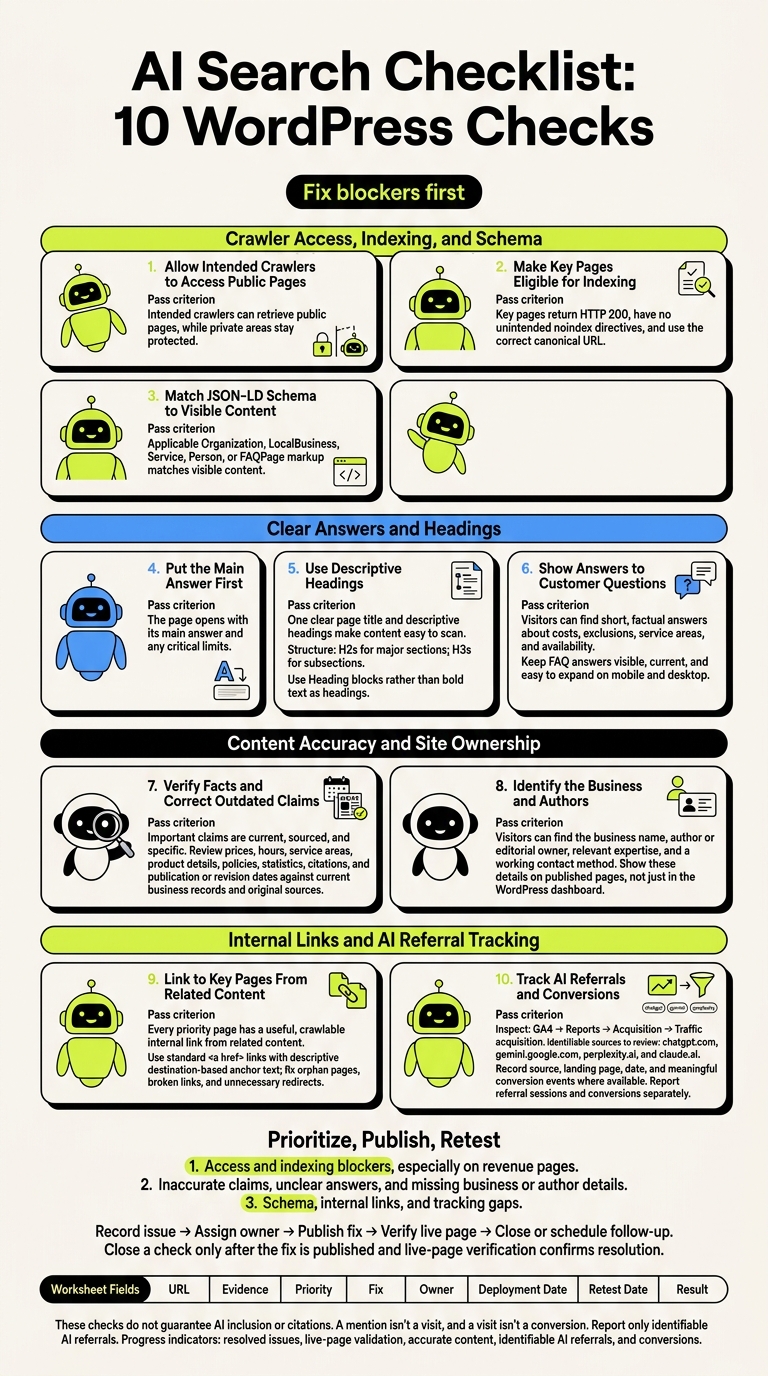
AI Search Checklist: 10 WordPress Checks
Crawler Access, Indexing, and Schema
Check 1: Allow Intended Crawlers to Access Public Pages
Inspect: Review your live /robots.txt, security plugins, CDN bot controls, and firewall logs.
Pass: Intended crawlers can retrieve public pages, while private areas stay protected.
Fix: Remove accidental blocks, clear relevant caches, and check live responses. Saved settings alone won’t tell you whether access works.
OAI-SearchBot is OpenAI’s search-specific crawler. GPTBot collects content that may be used to train OpenAI models, while CCBot collects content for Common Crawl. Google-Extended controls certain uses of content for Gemini. It does not control Google AI Overviews. Blocking standard crawlers can prevent AI search systems from retrieving your content. [2]
Once crawlers can reach your public URLs, check whether those URLs are eligible for indexing.
Check 2: Make Key Pages Eligible for Indexing
Inspect: In Settings → Reading, confirm that the following option is unchecked:
“Discourage search engines from indexing this site”
Then check key pages for page-level noindex directives, HTTP status codes, canonical URLs, and redirects.
Pass: Key pages return HTTP 200, have no unintended noindex directives, and use the correct canonical URL.
Fix: Remove accidental indexing restrictions and correct canonicals that point to the wrong page. If a URL returns 404, use a 301 redirect to a relevant live page.
After checking indexing eligibility, make sure your schema matches what visitors see.
Check 3: Match JSON-LD Schema to Visible Content
Inspect: Check the page source for application/ld+json, then verify the rendered page rather than relying only on plugin settings.
Pass: Applicable Organization, LocalBusiness, Service, Person, or FAQPage markup matches the visible business name, authors, services, contact details, and FAQs.
Fix: Update outdated properties, remove conflicting markup from themes or plugins, and test again after publishing changes. Validate your markup with the Google Rich Results Test and the Schema.org Validator. [4]
Valid schema reduces ambiguity, but it does not guarantee citations. [3]
Next, move from technical eligibility to answer-first content.
Optimize your WordPress site for AI search
Find out what ChatGPT, Gemini, and Perplexity can and can't read on your site, and exactly what to fix.
Clear Answers and Headings
Check 4: Put the Main Answer First
Once your pages can be crawled and indexed, put the main answer on the first screen.
Inspect: Read the opening paragraphs in the WordPress editor.
Pass: The page opens with its main answer and any critical limits.
Fix: Replace generic welcomes and lengthy company history with the answer. On service pages, state your services and coverage area first. Keep limits beside claims, and make these edits to the visible page. [5]
Check 5: Use Descriptive Headings
Inspect: Check the Outline panel in the block editor and the published page.
Pass: One clear page title and descriptive headings make your content easy to scan.
Fix: Use H2s for major sections and H3s for subsections. Each heading should describe the content beneath it. Replace bold text used as headings with Heading blocks. [6][7][8]
Clear headings also help visitors scan the customer answers in the next check.
Check 6: Show Answers to Customer Questions
Use your support data to find questions your headings don't cover.
Inspect: Compare your service, product, and informational pages with questions from customer-service emails, search queries, support tickets, and sales calls.
Pass: Visitors can find short, factual answers about costs, exclusions, service areas, and availability.
Fix: Add missing answers directly to the page. Combine overlapping questions, and link to longer explanations instead of repeating them.
Keep FAQ answers visible, up to date, and easy to expand on mobile and desktop. Focus on useful answers. FAQs and structured data do not guarantee showing up in AI search. [9][10]
My 2026 GUIDE to SEO, AEO and GEO for WordPress!
Content Accuracy and Site Ownership
Once your pages are clear, check their facts and who owns them.
Check 7: Verify Facts and Correct Outdated Claims
Inspect: In WordPress, review prices, hours, service areas, product details, policies, statistics, citations, and publication or revision dates. Check important claims against current business records and original sources. Copies of the same claim don't count as verification.
Pass: Important claims are current, sourced, and specific.
Fix: Correct outdated details wherever they appear, including footers. Remove claims you can't support. When facts change, update the revision date after making a meaningful edit. Use clear U.S. formats:
$1,250.00 and October 11, 2026
Check 8: Identify the Business and Authors
Make it clear who owns your business and who owns your content.
Inspect: Check your About and Contact pages, footer details, article bylines, and Users → Profile in WordPress. Confirm that business ownership and the content owner appear on published pages, not just in the dashboard.
Pass: Visitors can find your business name, author or editorial owner, relevant expertise, and a working contact method.
Fix:- Complete author bios with verified job titles, credentials, and public professional profiles [1][2].
- Match your business name, address, and phone number to your Google Business Profile [2].
- List the specific cities, counties, or ZIP codes you serve. Remove vague regional labels [1].
Internal Links and AI Referral Tracking
Check 9: Link to Key Pages From Related Content
Once your pages are accurate and ownership is clear, link them to the pages readers should visit next.
Inspect: Check menus under Appearance → Menus or Appearance → Editor, along with footer links, category pages, and links within posts. Compare your crawl report with your page list to spot orphan pages. Check priority service, product, and contact pages for broken links, redirect chains, and anchor text that doesn’t explain the destination.
Pass: Every priority page has a useful, crawlable internal link from related content. Use standard <a href> links with anchor text that names the destination.[13]
Fix: Link to orphan pages from related articles or category hubs. Replace broken links with current URLs, and update links that go through unnecessary redirects. Connect supporting articles to the relevant service page when that helps the reader.
Check 10: Track AI Referrals and Conversions
Inspect: Confirm your WordPress analytics integration loads on the homepage, key pages, forms, and conversion pages. In Google Analytics 4 → Reports → Acquisition → Traffic acquisition, check session source/medium and landing pages for visits from chatgpt.com, gemini.google.com, perplexity.ai, and claude.ai. Review any UTM-tagged links you use.[14][15]
Pass: For identifiable AI visits, record the source, landing page, date, and meaningful conversion events where available. Report referral sessions and conversions separately. A mention isn’t a visit, and a visit isn’t a conversion.[11]
Fix: Apply consistent source rules while keeping the original source/medium intact. Test a tagged visit and each important conversion in a GA4 debug or real-time view. Make sure successful form submissions count once, rather than on every button click. Add annotations whenever tags, consent settings, channel rules, or URL structures change.
Missing referrers can hide AI-origin visits in direct or unassigned traffic. Report only identifiable referrals. These counts don’t prove citations, recommendations, or inclusion.[11] Use the results to prioritize fixes, then retest the pages you changed.
Prioritize Fixes and Retest
After completing Checks 1 through 10, close the audit by tackling access and indexing blockers first, especially on revenue pages. Next, fix inaccurate claims, unclear answers, and missing business or author details. Then address schema, internal links, and tracking gaps.
Record every failed check in the worksheet with its URL, evidence, priority, fix, owner, deployment date, retest date, and result. Close a check only after the fix is published and verification of the live page confirms that the original problem is resolved.
Use LovedByAI readiness scans and referral reports as audit aids, rather than proof that a page is correct. After deployment, view the page while logged out and run Google Search Console → URL Inspection → Test live URL.[16] Record the result. Google’s test validates the live page, but it doesn’t prove that every AI crawler can access it.
Have a knowledgeable owner approve every factual change, including AI-generated edits. Before publishing, compare the JSON-LD with the visible content. Don’t publish invented credentials, outdated prices, or FAQ answers that aren’t on the page. After any schema change, rerun Google’s Rich Results Test on the live page.[9]
Measure progress through resolved issues, live-page validation, accurate content, identifiable AI referrals, and conversions. Keep inconclusive checks open and assign a follow-up date.
FAQs
How often should I repeat my WordPress AI search audit?
Audit your WordPress site every quarter [1][2]. AI models frequently update their retrieval logic and context windows. These updates can change how models weight schema types and reduce your strategy’s impact [1].
Run another audit immediately after major changes, such as theme updates, new plugin installations, or service page edits. Check that your data structure is still intact [1][2]. After improving your content, recheck priority pages in 4 to 6 weeks to track progress [3].
Which pages should I audit first on a large site?
Don’t audit every page at once. Fix technical blockers first: accidental crawler restrictions, JavaScript-only content, and structured data errors.
Then focus on your homepage, core service pages, and contact page. These are the main sources AI tools use to identify your business. Make sure your LocalBusiness, Service, or FAQPage schema is accurate and matches the content visitors can see.
Next, add relevant schema to your high-performing blog posts. You don’t need to rewrite them from scratch.
How can I check AI citations that don't generate visits?
Track unlinked mentions separately from referral traffic. Test your ten priority customer questions in ChatGPT, Perplexity, and Gemini. Record whether each answer mentions your brand and includes a citation link. Then compare those results with AI referral traffic in Google Analytics 4.
If mentions aren’t bringing visits, check whether your answer-first summaries give readers a reason to click through. Also, make sure your JSON-LD schema matches your business facts. Track these results monthly.