If your ChatGPT numbers in Google Analytics look too small, or fell off a cliff in October and came back, you are not imagining it and you probably did not lose the visitors. ChatGPT traffic is split across four places in GA4, and only one of them says "ChatGPT".
We build LovedByAI, an AI search optimization platform for small businesses that tracks AI referral visits on the sites it optimizes. This guide uses what those sites saw in October 2026, when ChatGPT's links briefly lost their label, to show where the visits go and how to count them.
Why is ChatGPT traffic not showing in Google Analytics? The four places it lands
GA4 can only name a source if the visit tells it. A ChatGPT visit tells it in one of two ways: a utm_source=chatgpt.com tag on the link, or a chatgpt.com referrer passed by the browser. Depending on which survive, the same ChatGPT visitor lands in one of four rows:
| Where it lands | Why | How it shows in Session source / medium |
|---|---|---|
| AI Assistant | GA4 recognised ChatGPT and assigned medium ai-assistant | chatgpt.com / ai-assistant |
| Referral | Only the referrer survived, and the assistant isn't on Google's list | chatgpt.com / referral, perplexity.ai / referral |
| Direct | No tag and no referrer: app clicks, copied links, stripped tags | (direct) / (none) |
| Unassigned | A tag arrived without a medium GA4 can map | chatgpt.com / (not set) |
So "ChatGPT traffic not showing" usually means it is there under another name. The fastest check: Reports → Acquisition → Traffic acquisition, change the first column to Session source / medium, and type chatgpt in the search box. Every row that appears is ChatGPT.
Why ChatGPT traffic shows as Direct in GA4
A visit becomes Direct when it carries neither a tag nor a referrer. With ChatGPT that happens in three ordinary ways:
- The ChatGPT apps. A tap in the mobile or desktop app opens a browser with no referrer. If the link has no tag, it is Direct.
- Copied links. Someone copies a URL out of a chat and pastes it later.
- Links that lose their tag. ChatGPT adds
utm_source=chatgpt.comto the links it shows. When that stops, everything that relied on it falls into Direct.
The third one is not theoretical. It happened for a week in October 2026.
ChatGPT traffic showing as Direct in October 2026: what our data shows
OpenAI rolled GPT-6 out to paid ChatGPT plans on October 7 2026 and to Free and Go users from October 8. Until a fix on October 15, many ChatGPT links arrived without their tag, so analytics counted them as Direct. On the small business sites LovedByAI monitors, the same sites over the same days:
ChatGPT visits fell off a step, then came back with the tags
Same small business websites, daily, indexed to the Oct 1–8 average = 100
- The typical site lost 60% of the visits it could identify as ChatGPT over October 9 to 14, compared with October 1 to 8. More than nine sites in ten saw the drop.
- ChatGPT kept reading the pages.
ChatGPT-User, the agent that fetches a page live when someone asks ChatGPT about it, read the typical site only 23% less. - Every other assistant sent more. Visits from Gemini, Perplexity, Claude and the rest rose 13% over the same days.
- The fix was a switch. Tagged ChatGPT visits stayed at their gap level until 14:00 UTC on October 15, then returned to their usual level within the hour. Over October 16 to 21 they ran 14% above their October 1 to 8 level.
The part most coverage missed: the fix did not reach back in time. A ChatGPT visit that arrived untagged between October 8 and 15 was recorded as Direct and stays Direct. October's ChatGPT total will look low in every report forever, and October's Direct total will look high.
What to do about it:- Add a GA4 annotation for October 8 to 15 2026: "ChatGPT links untagged, counted as Direct".
- Leave those days out when you compare October with September or November.
- Count ChatGPT by the tag, not the referrer. Since the fix, fewer than one in thirty ChatGPT visits to these sites also carries a
chatgpt.comreferrer (through October 21), so a referrer-based report undercounts badly.
The hour-by-hour data is in our Lab write-up, ChatGPT didn't stop sending visitors, it stopped telling you it sent them, and in the October 2026 AI Search News.
How GA4's AI Assistant channel works, and what it misses
In May 2026 Google added AI Assistant to GA4's default channel group. From Google's channel definitions:
- It catches visits "from sources like ChatGPT". Google's examples are ChatGPT, Gemini, Deepseek, Copilot and Grok.
- GA4 sets medium
ai-assistantand campaign(ai-assistant)when the referrer matches Google's list. - It excludes Google's AI Overviews and AI Mode, which count as Organic Search.
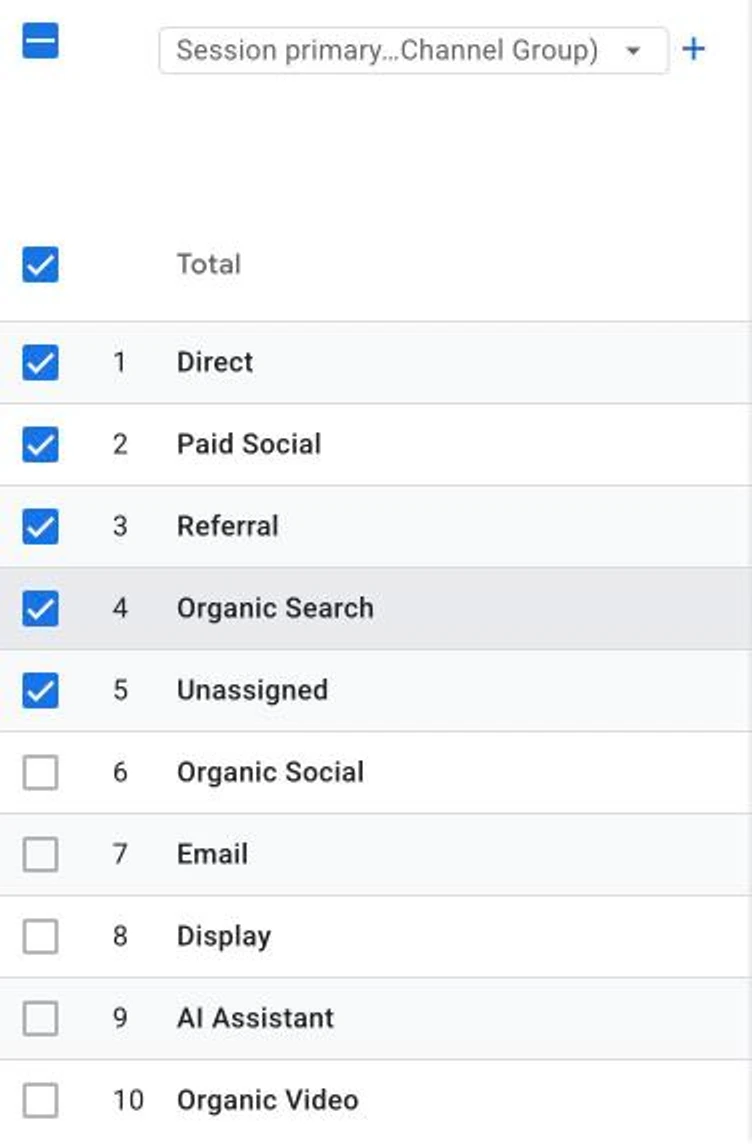
Once Google adds it to your property, AI Assistant shows up as its own row in the default channel group, next to Referral and Direct.
Three limits worth knowing:
- It is not retroactive. Visits before the channel reached your property stay in Referral or wherever they were.
- You cannot edit it. If an assistant is missing, you cannot add it to the default group.
- It depends on the referrer or tag reaching GA4. Direct visits never get there, which is why the October gap went straight past it.
Gemini now tags some of its links too. Since October 4 2026, some Gemini links carry utm_source=gemini.google.com&utm_medium=ai-assistant. On the sites we monitor, about one Gemini visit in twenty-five carried the tags through October 21, and every one also carried the normal referrer, so nothing was hiding. If Gemini tags more of its links, its row will grow without a single extra visitor.
Why Perplexity traffic is not in GA4's AI Assistant channel
Perplexity is not named in Google's definition of the AI Assistant channel. In practice, Perplexity visits often land in Referral as perplexity.ai / referral, so a quick look at the AI Assistant row makes Perplexity look like it sends nothing. Check Session source / medium for perplexity in your own property. If you want every assistant in one row, build the custom group below.
How to build a custom AI channel group in GA4 (with a tested regex)
A custom channel group puts every AI assistant in one row, including the ones Google's list leaves out. It also applies to historical data, unlike the default channel.
- Admin → Data display → Channel groups → Create new channel group. You need Editor access.
- Name it, for example "Channels with AI".
- Add new channel called "AI assistants", condition Session source matches regex, and paste:
(.*\.)?(chatgpt\.com|openai\.com|perplexity\.ai|claude\.ai|gemini\.google\.com|copilot\.microsoft\.com|deepseek\.com|grok\.com|meta\.ai)
- Drag the new channel above Referral and save. GA4 assigns each visit to the first channel it matches, so below Referral it catches nothing.
We tested this pattern against real source values. It matches chatgpt.com, chat.openai.com, perplexity.ai, www.perplexity.ai, claude.ai, gemini.google.com, copilot.microsoft.com, chat.deepseek.com, grok.com and meta.ai. It does not match google.com, mail.google.com, facebook.com or look-alikes such as fakechatgpt.com. Avoid patterns that start with a bare .*ai: they also catch sources like mail and taiwan.
Why your custom AI channel group is not showing in GA4
These are the failures readers report most, and the fix for each:
- The report still uses the default group. In Traffic acquisition, click the dropdown on the first column and pick your custom group by name ("Session Channels with AI"). The group never replaces the default on its own.
- The AI channel sits below Referral. Move it up. Rule order decides which channel wins.
- You are in User acquisition. That report uses first-user dimensions, so a visitor who first came from Google stays Organic there. Use Traffic acquisition for session-level sources.
- Your regex uses "contains" on a short word. "contains ai" matches half the internet. Use the full-match pattern above.
- The filter has no ChatGPT value to pick. Filters only list values that already have data in the date range. Widen the range or wait a day.
Can Google Analytics show traffic from AI Overviews and AI Mode?
No. A click from an AI Overview or AI Mode arrives as an ordinary google.com visit with no tag, and Google's channel definitions count both as Organic Search. No regex can split them out. Search Console's performance reports are the closest view Google gives you of AI Mode and AI Overview visibility.
This is also why reports of "AI traffic" show ChatGPT with almost all of it: they measure the assistants that identify themselves. Google's own AI surfaces are inside your organic line, not missing.
How to tag the links you control so AI traffic stays labelled
You cannot control how ChatGPT formats its links, but you can tag the ones you put into the world: links in your Google Business Profile, directory listings, PDFs and partner pages that assistants often quote. Use utm_source and utm_medium consistently, for example utm_source=google_business_profile&utm_medium=listing, so a visit that started in an AI answer but clicked through one of your own links keeps a name instead of becoming Direct.
ChatGPT mentions vs ChatGPT visits: what Google Analytics cannot see
GA4 counts visits. It cannot tell you how often ChatGPT read or mentioned your site without anyone clicking. On the sites LovedByAI monitors, the median site saw 55 AI assistant page fetches for every AI referral visit over the 90 days to October 23 2026. For every person who clicked through, dozens of answers drew on the page without sending anyone.
So a small ChatGPT row in GA4 is not the same as ChatGPT ignoring you. To see the fetches, you need server logs or a tool that reads them; our AI crawler statistics show what that looks like across small business sites. To see which of your pages ChatGPT sends people to, see which pages get ChatGPT referral traffic.