
AI visibility platforms sell "prompt research" as a paid feature: a list of the questions people ask AI about your industry. Google Search Console already keeps a list like that for your own website, made from real searches, for free. It's in the Queries table, mixed in with your keywords, and a regex filter pulls it out.
We build LovedByAI, a generative engine optimization platform for small businesses built around WordPress, and this is the method we use on our own Search Console. The screenshots below are from it.
Where AI prompts show up in Google Search Console
Google puts AI Overviews and AI Mode data in the Performance report, under the Web search type, with everything else. Its AI features documentation says so. There's no AI Mode filter in that report and no label on the rows, so a 30-word question typed into AI Mode sits in the same Queries table as "plumber near me".
Google added a separate Generative AI performance report in June 2026 and rolled it out to every website on 31 August 2026. It shows impressions by page, country, device and date, and no queries. If you want the words people used, the standard Performance report is the only place Google shows them.
Prompts and keywords look different, and that's what makes them easy to separate. People type two to five words into a search box. Into AI Mode they type the whole problem, often with a question mark, sometimes with their job title and city.
Search Console regex to find AI prompts
Search Console's query filter accepts regular expressions in Google's RE2 syntax. Three patterns do the work.
1. Long queries: any query of 10 or more words.
^(\S+\s+){9,}\S+$
2. Question marks: any query with a question mark, which people rarely type into a search box.
\?
3. Long questions: a query that opens with a question word and runs to 7 or more words.
^(who|what|where|when|why|how|which|is|are|can|does|do|should|will)\s(\S+\s+){5,}\S+$
They overlap, so run them as one filter. Copy this:
^(\S+\s+){9,}\S+$|\?|^(who|what|where|when|why|how|which|is|are|can|does|do|should|will)\s(\S+\s+){5,}\S+$
On a local business site, lower the word count: change {9,} to {6,} to catch queries of 7 or more words. Smaller sites see fewer long prompts, so a lower threshold catches more of them.
How to find AI prompts in Google Search Console, step by step
-
Open the Performance report. In Search Console, go to Performance, then Search results, and set the date range to the last 3 months.
-
Add the regex filter. Click Add filter, choose Query, switch the dropdown from "Queries containing" to "Custom (regex)", leave the second dropdown on "Matches regex", paste the pattern and click Apply.
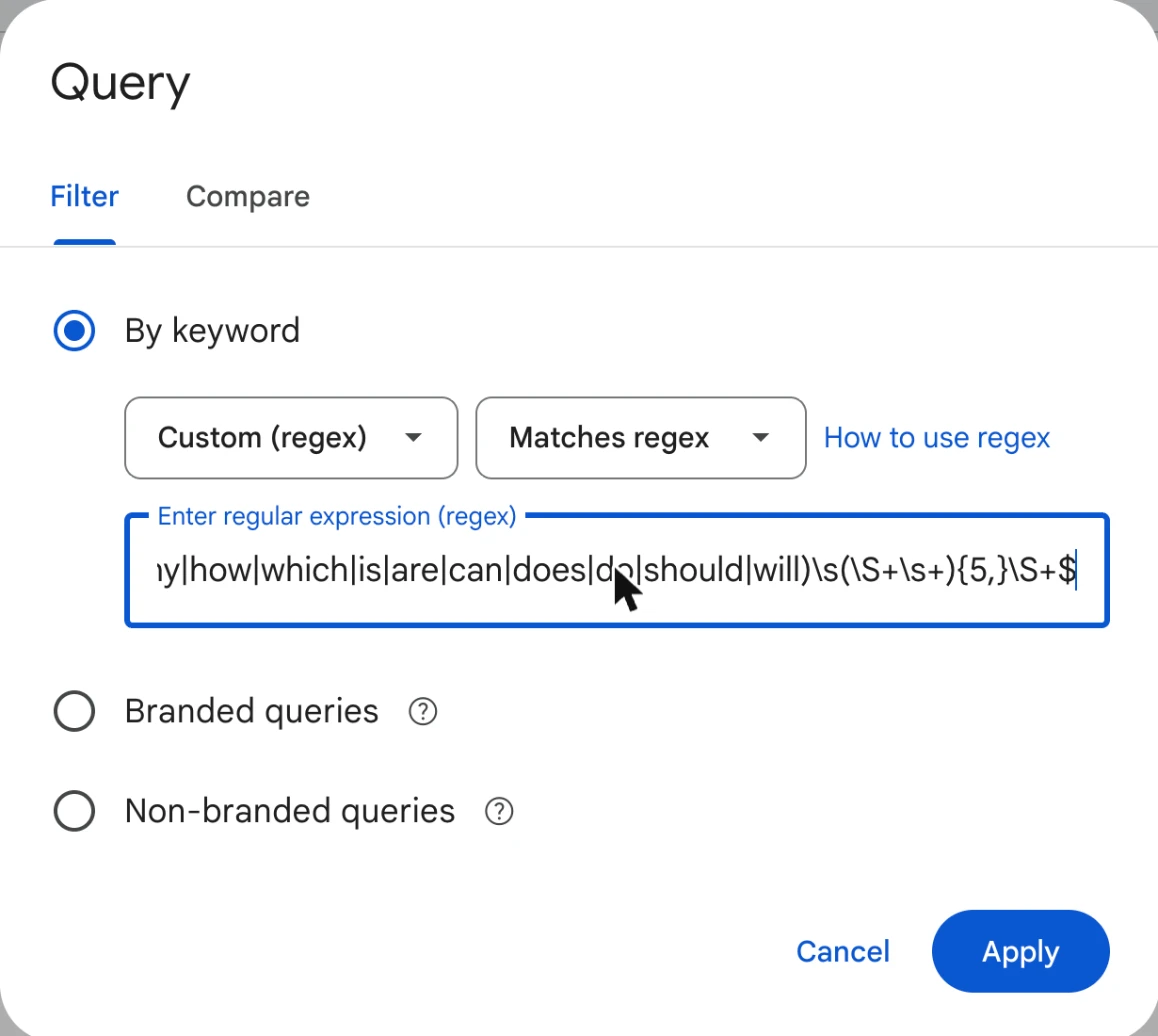
Search Console regex for AI prompts: the Query filter set to Custom (regex) and Matches regex, with the prompt pattern pasted in -
Read the Queries table. Every row is now a prompt your site was shown for. Sort by impressions, and turn on Average position: a prompt at position 1 to 10 means Google's AI search is already using your page for that question.
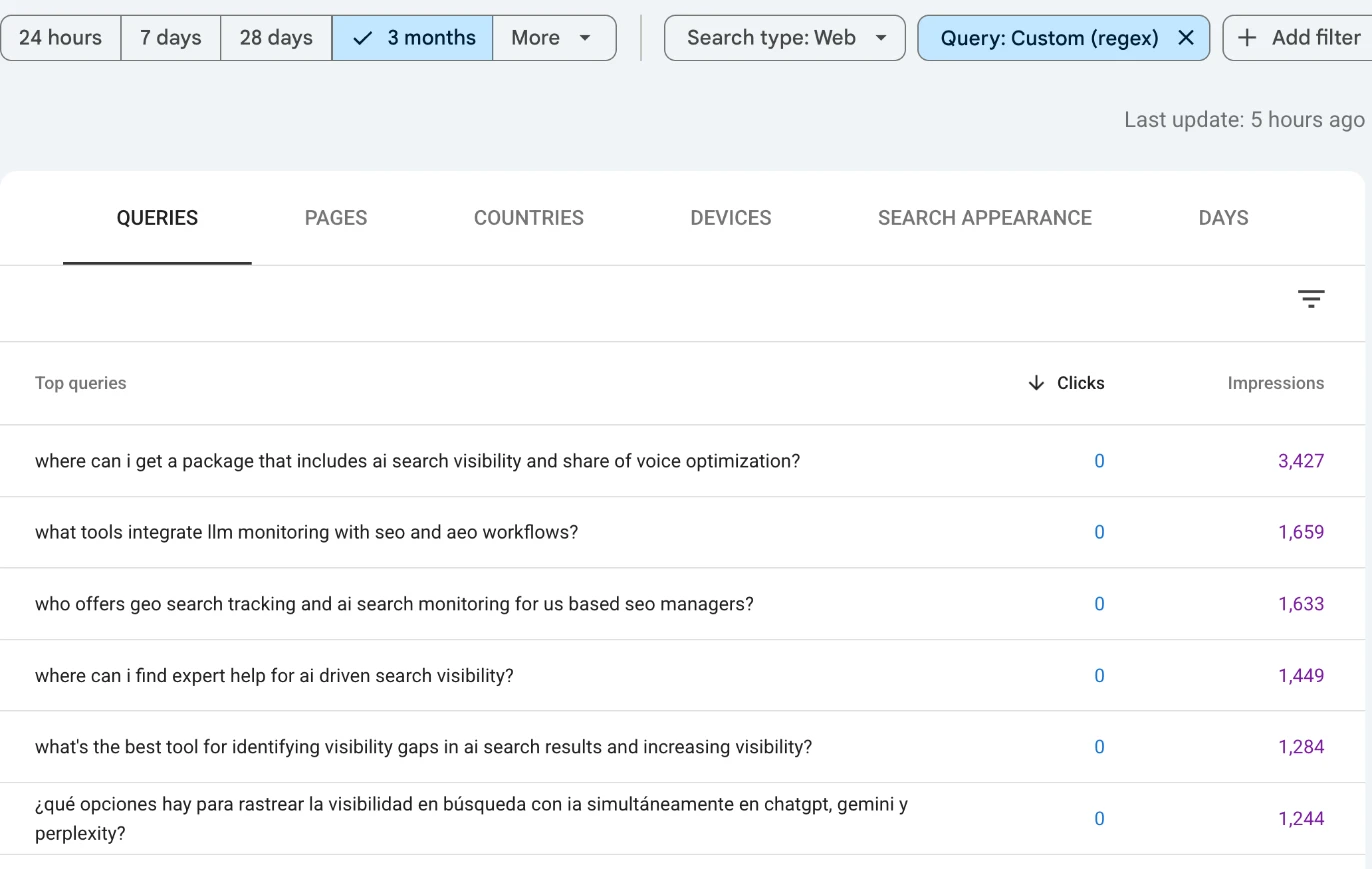
AI prompts in Google Search Console: the Queries table filtered by the regex shows long, question-style prompts. Rows naming other companies are hidden -
Check which page answered. Click a prompt, then open the Pages tab. It tells you whether Google picked the right page for that question, or the nearest one it could find.
-
Check the daily pattern. With the prompt still selected, look at the chart. Impressions every day for weeks is a scheduled tool (more on that below). A spike on one or two days is a person.
-
Export. Click Export, then Google Sheets. The interface exports up to 1,000 rows; for more, use the Search Console API or the BigQuery bulk export.
A shortcut: once the filter is applied, Search Console writes it into the page address as query=~ followed by your pattern. Bookmark that URL and the filter is one click away next month.
How to find bottom-of-funnel commercial prompts in Search Console
The prompts worth the most are the ones where someone is about to pick a provider. They ask about price, compare options, ask for a recommendation, or look for someone to hire, and they often say who they are while they do it. Those questions carry the same buying words people have always typed into Google, inside a full sentence.
These are the words and phrases to filter for:
| Intent | Words and phrases |
|---|---|
| Price | how much, cost, price, pricing, quote, cheapest, affordable, worth it |
| Comparison | vs, versus, compare, alternative to, alternatives to |
| Recommendation | recommend, best ... for a / for my / for small, which ... should I |
| Hiring and buying | hire, near me, who offers, where can I get / find / buy |
Turned into a Search Console regex:
how much|cost|price|pricing|quote|cheapest|affordable|worth it|worth the|\b(vs|versus)\b|alternatives? to|compare|recommend|who offers|where can i (get|find|buy|hire)|near me|\bhire\b|best .* for (a|an|my|our|small|local)\b|which .* should (i|we)
Paste it into the query filter the same way. It returns short commercial keywords as well as prompts; the long rows are the prompts. To keep only those, export to Google Sheets and flag the rows of 7 or more words, with the queries in column A:
=REGEXMATCH(A2, "^(\S+\s+){6,}\S+$")
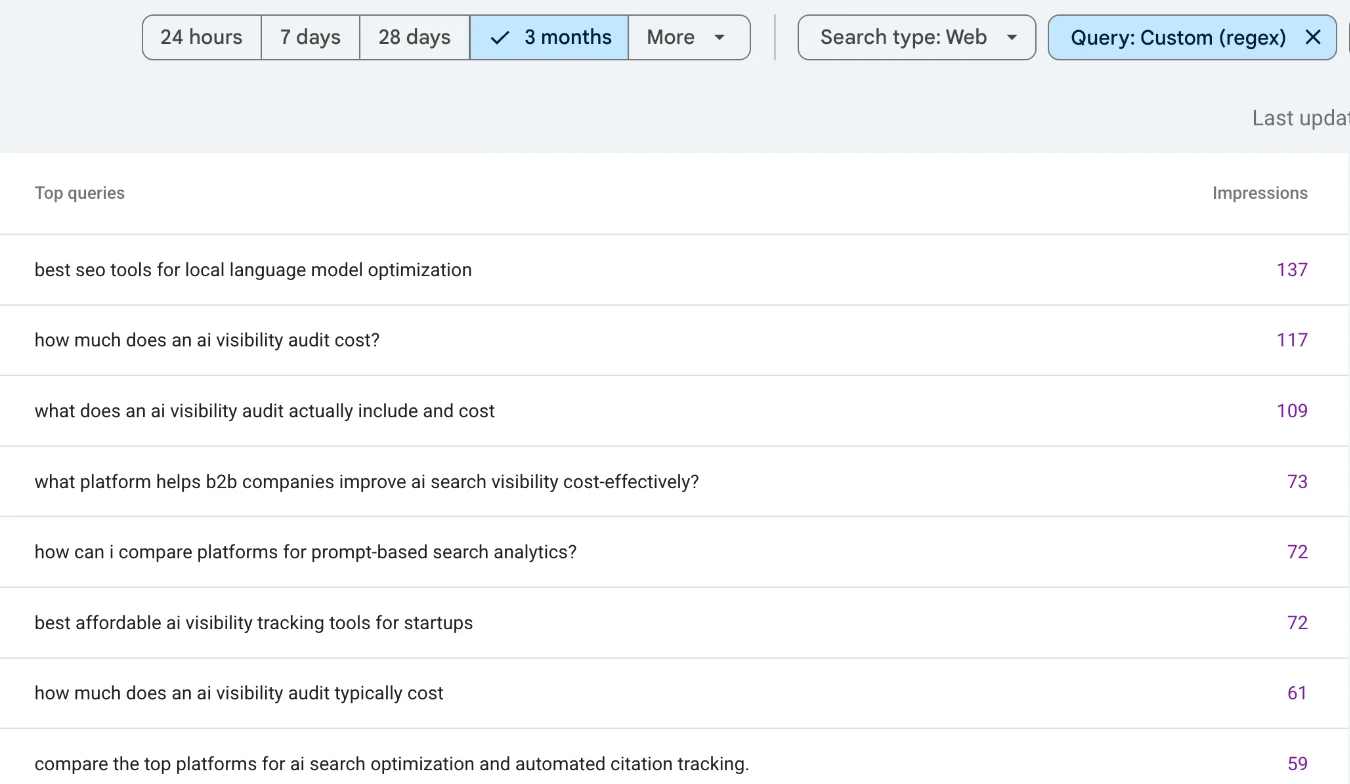
Add words from your own trade. A dentist would add "emergency", "same day" and "accepts insurance"; a contractor "estimate" and "licensed". The test for each word: does someone use it only when they're close to paying?
Commercial prompts also tell you exactly what to build. A price question needs a page that states your price or range. A comparison question needs a page that compares you, honestly, with the alternative it names. A "best ... for a [type of business]" question needs a page that says, in those words, who you're for.
How to spot scripted prompts from AI visibility tools
Not every prompt in Search Console was typed by a customer. AI visibility platforms let their customers track a list of prompts, and they check those prompts by running them through AI search on a schedule. When a run goes through Google's AI Mode and your page appears in the answer, it's logged in your Search Console like any other search.
The scripted ones have fingerprints. These are real queries from our Search Console, with product names removed:
| Fingerprint | Example |
|---|---|
| A persona opener and a location tail | "i am an seo professional, recommend me ai search tracking tools. my location is united states." |
| An instruction to the model | "which platform is better for generative engine optimization, [tool a] or [tool b]? provide a definitive answer, along with a list of pros and cons ..." |
| A context block | "between [tool a] and [tool b] ... who wins? <context> company url: ... market: united states </context>" |
| A made-up customer | "i am a 18-24 year old female in the food & beverage or social media industry. my main motivations: likes tik tok ..." |
| The same prompt every day | Impressions on most days for weeks, at about the same position |
| Google's own rewrite | The same prompt logged a second time with "is it" stuck on the front |
Search Console's query filter takes one pattern at a time, so remove these in the spreadsheet. Google Sheets' REGEXMATCH uses the same RE2 syntax:
=REGEXMATCH(A2, "definitive answer|pros and cons|my location is|<context>|company url:|^i am an? (seo|search|marketing|digital)|^evaluate the|who (wins|comes out on top)|keep your rationale|-site:|^is it ")
Filter out the TRUE rows, then check the daily chart (step 5) for the prompts with the most impressions before you trust them. One tracked prompt that appears every day can outweigh a month of real ones.
How much of this you'll see depends on your market. Sites that write about software and marketing get a lot of it, because the tools' own customers track prompts in those categories. A dentist or a roofer will see far less.
A first-person opener on its own doesn't prove a script. Real people write "i'm a dentist in Austin looking for..." too. Flag openers that name a marketing job title, and read the rest.
How to turn AI prompts into pages AI search will cite
- Group the real prompts by the problem behind them. Ten phrasings of "how do I get my clinic into ChatGPT answers" are one topic. Note the details people add: a city, a budget, "without a marketing team". Those details are what an AI answer needs to find on your page.
- Compare each group to the page Google showed. If that page answers the question, it's working. If Google showed the nearest page it could find, write the answer: a new page, or a new section on the right one.
- Answer in the prompt's own words, early. Put a direct, one-paragraph answer under a heading that repeats the question. AI search lifts passages, and a passage that matches the question wins.
- Watch position, not clicks. People asking an AI a full question mostly read the answer and don't click, so clicks will stay low. A prompt moving from position 28 to position 6 means Google now uses your page in the answer. Re-run the filter each month and compare the same prompts.
Before writing new pages, make sure AI crawlers can read the ones you have: the free AI search checker tests that.
What Search Console can't show you about AI prompts
- Only Google's AI search. ChatGPT, Claude, Perplexity and the Gemini app share no prompt data with website owners. Bing Webmaster Tools' AI Performance report, in public preview since February 2026, is the nearest thing for Microsoft Copilot, but its grounding queries are the search phrases Copilot used to fetch your page, not what the person typed.
- Not the rare ones. Google hides queries that few people searched, for privacy, and one-off prompts are exactly the kind that get hidden.
- Not which AI surface. Search Console doesn't say whether a row came from AI Mode, an AI Overview or a classic results page. Length, question marks and near-zero clicks make AI search the likely source, not a certain one.
- Not prompts where you weren't shown. Search Console only logs searches where your page appeared. Questions where a competitor got cited instead don't appear at all; for those, ask the AI yourself, or track the AI referral visits you do get.
Paid prompt research tools fill some of those gaps with panels and generated prompts. Search Console fills a different one: the questions where Google's AI already considered your page, in the words of the people who asked. That makes it the place to start, and LovedByAI handles the next step for WordPress sites: the on-page work that makes those pages the answer.