
You probably have an opinion on whether AI crawlers should be allowed on your site. The more useful question is whether your site already agrees with you, because in a lot of cases it does not.
We build LovedByAI, an AI search optimization platform for small businesses, which means we fetch websites as AI crawlers every day. When we tested 314 live websites as 38 different AI crawlers in August 2026, 43% refused at least one, and most of those refusals were not in robots.txt, the one place owners look.
This guide covers how to check your own site in five minutes, what each AI crawler actually does, and which ones to allow if you want ChatGPT, Claude and Perplexity to find you.
Is your site blocking AI crawlers? How common it is
Every square is one of the 314 websites we checked, 27 to 30 August 2026
179 sites
Fully reachable
Every one of the 38 crawler tokens we tested got through.
112 sites
Blocked, but not in robots.txt
The server turns a crawler away. robots.txt says nothing about it.
23 sites
Blocked in robots.txt
Visible, auditable, reversible in a text editor. 18 of the 23 were written by Cloudflare, not the owner.
135 of the 314 sites refused at least one AI crawler. Three findings from that test matter for your own check:
- Most blocks are invisible in robots.txt. On 112 sites, robots.txt allowed every AI crawler while the server or CDN refused them anyway, usually with a
403 Forbidden. - Most blocking is aimed at scrapers, and that is fine. 102 of the 135 sites refused only training crawlers such as Bytespider, Amazonbot and CCBot.
- The costly blocks are rarely chosen. 33 sites refused at least one crawler that fetches pages to answer a live question (OAI-SearchBot, ChatGPT-User, PerplexityBot, Claude-SearchBot, Claude-User). Only 2 of those 33 had written that rule in robots.txt.
So the check has two halves, and the second one is where the surprises are.
How to check if your site is blocking AI crawlers: robots.txt and server responses
Step 1: read your robots.txt. Open yourdomain.com/robots.txt in a browser. Look for User-agent: lines that name AI crawlers, followed by Disallow: /. If you see a block between # BEGIN Cloudflare Managed content and # END Cloudflare Managed Content, your CDN wrote it, not you.
Step 2: ask your server what it tells each crawler. A robots.txt rule is a request. A firewall, security plugin or CDN rule is a refusal, and it leaves no note in robots.txt. To see it, request a page as a normal browser first, then as each crawler, and compare:
# Control: a normal browser request
curl -s -o /dev/null -w "%{http_code}\n" -A "Mozilla/5.0" https://yourdomain.com/

# The same page as OpenAI's search crawler, then as its training crawler
curl -s -o /dev/null -w "%{http_code}\n" -A "Mozilla/5.0 (compatible; OAI-SearchBot/1.0; +https://openai.com/searchbot)" https://yourdomain.com/
curl -s -o /dev/null -w "%{http_code}\n" -A "Mozilla/5.0 (compatible; GPTBot/1.1; +https://openai.com/gptbot)" https://yourdomain.com/
Read the result like this:
| Browser | Crawler | What it means |
|---|---|---|
| 200 | 200 | Not blocked at the server. Check robots.txt for a written rule. |
| 200 | 403 or 503 | Your server, security plugin or CDN refuses that crawler. |
| 200 | 200, but the page is a challenge | A bot challenge (for example a JavaScript check) stops the crawler, even though the code says 200. |
| 429 | 429 | Rate limiting from your own repeated tests. Wait and try again; it is not a block. |
One caveat: some CDNs verify a crawler by its IP address, not just its user agent, so a request from your laptop pretending to be GPTBot can be treated differently from the real GPTBot. A refusal is still a refusal; an allow from your laptop is a strong hint, not proof.
Or do both in one step. Our free robots.txt checker for AI crawlers reads your robots.txt and requests your homepage as each major AI crawler, side by side, so you can see a written rule and a server refusal in the same table.
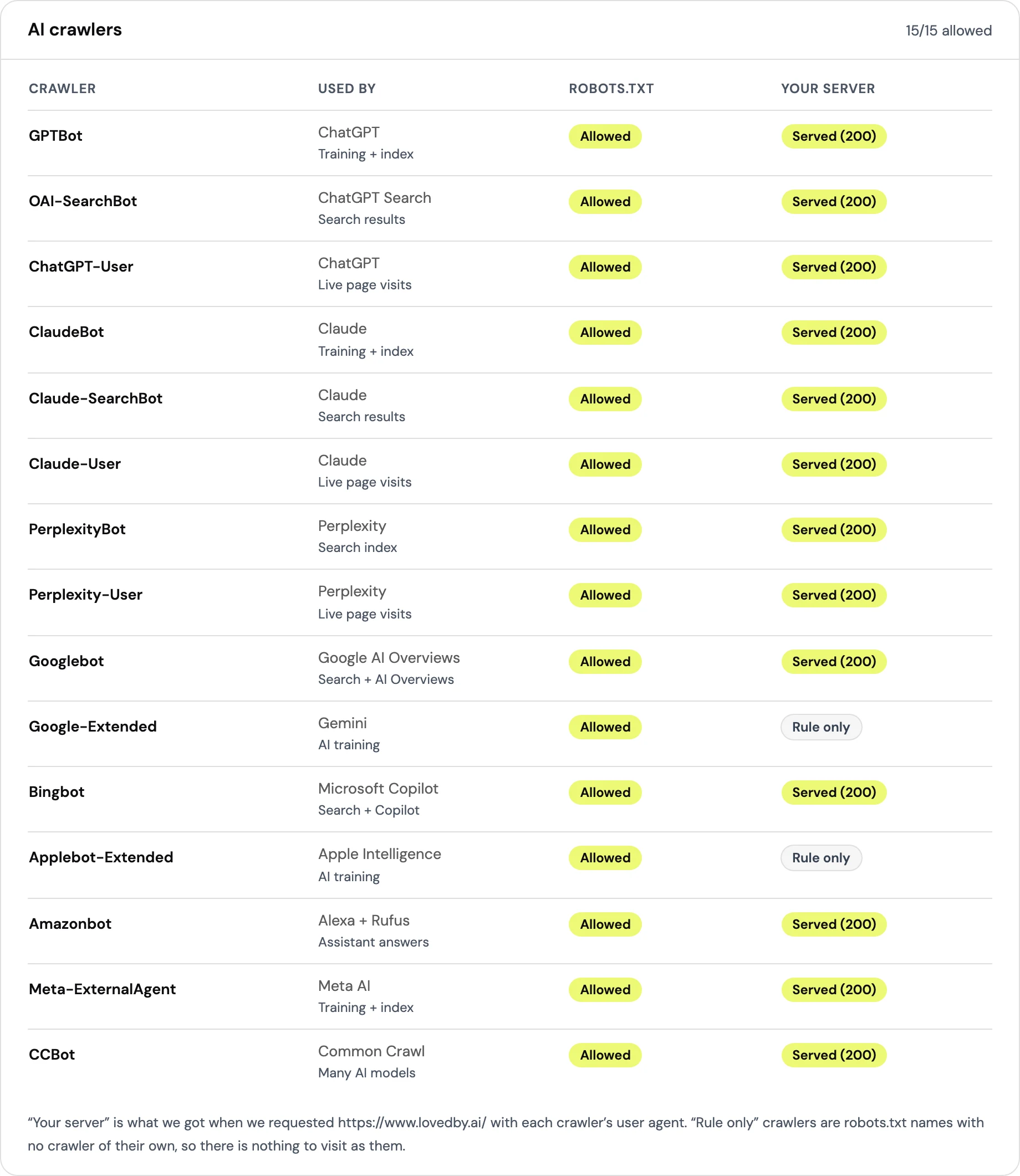
A healthy result looks like this: every crawler you want is Allowed in robots.txt and Served (200) by your server. A crawler marked Allowed but Refused is the silent block this guide is about.
Is Cloudflare blocking AI crawlers on your site?
If your site is on Cloudflare, start there. In our 314-site test, 18 of the 23 sites with an AI crawler rule in robots.txt did not write it. Cloudflare's managed robots.txt did. On several of them, the owner's SEO plugin added an "allow everything" block right underneath, so the file contradicted itself.
Cloudflare now groups AI crawlers by purpose rather than with a single "Block AI bots" switch. According to Cloudflare's own announcement, the controls cover three kinds of crawler: Search (crawlers that index pages for AI answers), Training (crawlers that collect data for models) and Agent (fetches made on a person's behalf). From September 15 2026, new domains get Training and Agent blocked on pages that carry ads, with Search allowed.
Two things to check in your Cloudflare dashboard:
- Managed robots.txt. If it is on, Cloudflare prepends its own Disallow list to your file. That list includes GPTBot and ClaudeBot (training) and Google-Extended (a consent token, explained below).
- The Training setting. Cloudflare notes that some crawlers do more than one job. Its announcement says that customers who block Training can also block multi-purpose crawlers such as Googlebot, Applebot and Bingbot. If organic traffic matters to you, read that setting carefully before you switch it on.
Does a robots.txt block stop AI crawlers? What our crawler logs show
robots.txt is a convention, not a lock. We compared each site's rules with what its server logs recorded over the four weeks before the August 2026 test:
Share of sites that logged a real page request from the crawler, 1 to 26 August 2026
Grouped by what our check found on the same sites a few days later.
GPTBot
ClaudeBot
PerplexityBot
OAI-SearchBot
- 33.3% of the sites that disallowed GPTBot in robots.txt still logged GPTBot page requests, and 17.6% of the sites disallowing ClaudeBot logged ClaudeBot.
- On the 9 sites that refused GPTBot at Cloudflare's edge, none logged a single GPTBot page request.
- For OAI-SearchBot, sites refusing it at their own server still logged a page request 84.6% of the time, against 0.0% for an edge block. An origin block often shows up in logs as if nothing were wrong.
Two practical conclusions. If you want a crawler to stay out, robots.txt asks and a CDN rule enforces. And if you are checking whether you have a problem by looking at a crawler-stats plugin, a server-level block can look exactly like a working site.
Which AI crawlers visit websites: training, search and user-triggered bots
Every AI crawler does one of three jobs, and the job decides whether blocking it costs you anything:
- Training crawlers collect pages to train models. They send no visitors back. Examples: GPTBot, ClaudeBot, CCBot, Bytespider, Meta-ExternalAgent.
- Search crawlers build the index an assistant searches when it answers. Blocking them can keep you out of AI answers. Examples: OAI-SearchBot, Claude-SearchBot, PerplexityBot.
- User-triggered fetchers load a page because a person just asked about it. Examples: ChatGPT-User, Claude-User, Perplexity-User.
On the 924 small business sites in our AI crawler statistics, 69.9% of AI crawler requests on the average site were for training, 18.8% for AI search and 11.3% were triggered by a person asking a question (6 September to 5 October 2026). Most of the crawling you see is the part you can block without losing anything.
Should you block GPTBot? What blocking each OpenAI crawler does
OpenAI runs separate crawlers for separate jobs, and blocking one does not block the others. From OpenAI's crawler documentation:
| OpenAI agent | What it does | What blocking it does | Obeys robots.txt? |
|---|---|---|---|
| GPTBot | Collects pages for training OpenAI's foundation models | Signals your content should not be used for training. Does not remove you from ChatGPT search | Yes |
| OAI-SearchBot | Indexes pages for ChatGPT's search features | "Sites that are opted out of OAI-SearchBot will not be shown in ChatGPT search answers, though can still appear as navigational links" | Yes |
| ChatGPT-User | Fetches a page when a person asks ChatGPT about it, or in a custom GPT | Stops ChatGPT reading your page live for that user | "Robots.txt rules may not apply" because the user started it |
| OAI-AdsBot | Checks pages submitted as ads on ChatGPT | Only relevant if you advertise on ChatGPT | Not stated |
So the answer to "should I block GPTBot" is a values question, not a visibility one. Block GPTBot if you do not want to contribute to training; keep OAI-SearchBot and ChatGPT-User allowed if you want ChatGPT to find and cite you. OpenAI says robots.txt changes take about 24 hours to reach its search systems.
A common mistake runs the other way: a security plugin or CDN list that refuses "OpenAI" as a whole, catching OAI-SearchBot and ChatGPT-User along with GPTBot. That is how most of the 33 sites in our test ended up refusing assistants they never meant to refuse.
ClaudeBot vs Claude-SearchBot vs Claude-User: Anthropic's crawlers
Anthropic uses the same three-way split. From Anthropic's crawler help page:
| Anthropic agent | What it does | What blocking it does |
|---|---|---|
| ClaudeBot | Collects web content that could contribute to model training | Signals your future content should be excluded from training |
| Claude-SearchBot | Indexes content to improve Claude's search answers | May reduce your visibility in Claude's search results |
| Claude-User | Fetches a page when a person asks Claude a question | Prevents Claude retrieving your content for that user |
Anthropic asks site owners to opt out through robots.txt rather than IP blocking, and to repeat the rule on each subdomain.
Google-Extended and Applebot-Extended: AI tokens, not crawlers
Two names on most AI blocklists are not crawlers at all. Google-Extended has no user agent; it is a robots.txt token that tells Google whether content Googlebot has already crawled may be used for Gemini training and grounding. Disallowing it does not change how Googlebot crawls or ranks you in Google Search. Applebot-Extended works the same way for Apple.
In our test, 19 sites disallowed one of these two tokens, and 18 of those 19 also disallowed GPTBot, CCBot and Bytespider in the same block. That pattern points to a copied list, not a decision about Google or Apple.
Which AI crawlers to allow: a robots.txt template that keeps AI search visibility
If you want to stay out of model training but stay findable in AI answers, this is the shape to aim for. Adjust it to your own policy:
# Training crawlers: opt out
User-agent: GPTBot
Disallow: /

User-agent: ClaudeBot
Disallow: /

User-agent: CCBot
Disallow: /

User-agent: Bytespider
Disallow: /

User-agent: Google-Extended
Disallow: /

# AI search and user-triggered fetchers: allow
User-agent: OAI-SearchBot
Allow: /

User-agent: ChatGPT-User
Allow: /

User-agent: Claude-SearchBot
Allow: /

User-agent: Claude-User
Allow: /

User-agent: PerplexityBot
Allow: /

User-agent: *
Allow: /

Sitemap: https://yourdomain.com/sitemap.xml
Then run the server check again. A robots.txt that allows OAI-SearchBot does nothing if your firewall refuses it. If your server returns a 403 to a crawler you meant to allow, the fix is in your CDN, hosting firewall or security plugin, not in this file.
If you are worried about server load rather than training, a rate limit for aggressive scrapers is usually a better tool than a blanket block: it keeps the search crawlers in and the bandwidth bill down.
Is your site blocking AI crawlers? What to do next
- Run both checks today: robots.txt and a request as each crawler. The robots.txt checker does both.
- If you are on Cloudflare, look at managed robots.txt and the Training setting before anything else.
- Allow the search and user-triggered crawlers if you want to appear in ChatGPT, Claude and Perplexity answers. Block training crawlers if you prefer; it does not cost you visibility.
- Re-check after any change to your CDN, host or security plugin. Most of the blocks we found were side effects of someone else's default.
For the full numbers behind this guide, read the 314-site AI crawler blocking study and our AI crawler statistics.