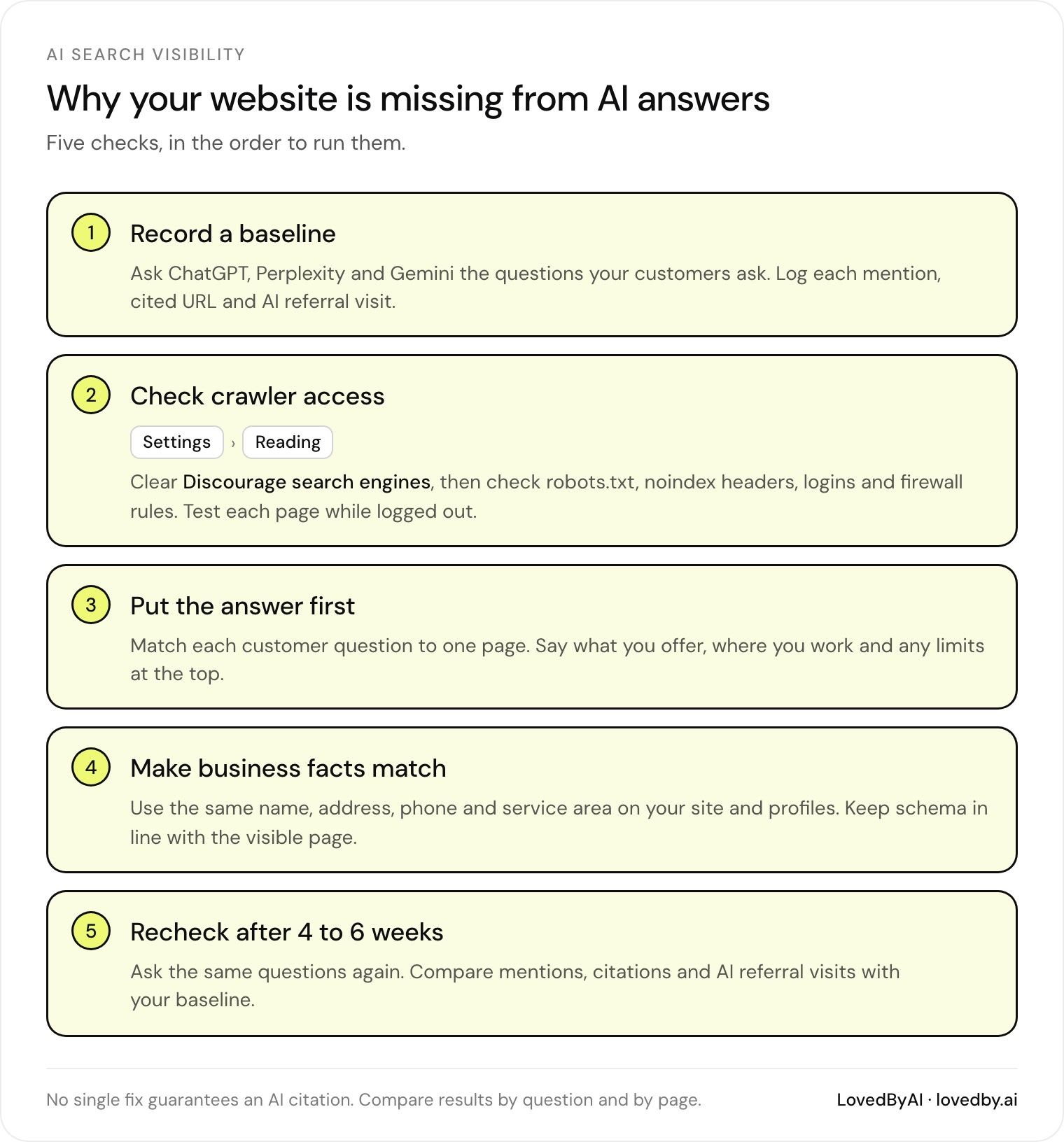
Being indexed doesn’t guarantee an AI citation. I’d start with 4 checks: can crawlers reach your pages, do those pages answer customer questions, are your business facts correct, and does each page match what customers ask?
Here’s the order I’d use:
-
Check WordPress access: Review Reading settings,
robots.txt,noindex, and login restrictions. - Make answers easy to find: Put service details, supported prices, timelines, and limits near the top.
- Check business facts: Keep contact details and public profiles consistent. Make sure schema matches visible content.
- Measure before and after: Test 10 customer questions across ChatGPT, Perplexity, and Gemini. Track mentions, linked citations, and referral visits separately.
I’d start with a few priority pages and recheck after 4–6 weeks. That’s a checkpoint, not a deadline. No fix guarantees inclusion.
Check WordPress Crawl and Indexing Barriers for AI Search
Check Search Settings and Crawler Blocks
On your public site, go to Settings → Reading and clear this option:
“Discourage search engines from indexing this site”
Next, check your SEO plugin, live /robots.txt, and response headers for unintended noindex directives. A header such as X-Robots-Tag: noindex can keep a page out of the index even when its HTML looks fine.[6][9]
robots.txt blocks crawling; noindex blocks indexing. If you block crawling, Google may never see the page’s noindex directive. nofollow applies to following links, not indexing the page itself. nosnippet and max-snippet control how much content appears in search results.[7][9]
Remove only restrictions you didn’t intend. Keep authentication and other protections in place for staging sites, customer portals, and private files.[7][9]
Use this table to tell crawl blocks apart from indexing blocks.
| Observed problem | Likely cause | WordPress check | Targeted fix |
|---|---|---|---|
Public pages contain noindex | Global or page-level exclusion | Reading settings, SEO plugin, HTTP headers | Remove the unintended directive; verify the response |
/robots.txt contains Disallow: / | Broad block left on production | Live file, hosting rules, security settings | Remove the public-site block; keep needed private-path rules |
| URL returns 403 or a bot challenge | Firewall or CDN restriction | Hosting logs and security rules | Adjust the rule for verified legitimate crawlers, not all bots |
| Page requires a login or password | Restricted page visibility | Page status, access plugins, maintenance mode | Publish a public version if appropriate; otherwise keep protection |
Check Page Access and URL Discovery
If a page is reachable but still missing from search, check whether Google can discover it.
Test each important URL while logged out. It should return 200 OK, with its core answers available in the HTML or rendered page - not behind a login wall, maintenance screen, click, or form. Use Search Console’s URL Inspection → Test live URL to check crawler access. A normal browser visit doesn’t test that.[11][13]
Review incoming links from relevant pages, the rel="canonical" tag, and the XML sitemap. Use the correct HTTPS URL and hostname, and don’t point every page’s canonical to the homepage. Include only preferred public URLs in the XML sitemap. A sitemap helps discovery; it can’t override access restrictions.[8][11][12]
Keep a URL log that records the date, URL, status, access, directive, canonical, fix, and recheck date. In Search Console, treat the indexed record and live test as separate checks.[10][13] If access and discovery are clear, move on to relevance and evidence.
Optimize your WordPress site for AI search
Find out what ChatGPT, Gemini, and Perplexity can and can't read on your site, and exactly what to fix.
Make Each Page Answer the Question AI Search Gets Asked
Accessibility alone isn’t enough. A page may answer the wrong question, bury the answer, or offer no evidence to support it. Fixing these gaps makes your content more useful, but it does not guarantee an AI citation.
Match Customer Questions to Pages
Once access is clear, give each page a question to answer. Gather questions from customer support inboxes, Google Search Console queries, and “People Also Ask” results. Group them by service, location, cost, timing, and eligibility.
Walk through each customer task on your site to find missing or vague details. Update the best existing page first. Create a new page only when none fits the intent.[1][5]
Use this table to find pages that need a better match - not simply more content.
Customer question Current page Answer completeness Missing evidence or detail Recommended update “How much does roof repair cost in Denver?” /services/roof-repairPartial if it only says “request a quote” Supported price range and estimate factors Update the service page with verified pricing and factors “Do you help with hail insurance claims?” /services/roof-repairNone if the process is absent Actual scope of assistance and limitations Add a section; create a dedicated page only if the service warrants one “How long does a consultation take?” /contactLow if no duration appears Confirmed duration and what happens next Add a short “What to expect” section
Put Key Answers First
Once a page matches the question, put the answer at the top. State what you offer, where you work, and any limits. Include a price range only when your own estimates support it, then explain what can change the quote. Make timelines easy to find.
Keep the page focused on roof repair. Use descriptive <h2> and <h3> headings that match customer questions, and change the updated date only when the facts change in a meaningful way.[3][5]
Verify Business Details and Schema Markup
Back up the page with consistent business facts and structured data. Your business name, address, phone number, service areas, specialties, and years in business should match across your site and public profiles. When relevant, link author information to a Person entity that includes credentials.[1][2]
Add valid JSON-LD for LocalBusiness and Service. This markup should support - not replace - accurate, visible content. Choose the most specific valid subtype, and use separate Service blocks for different offerings. Make sure areaServed matches your actual coverage and sameAs links to profiles that belong to your business.[2]
Apply Fixes and Measure AI Visibility
Once the technical and content fixes are in place, update priority pages in small batches. Log each URL, edit date, and change type. Then check whether AI systems surface those pages.
Use LovedByAI to Run These Checks on WordPress
LovedByAI is a generative engine optimization platform for small businesses on WordPress. It checks crawler access, publishes an AI-readable version of each page with JSON-LD schema, and reports AI mentions and AI referral traffic, so you can see whether the fixes worked.
Track Mentions, Citations, and Question Coverage
Record a baseline before making edits. Focus on questions customers actually ask - not broad traffic spikes. Test 10 priority customer questions across ChatGPT, Perplexity, and Gemini. For each test, record the date, exact prompt, tool, location, mention, citation URL, and AI referral visits. Repeat the same questions under comparable conditions.[1]
Keep unlinked mentions separate from website citations. Track how many tested questions return mentions and citations, along with AI referral visits. A mention doesn’t prove that an AI can complete a task, such as submitting a consultation request. Compare later checks against that baseline after re-crawling.
Recheck Results After Crawling and Reprocessing
Log technical, content, and schema changes separately. Recheck in 4–6 weeks - a checkpoint, not a deadline.[1][2] Compare trends by question and URL across repeated checks. Treat gains as directional evidence, not proof that a single edit caused them.
Which AI Search Fixes to Make First
Fix your highest-priority pages first - not the whole site. Remove unintended WordPress access barriers, make key answers easy to understand, and keep business facts consistent across your profiles and directories.[1]
Support those pages’ claims with public proof, such as source documents and portfolio photos. Keep business schema plugins accurate and in line with the page’s content.[1][4]
Track mentions, citations, and AI referral traffic over time rather than relying on one favorable answer.[1]
FAQs
Can my site rank on Google but miss AI citations?
Yes. A website can rank well in Google search results without appearing in AI-generated answers. SEO and Generative Engine Optimization (GEO) work differently: search engines rank pages, while AI models interpret content and information about entities.
If your site lacks clear, machine-readable structured data (JSON-LD) or has too much code bloat, AI models may have trouble interpreting your content - even when it ranks well.
Which WordPress pages should I fix first?
Start by fixing technical blockers: accidental crawler blocks, content that only displays with JavaScript, and structured data errors. Then focus on your homepage, core service pages, and contact page. Add accurate LocalBusiness, Service, or FAQPage schema where it fits.
Use clear headings, lead each section with a direct answer, and present comparisons in tables. Keep your business name, address, and phone number consistent across directories, Google Business Profile, and your website schema.
What should I check if AI citations don’t improve?
Start by checking that crawlers can access and read your content. Review robots.txt for blocked AI user agents. Then use the Google Rich Results Test and Schema Markup Validator to spot syntax errors, missing properties, or conflicting schema.
Make sure JSON-LD matches the content visitors see. Check the page source to confirm that core content and schema appear in raw HTML - not hidden behind client-side JavaScript or buried in excessive DOM bloat.