WordPress robots.txt lets you set separate rules for AI search and model training. Start by checking your live /robots.txt, then choose which provider-specific bots you want to allow or block.
Your policy should cover search, training, and user-requested page fetches. Google-Extended controls certain Google AI uses without blocking Search, while some user-requested fetches need server or CDN rules instead of robots.txt.
Before you deploy:
- Keep existing WordPress restrictions and sitemap links.
- Check bot names against provider docs.
- Test the live response and review crawler logs to see if bots are being blocked at the server level.
- Protect private pages with login and permission checks.
LovedByAI tracks AI mentions and referral traffic. Use those reports to monitor outcomes, but remember that allowing crawlers does not guarantee citations.
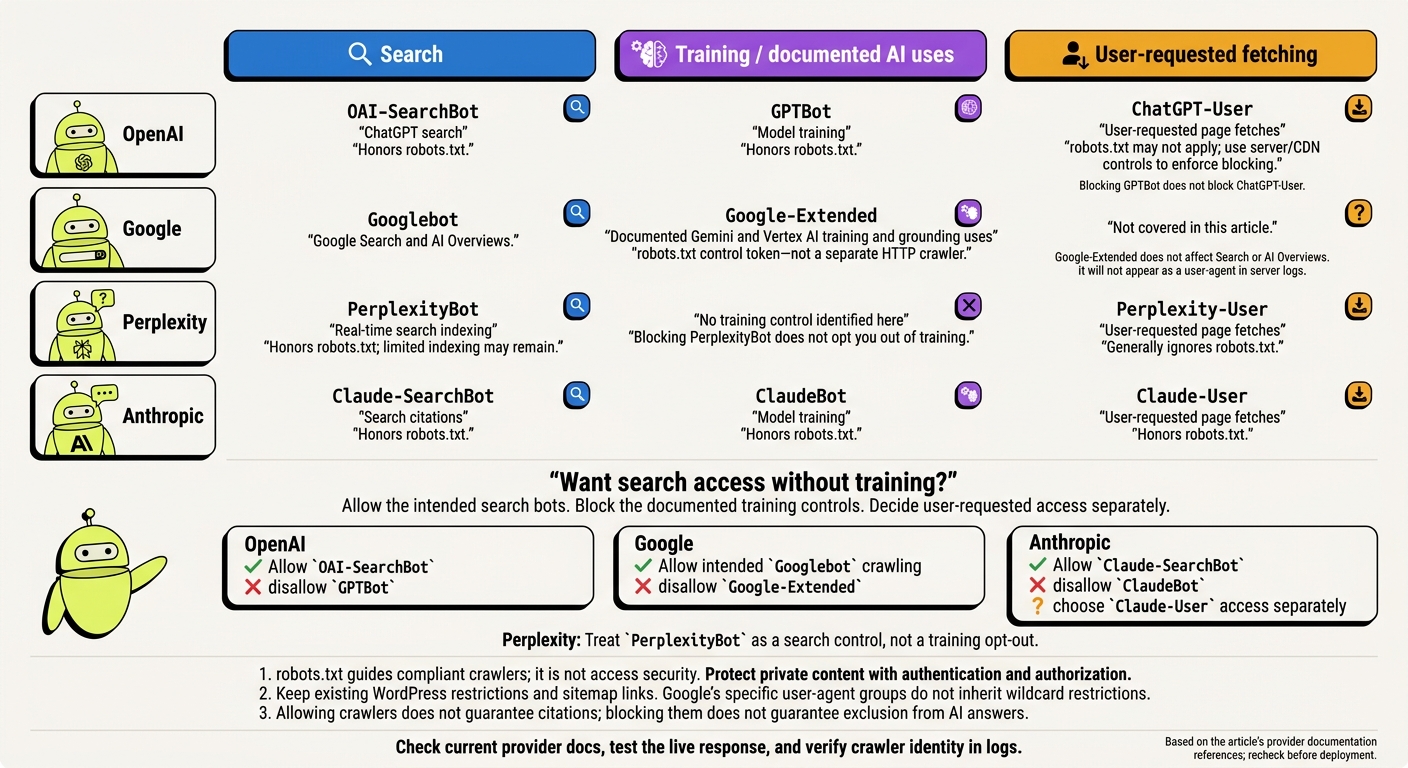
WordPress AI Bot Controls: Search vs. Training vs. User Fetches
OpenAI Crawler Access Rules
OpenAI uses separate bots for search, training, and user-requested fetching. The guidance below follows OpenAI’s bot documentation.
Separate OAI-SearchBot From GPTBot
OAI-SearchBot crawls for ChatGPT search. GPTBot collects content to improve future models. You can control each bot separately in robots.txt. 1
To keep your pages open to search discovery while blocking training crawls, use these rules:
User-agent: OAI-SearchBot
Allow: /

User-agent: GPTBot
Disallow: /
A blocked page may still appear as a link and title through third-party search results, according to OpenAI. 1
Check ChatGPT-User Rules
Handle user-requested fetches separately from search and training crawls. ChatGPT-User fetches pages when a user requests them. It does not perform automated search indexing or training crawls. OpenAI says robots.txt may not control these fetches because a person triggers them. 1 Blocking GPTBot does not block ChatGPT-User.
If you want ChatGPT to fetch your public pages on request, allow ChatGPT-User through your CDN and firewall. To block it, enforce the restriction at your server or edge layer.
Google also separates search from training, but its bot groups and matching rules differ. Next, map that split to Google’s crawler names and user-agent matching rules.
Optimize your WordPress site for AI search
Find out what ChatGPT, Gemini, and Perplexity can and can't read on your site, and exactly what to fix.
Google Search and Gemini Access Controls
Googlebot vs. Google-Extended
Googlebot handles Search. Google-Extended controls documented Gemini and Vertex AI training and grounding uses. Google AI Overviews use the same Googlebot-crawled index.
Google-Extended is a robots.txt rule name, not a separate HTTP crawler. You won’t see it as a user-agent in your server logs. For the current policy scope, see Google’s crawler overview and Google’s common crawler documentation.
| Crawler or rule name | Primary purpose | Search visibility effect | Training-control effect |
|---|---|---|---|
Googlebot | Crawls content for Google Search and AI Overviews | Blocking prevents crawling but does not necessarily prevent search inclusion | None |
Google-Extended | Controls documented Gemini and Vertex AI training and grounding uses | Does not affect Search or AI Overviews | Disallowing restricts the documented training and grounding uses |
To apply these controls correctly, you need separate user-agent groups. For more advanced configurations, see our WordPress AI SEO guides.
How Google Matches User-Agent Groups
Google uses the most specific matching user-agent group. A Googlebot group takes precedence over User-agent: * and does not inherit its restrictions.
To keep Search crawling open while blocking Google-Extended’s documented uses, use the groups below. Repeat the /wp-admin/ restriction in the Googlebot group, including the admin-ajax.php exception.
User-agent: Googlebot
Disallow: /wp-admin/
Allow: /wp-admin/admin-ajax.php

User-agent: Google-Extended
Disallow: /

User-agent: *
Disallow: /wp-admin/
Allow: /wp-admin/admin-ajax.php
Also check that your CDN or firewall allows Googlebot requests. Permission in robots.txt cannot override an edge-layer block.
Perplexity and Anthropic Crawler Rules
Perplexity and Anthropic separate search, training, and live user fetches, but their robots.txt behavior differs from OpenAI’s and Google’s. On your WordPress site, each access type needs its own rules to ensure generative engine optimization for AI search.
PerplexityBot and Perplexity-User Rules
PerplexityBot handles real-time search indexing rather than model training. Blocking it can limit crawling, but Perplexity may still show your domain, title, and a short summary. Blocking PerplexityBot does not opt you out of training or guarantee removal from answers[1].
Perplexity-User fetches pages when a user requests them and generally ignores robots.txt[1].
Anthropic’s 3 Crawler Roles
Anthropic assigns each task to a separate bot: ClaudeBot handles training, Claude-SearchBot supports search citations, and Claude-User fetches pages at a user’s request.
Anthropic says all three honor robots.txt, including Claude-User[1]. To block training while allowing search citations and user-requested fetches, block ClaudeBot and leave the other two open.
The table below maps each bot to the access you can allow or block.
Compare Crawler Controls Across Providers
Choose your controls by purpose, rather than company name alone.
| Provider | Exact crawler or control token | Category | robots.txt behavior | Control objective | Provider source |
|---|---|---|---|---|---|
| Perplexity | PerplexityBot | Search | Honors rules; limited indexing may remain | Real-time indexing | October 26, 2026 |
| Perplexity | Perplexity-User | User-requested fetching | Generally ignores robots.txt | User fetch | October 26, 2026 |
| Anthropic | ClaudeBot | Training | Honors rules | Model training | October 26, 2026 |
| Anthropic | Claude-SearchBot | Search | Honors rules | Search citations | October 26, 2026 |
| Anthropic | Claude-User | User-requested fetching | Honors rules | User-requested fetch | October 26, 2026 |
| OpenAI | GPTBot | Training | Honors rules | Model training | October 26, 2026 |
| OpenAI | OAI-SearchBot | Search | Honors rules | ChatGPT search | October 26, 2026 |
| OpenAI | ChatGPT-User | User-requested fetching | Rules may not apply | User fetch | October 26, 2026 |
Choose Your WordPress AI Access Policy
Set separate rules for search crawling, model training, and user-requested fetching. robots.txt guides crawling but does not enforce access. Use the table below to choose a policy for your site.
Compare 4 Access Policies
| Policy | Benefit | Limitation | Visibility effect | Maintenance |
|---|---|---|---|---|
| Allow search, block training | Keeps AI search visibility while blocking training | Requires provider-specific controls | Preserves AI search eligibility | Moderate; review bot names |
| Allow both | Simplifies crawler access | Permits documented training uses | Preserves AI search eligibility | Low; maintain standard rules |
| Block named AI crawlers, preserve search | Limits known AI crawlers | Misses unidentified crawlers | Limits AI-specific discovery | High; monitor new tokens |
| Restrict specific paths | Limits crawling by URL path | Does not secure content | Leaves allowed pages discoverable | Moderate; audit URL changes |
Choose the least restrictive policy that meets your goals. To allow search without training, use the provider’s documented training controls. Decide separately whether to allow user-requested access.
Google-Extended is a control token, not a crawler. Bot names differ by provider.
After setting crawler rules, secure anything that needs to stay private.
Protect Private Content With Authentication
Use authentication and authorization to protect private content. For staging sites, use server-side authentication or network restrictions. Keep private files behind permission checks. An unlinked URL alone does not protect a file.
robots.txt can expose private paths without securing them. Test your private URLs while signed out. Your server should deny access regardless of crawler rules.
Apply and Test WordPress robots.txt Rules
After you choose a policy, check the live response and the layer serving it. Make sure your live site returns your provider-specific rules unchanged. Compare the response with the file, plugin, host, or CDN serving it, and keep unrelated restrictions in place when you deploy changes.
Test the Live robots.txt Response
Fetch your live robots.txt URL with curl -i. Confirm that you get 200 OK, readable rules, and no HTML challenge page. Check exact agent names against provider documentation. Place specific crawler groups before User-agent: * to make the file easier to read. Their position does not determine precedence.
Next, test whether crawlers can reach the pages you meant to allow or block. Request a page with curl -A "OAI-SearchBot" -i, then repeat the request without a crawler user agent.
Check the status code: 403 or 406 usually points to a firewall or server rule, 429 means rate limiting, and 5xx means server failure. Even a 200 response can contain a challenge page. Compare CDN logs with origin logs, and inspect the returned HTML for your page’s main content. Retest after changes to Elementor or other plugins, hosting, caching, or security settings. [2][3]
Then check whether the requests in your logs come from the bot you expect.
Check Logs and Confirm Crawler Identity
Use your logs to check that the crawler identity matches the rule you set. Logs show requests. They don’t reveal intent or downstream use. Record timestamps, paths, status codes, source IPs, and user agents. Requests blocked by your CDN may never appear in origin logs.
User-agent strings can be spoofed. Verify source IPs against provider-published ranges in OpenAI’s crawler documentation, Anthropic’s crawler documentation, and Perplexity’s bot documentation. For Googlebot, follow Google’s verification procedure, including forward-confirmed reverse DNS. [1]
Keep Search, Training, and User Access Separate
Once your crawler map is set, use it to define your WordPress policy. Decide separately how to handle search, training, and user-requested access. Use exact documented tokens rather than guessed bot names.
When restricting training, keep your intended search access in place. Watch for provider exceptions: Google-Extended is a robots.txt token, and robots.txt may not govern ChatGPT-User requests. [1]
Protect private content with authentication and server-side controls. Allowing a crawler does not guarantee citations, and blocking one cannot guarantee exclusion from every AI answer. [1]
Document and Review Your Policy
After deployment, assign one owner to keep your policy current. Record each rule’s purpose, deployment date, source link, and review date so your search, training, and user-access choices remain clear. Store dated copies of provider docs alongside the policy.
Review it periodically and after provider announcements or changes to WordPress, hosting, your CDN, or security settings.
Track AI Mentions and Referrals
Once your policy is in place, use reporting to track outcomes. LovedByAI can help you track AI mentions and referral traffic from major AI platforms.
Log policy changes, but treat traffic swings as correlation rather than proof of cause. Mentions and referrals show what happened. They don’t tell you which crawler rule caused it.
FAQs
Where do I edit robots.txt in WordPress?
If you use an SEO plugin, open its settings and look for “robots.txt” or “Edit robots.txt.” Make your changes and save them there.
Otherwise, use an available file editor to edit robots.txt in your site’s root directory. You can also create or update the file through your hosting account.
How soon do AI bots follow updated rules?
Timing depends on the bot. For bots that follow robots.txt, your updates can take about 24 hours to register at OpenAI and up to 24 hours at Perplexity.
User-triggered fetchers, such as OpenAI’s ChatGPT-User and Perplexity-User, may ignore robots.txt because a user initiated the request. So robots.txt alone doesn’t guarantee when your changes take effect or whether a fetcher follows them.
Does blocking training remove content already collected?
No. Blocking AI training crawlers, such as GPTBot or ClaudeBot, stops future collection for training. It doesn’t remove content already collected.
Search indexing and AI citations are handled separately by search crawlers, such as OAI-SearchBot, Claude-SearchBot, and PerplexityBot. Blocking training crawlers should leave your existing search visibility intact. It only restricts future training access.