Start your AI readiness audit by checking whether crawlers can load your homepage, main service pages, and Contact page. A 200 OK response can still hide a bot challenge, so check the page content too.
Then check whether your pages give clear answers and whether your business details match across your site, schema, and public listings. Your audit should leave you with:
- A checklist for each page, with findings and supporting records.
- A ranked fix list, starting with blocked access and incorrect business details.
- A retest plan, with dated results and tracking for indexing, AI referrals, and mentions.
For WordPress, LovedByAI generates crawler-friendly page versions and adds JSON-LD schema markup. Check its output against your approved business details.
Fixing these issues can help AI systems access and understand your pages, but it does not guarantee citations.
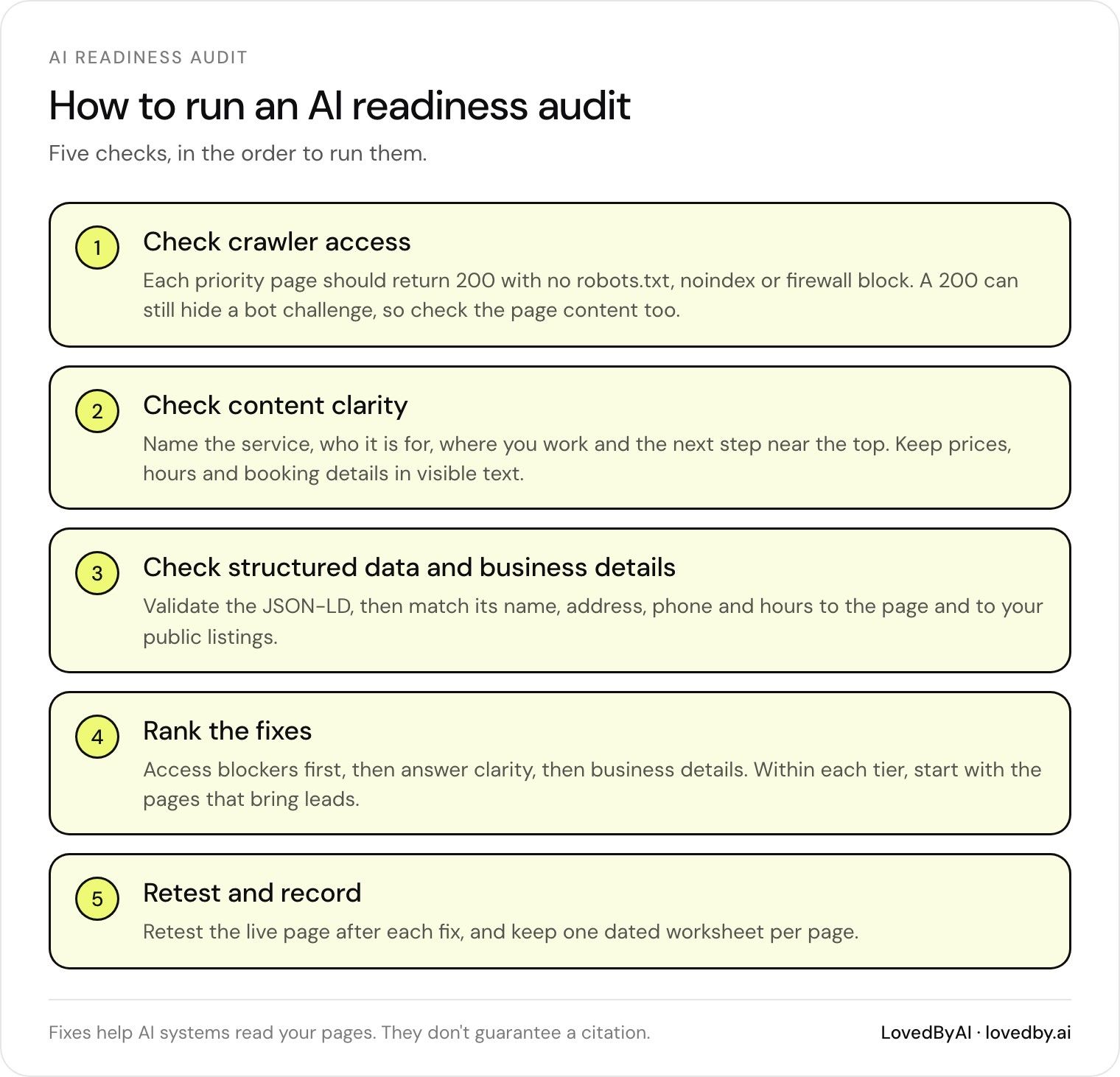
How to run an AI readiness audit: five checks, in the order to run them
Check Crawler Access
With your audit worksheet started, check whether crawlers can reach the page.
Keep search indexing and training access separate. Search bots crawl pages for indexing. Other AI crawlers may fetch live content or collect training data. Set rules based on each bot’s purpose rather than its name. [1]
Check HTTP Status, Indexing Rules, and Sitemaps
Check that each priority URL returns a 200 response. Then review robots.txt, HTML robots meta tags, and the X-Robots-Tag header for blocks.
Confirm the URL appears in your XML sitemap. In WordPress, check Settings → Reading → “Discourage search engines from indexing this site.” Record crawl rules and sitemap presence in your worksheet. A missing sitemap entry does not mean the page is blocked. [1]
| URL | HTTP status | robots.txt access | noindex | Sitemap inclusion | Status |
|---|---|---|---|---|---|
| Homepage URL | Record code | Check for blocking rules | Check HTML/header | Yes/No | Assign status |
| Main service URL | Record code | Check for blocking rules | Check HTML/header | Yes/No | Assign status |
| Contact page URL | Record code | Check for blocking rules | Check HTML/header | Yes/No | Assign status |
Test Page Content and Bot Protection
Review your CDN and firewall logs for blocks, errors, and repeated challenges. Test crawler user-agents such as GPTBot, ClaudeBot, and PerplexityBot. Use these results only to help diagnose access issues.
In Google Search Console, inspect sample URLs and run Test live URL. This checks Google’s access; it does not check access for every AI crawler. [2]
Keep your protections in place. Change only the rule linked to a confirmed block.
Keep llms.txt Optional
Treat llms.txt as optional guidance rather than access control. It cannot replace crawlable HTML or structured data. Google’s AI search features require no special AI file or schema. Fix blocked pages before spending time on llms.txt. [1][2]
Optimize your WordPress site for AI search
Find out what ChatGPT, Gemini, and Perplexity can and can't read on your site, and exactly what to fix.
Check Content Clarity
Once crawlers can reach your page, check whether the opening answers the query fast enough to be quoted.
State Service Details Near the Top
Name the service, audience, service area, process, and next step in the first few lines. Keep the opening factual and put the answer first. [3][4][6]
For a Denver plumbing page, check whether the opening names the service area, emergency availability, and booking path. Confirm those details with the business.
Check Headings and Internal Links
Use one H1 and a clear H2/H3 hierarchy. Match headings to the service or question. Use descriptive text for internal links and breadcrumbs that show where the page fits on your site. [2][6][7]
Each section should make sense on its own.
Check Facts, Dates, and Readable Text
Keep prices, hours, service areas, and booking instructions in visible text, rather than only in images. Check claims against business records, remove expired offers, and fix conflicting details.
Copy each key answer into your notes as a standalone line. If it loses meaning without the surrounding text, rewrite the page copy. Change an “updated” date only after you review or revise the page. [2][6]
| Customer question | Answering section | Clarity check | Evidence | Date accuracy | Fix |
|---|---|---|---|---|---|
| Where is service available? | Opening/service area | Names specific areas | Current coverage list | Coverage still current? | Replace vague location wording |
| Can I book emergency service? | Availability/booking | States hours and next step | Confirmed hours and booking details | Hours still correct? | Remove unsupported availability claims |
| What will I pay? | Pricing | States price clearly | Approved rate sheet | Rate still valid? | Update expired prices |
Next, check that the same details appear in your structured data and business listings.
Check Structured Data and Business Details
Inspect and Validate JSON-LD
Open each page’s source and search for application/ld+json. Check that the matching blocks use types that fit the page, such as LocalBusiness, Organization, or Service. [4][8]
Paste the URL or markup into the Schema.org Validator to check syntax and vocabulary. Next, use Google’s Rich Results Test to see which types Google detects and whether they qualify for rich results. Valid Schema.org markup alone doesn’t ensure rich results or AI citations. [4][7][8][10]
Compare the markup’s name, address, telephone, areaServed, openingHours, and price details with what visitors see on the page. Record any missing or conflicting fields. If you use WordPress, check whether multiple plugins create duplicate LocalBusiness blocks. Disable redundant output so one JSON-LD block remains, and confirm that service markup names the correct provider. [4][8]
Once the markup matches the page, check those same details across public listings.
Compare Business Details Across Sources
Use one approved business record to check your website, JSON-LD, Google Business Profile, and public listings. Compare each source’s business name, address, phone number, hours, service area, and service types against that record. [3][9]
| Status | When to use it | Audit action |
|---|---|---|
| Matching | Sources agree with the approved record | Record the verification date |
| Outdated | A source still shows a superseded value | Replace it with the current value |
| Missing | A relevant detail is absent | Add it where appropriate |
| Conflicting | Sources disagree and the correct value is unconfirmed | Confirm with the business before editing |
Keep the approved record in U.S. formats: prices such as $150.00, a consistent phone number format, and hours labeled with the local time zone. Recheck quarterly and after major site changes. [8][4][1]
Prioritize Your AI Readiness Fixes
After your audit, tackle the fixes that block discovery first.
Rank Fixes by Severity and Business Impact
Assign each issue a severity level:
-
Critical:
robots.txtblocks,4xx/5xxerrors, accidentalnoindextags, and slow TTFB. - High: Buried answers, NAP mismatches, and missing LocalBusiness schema.
- Medium: Weak headings, outdated supporting content, unclear internal links, and missing XML sitemap coverage.
-
Low:
llms.txtand minor formatting issues.
Fix access blockers first, then answer clarity, then business details. Within each tier, start with pages that drive leads. [2][1]
Use WordPress-specific tools only after you’ve identified which pages need structural fixes.
Use LovedByAI for WordPress Fixes
After your manual audit, use LovedByAI’s WordPress plugin to generate crawler-friendly page versions and add JSON-LD schema markup.
Check generated facts against your approved business details and visitor-facing copy before relying on them. Keep the plugin’s role limited to WordPress-side page views and schema output. Send server and firewall fixes to your developer or host.
Once your page changes are in place, verify the exact version crawlers will see.
Retest Fixes and Keep an Audit Worksheet
Retest the access, content, and schema issues you flagged. After each change, check HTTP responses, robots directives, rendered content, sitemap inclusion, and JSON-LD.
Retest the live page, not just the status code. Use bot-agent checks only for diagnosis, and use Google Search Console or Bing Webmaster Tools to confirm indexing signals. [5]
Record a dated baseline before making changes. Then compare indexed pages, tracked AI referrals, and AI mentions over matching reporting periods. Use your worksheet alongside the plugin’s mention and referral reports.
Treat results as directional: attribution is incomplete, and successful repairs do not guarantee citations. Keep one worksheet per page, tracking it from baseline through retesting, and update it after each retest. [1][5]
# AI Readiness Audit Worksheet

Baseline date:
Reporting period:
Indexed pages:
Tracked AI referrals:
AI mentions:

## Finding: duplicate this block for each issue
URL:
Issue category:
Evidence:
Severity:
Recommended fix:
Owner:
Due date:
Status: Open / In progress / Ready to retest / Verified
Recheck date:
Retest result:
FAQs
How is AI readiness different from SEO?
SEO focuses on keywords and backlinks to drive clicks to your website. AI readiness, often called Generative Engine Optimization (GEO), focuses on clear structure and authority so AI answers cite your content, even when users don’t click through.
Both rely on the same technical foundation. That makes strong SEO a prerequisite for AI visibility. Improving your entity graph and making your content easier for machines to read also helps your search rankings.
Can I allow AI search bots but block training bots?
Yes, but your robots.txt file needs to distinguish between the two bots correctly [1]. OpenAI uses OAI-SearchBot for search and GPTBot for training. Name each agent explicitly to allow search crawling while blocking training crawling [1].
Double-check your setup so you don’t block the wrong bot. Most audit tools don’t distinguish between search and training crawlers [1].
How soon should I expect results after fixing issues?
Wait 4 to 6 weeks before running your full audit again. This gives AI tools time to recrawl your site and update their knowledge bases. Referral traffic and changes in AI-generated answers build gradually.
The timing depends on the tool. Live, search-integrated engines may reflect your updates within days or weeks, while base model training may lag several months. Submitting your updated pages through Google Search Console may help speed up the process.