A reranker can only select pages that retrieval has already found. If your WordPress page is missing from an AI answer, start by testing if your site is invisible to AI by checking crawl access, indexing rules, internal links, and readability.
Here’s the difference:
- Access: Can a crawler reach and read your page?
- Retrieval: Does your page enter the candidate pool?
- Reranking: How does your page rank among those candidates?
A missing citation alone cannot tell you which stage failed. Use access checks first, then candidate-level records when available to separate retrieval issues from ranking issues.
LovedByAI checks WordPress access and readability and tracks AI mentions and referral traffic. Its reports do not show an external platform’s candidate pool.
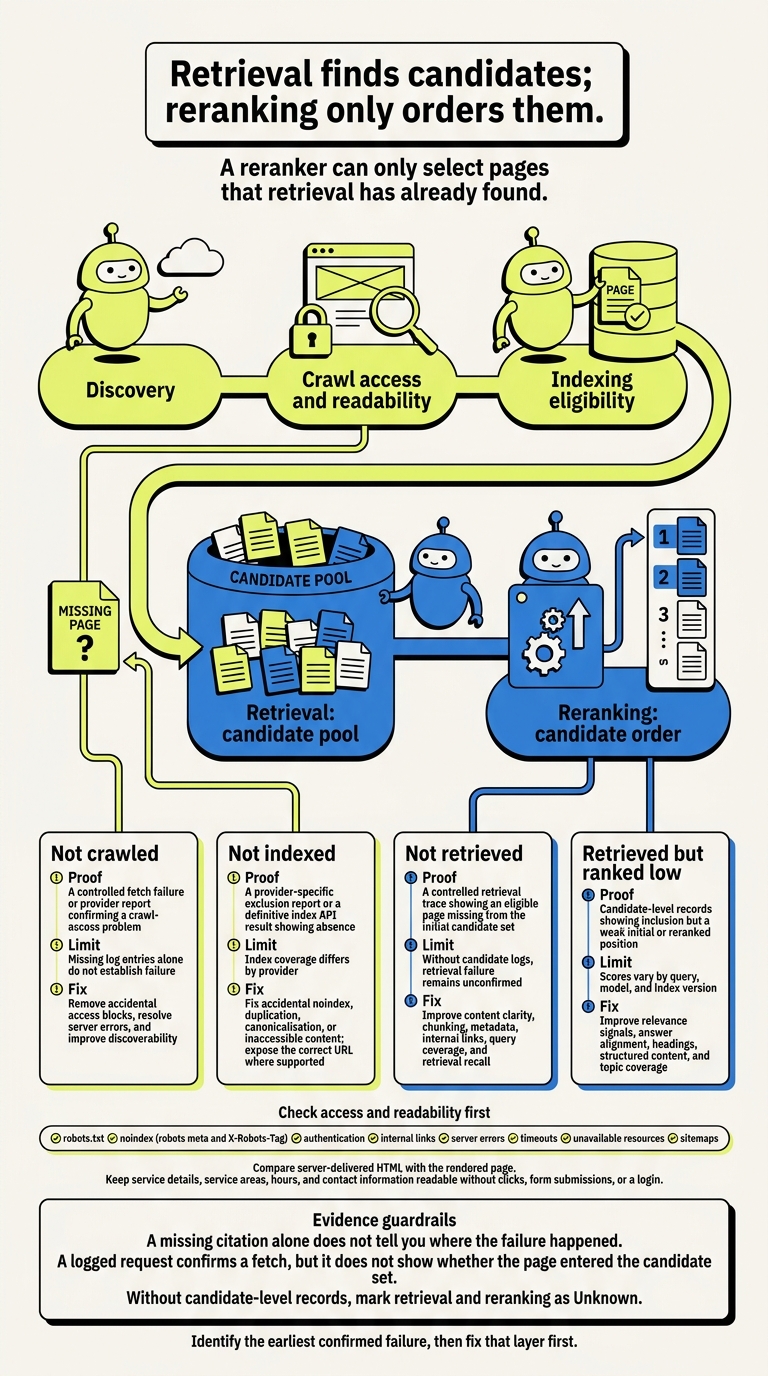
AI Retrieval vs. Reranking: Find the Failure Stage
What is Reranking in RAG?
Optimize your WordPress site for AI search
Find out what ChatGPT, Gemini, and Perplexity can and can't read on your site, and exactly what to fix.
Why Rerankers Cannot Select Missing Pages
A reranker can only reorder pages that have already been retrieved. It cannot add a missing page to the candidate pool.[4]
Missing Candidates vs. Low-Ranked Candidates
Before you choose a fix, check which problem you’re dealing with: was the page never retrieved, or was it retrieved but scored too low?
| Failure | Likely cause | What you see | Corrective focus |
|---|---|---|---|
| Missing candidate | The page was not crawled, indexed, retrieved, or included in the candidate set | The page does not appear in retrieval results | Check access, discovery, indexing eligibility, and readable text |
| Low-ranked candidate | The page entered the candidate set but received a weak relevance score | The page appears in retrieved results but falls below the final cutoff | Improve clear service names, location details, supporting text, titles, and headings |
The same distinction applies to a local service search.
Hypothetical example: a local plumber’s emergency-service page. For “24-hour emergency plumber in Austin,” a blocked
/emergency-plumbing/page may never become a candidate. The first action is to repair access. If the page is retrieved but ranked below general plumbing pages, review whether its title, service details, location signals, or supporting content are sufficiently relevant. Those are different diagnoses - not interchangeable fixes.
Blocked access points to an upstream retrieval problem. Weak relevance after retrieval points to a ranking problem.
You usually cannot see a platform’s candidate pool or scores, so a missing citation does not tell you where the failure happened. Server logs can confirm crawler requests, while indexing checks can reveal eligibility issues. Neither confirms that your page entered the candidate pool for a particular answer.
Larger Candidate Pools: Coverage, Cost, and Latency
When retrieval misses pages, pulling in more candidates can improve coverage. But processing more pages also adds cost and latency, and a larger pool does not guarantee selection.[5]
You generally cannot control an external platform’s pool size. On WordPress, focus on what happens before ranking: follow a step-by-step guide to make WordPress ready for AI SEO by managing internal links, sitemaps, indexing restrictions, and readable text.
LovedByAI can flag WordPress pages whose text is hard for AI search systems to read. It cannot show whether an external platform retrieved those pages. Broader retrieval can help coverage only when your pages are discoverable and readable.
How WordPress Access and Readability Support Retrieval
On WordPress, a page’s eligibility for retrieval depends on discovery, crawling, rendering, and indexing. A direct fetch alone does not prove the page is retrievable.[6][10]
If your page is missing from the candidate pool, start with access and readability. The checks below help you find where WordPress may block the page before it reaches reranking.
Check Discovery, Crawl Access, and Indexing Rules
Start with WordPress Settings → Reading and look for an unintended indexing restriction. Then check page-level settings and the actual HTTP response. The dashboard alone doesn’t tell the whole story. Also, don’t assume Google-specific robots.txt rules apply to every AI crawler.[7][9]
These checks help separate discovery and access problems from ranking problems. Once discovery and crawl access look right, check what crawlers can read.
| Check | What to verify | Action if unintended |
|---|---|---|
☐ robots.txt | Public pages and required resources are not disallowed | Remove overly broad rules; crawl restrictions alone do not ensure exclusion from the index |
☐ noindex | Neither robots meta nor X-Robots-Tag excludes the page | Remove accidental exclusions; allow fetching so crawlers can read directives |
| ☐ Authentication | Content loads without a login or private session | Remove unintended access restrictions |
| ☐ Internal links | Relevant pages link to the URL through ordinary HTML links | Add descriptive links from navigation or related pages |
| ☐ Server errors | The URL returns the intended content rather than an error or soft 404 | Fix hosting, permalink, redirect, or template problems |
| ☐ Timeouts | Requests finish reliably without security challenges | Review hosting logs, firewall rules, and rate limits |
| ☐ Unavailable resources | Required scripts, styles, and dependencies load | Fix missing assets or blocked requests |
| ☐ Sitemaps | Accessible XML sitemaps list preferred, indexable URLs | Remove obsolete variants; sitemap inclusion guarantees neither indexing nor ranking |
Check What Text Crawlers Can Read
Compare server-delivered HTML with the rendered page. Your service details, service areas, hours, and contact information should remain readable without clicks, form submissions, or a login. Text inside images, canvas elements, or script-driven widgets may not reach every crawler, even when the page looks complete in your browser.[6][8]
Look for thin descriptions, generic titles, unclear headings, duplicate URL variants, and weak internal links. Keep canonical signals consistent for duplicate pages. Structured data can add context, but it cannot replace missing service information.[10]
Check WordPress AI Readiness with LovedByAI
Use a WordPress AI search optimization audit after you’ve checked access and readability.
The LovedByAI WordPress plugin can check crawler access, create AI-readable page views that preserve visitor-facing meaning, and track AI mentions and referral traffic from ChatGPT, Gemini, Perplexity, and Claude. Use its reports to diagnose access and readability issues. They do not diagnose retrieval.
Find the Failure Stage Before Making Changes
Identify the earliest confirmed failure, then fix that layer first. A missing citation alone does not prove a retrieval or reranking problem.
Verify Access, Readability, and Discovery
Run the checks above in order. Then use Search Console URL Inspection to compare the URL’s live and indexed status.[11]
For third-party AI platforms, crawl logs, index reports, citations, and referrals offer partial clues. A logged request confirms a fetch, but it does not show whether the page entered the candidate set. Google indexing also does not prove that another provider can access the page.
Once those checks pass, use the stages below to classify the failure.
Match Each Failure Stage to the Right Fix
Choose your next action based on the earliest confirmed failure. If you control the retrieval system, save the query, timestamp, document ID, candidate inclusion, initial position, reranked position, and supplied passage. Check candidate inclusion before reranking, and mark any unavailable fields Unknown.
Use this table to match each verified failure with the right fix.
| Failure stage | Proof | Limits | Corrective focus |
|---|---|---|---|
| Not crawled | A controlled fetch failure or provider report confirming a crawl-access problem | Missing log entries alone do not establish failure | Remove accidental access blocks, resolve server errors, and improve discoverability |
| Not indexed | A provider-specific exclusion report or a definitive index API result showing absence | Index coverage differs by provider | Fix accidental noindex, duplication, canonicalization, or inaccessible content; expose the correct URL where supported |
| Not retrieved | A controlled retrieval trace showing an eligible page missing from the initial candidate set | Without candidate logs, retrieval failure remains unconfirmed | Improve content clarity, chunking, metadata, internal links, query coverage, and retrieval recall |
| Retrieved but ranked low | Candidate-level records showing inclusion but a weak initial or reranked position | Scores vary by query, model, and index version | Improve relevance signals, answer alignment, headings, structured content, and topic coverage |
Without candidate-level records, mark retrieval and reranking as Unknown.
Conclusion: Fix Access and Retrieval Before Reranking
If you confirm a page never entered the candidate pool, fix the earlier failure first. Retrieval finds candidates; reranking only orders them. Check crawl access and indexing, consult our WordPress AI SEO Guides, then make your WordPress pages readable, easy to find, and relevant to the query.
Track crawl access, readability, AI mentions, and referral traffic separately. Each signal helps you spot which layer failed and what to fix next.
A fetch does not prove retrieval, a mention does not guarantee a click, and referral traffic does not reveal every citation.
After changes to your WordPress templates, plugins, hosting, or content, check these signals again. Make sure your pages are eligible for selection before working on rank.
FAQs
How can I test retrieval without candidate logs?
You can’t verify indexation directly by querying an LLM. Use external checks instead. The LovedByAI GEO Checker lets you check whether your server or robots.txt blocks access to your pages.
Then manually ask 10 relevant customer questions in ChatGPT, Perplexity, and Gemini to set a baseline. Record mentions and citations each month. Treat these as signals that help you track trends, not proof that a platform retrieved your pages.
How soon should I recheck AI visibility after fixes?
Recheck your AI visibility after 4 to 6 weeks [1]. This is a checkpoint rather than a deadline. Crawlers may pick up technical changes within hours or days, while traffic and citation patterns take longer to show up [1][2].
Some real-time AI searches may reflect updates within days [3]. To judge results more reliably, use a 90-day window, since month-over-month changes can be noise [2].
Should I split long WordPress pages to improve retrieval?
Keep long WordPress pages intact rather than splitting them just to improve retrieval. Cover the topic fully, use question-led headings, and put direct, factual answers at the top. Include supporting details, such as verified pricing and hours.
Create a separate page only when your existing content doesn't match the user's intent or a specific service needs its own page.