Microsoft Copilot answers questions with sources: a short answer, then numbered links to the pages it used. Each of those links is a citation, and until this year there was no way to know how often your site was one of them.
Bing Webmaster Tools now tells you. It is free, setup takes a few minutes if you already use Google Search Console, and its AI Performance report goes further than Google's: it shows the search phrases the AI used to find you.
What is Bing Webmaster Tools used for?
Bing Webmaster Tools is Microsoft's free tool for website owners, the Bing version of Google Search Console. It reports which Bing searches show your site, the clicks and impressions each page gets, and whether Bing can crawl and index your pages. You can submit sitemaps, ask Bing to look at a page again, check your backlinks, and run an SEO scan that lists problems on your pages. Because Copilot and Bing's AI summaries work from Bing's index, a page Bing can't read is a page Copilot can't cite.
What you need to sign up for Bing Webmaster Tools
- An account to sign in with. A Microsoft, Google or Facebook account.
- A way to prove you own the site. If the site is already in Google Search Console, you can import it and skip this step. Otherwise there are three options: upload an XML file to your site's root folder, add a meta tag to your homepage, or add a CNAME record at your domain provider.
How to add your website to Bing Webmaster Tools
- Go to bing.com/webmasters and sign in.
- Choose Import from Google Search Console if your site is there. Bing brings in the site and its sitemaps, already verified.
- Or add the site by hand: type your website address, pick a verification method, follow the instructions, then click Verify.
- Give it a few days. A new site starts empty and fills in as Bing collects data.
Microsoft's own instructions are in its help center: Add and verify a site.
What the Bing AI Performance report shows
The AI Performance report counts how often your pages are cited as sources in Microsoft's AI experiences:
- Microsoft Copilot
- AI-generated summaries in Bing search results
- Select partner integrations that use Bing to ground their answers
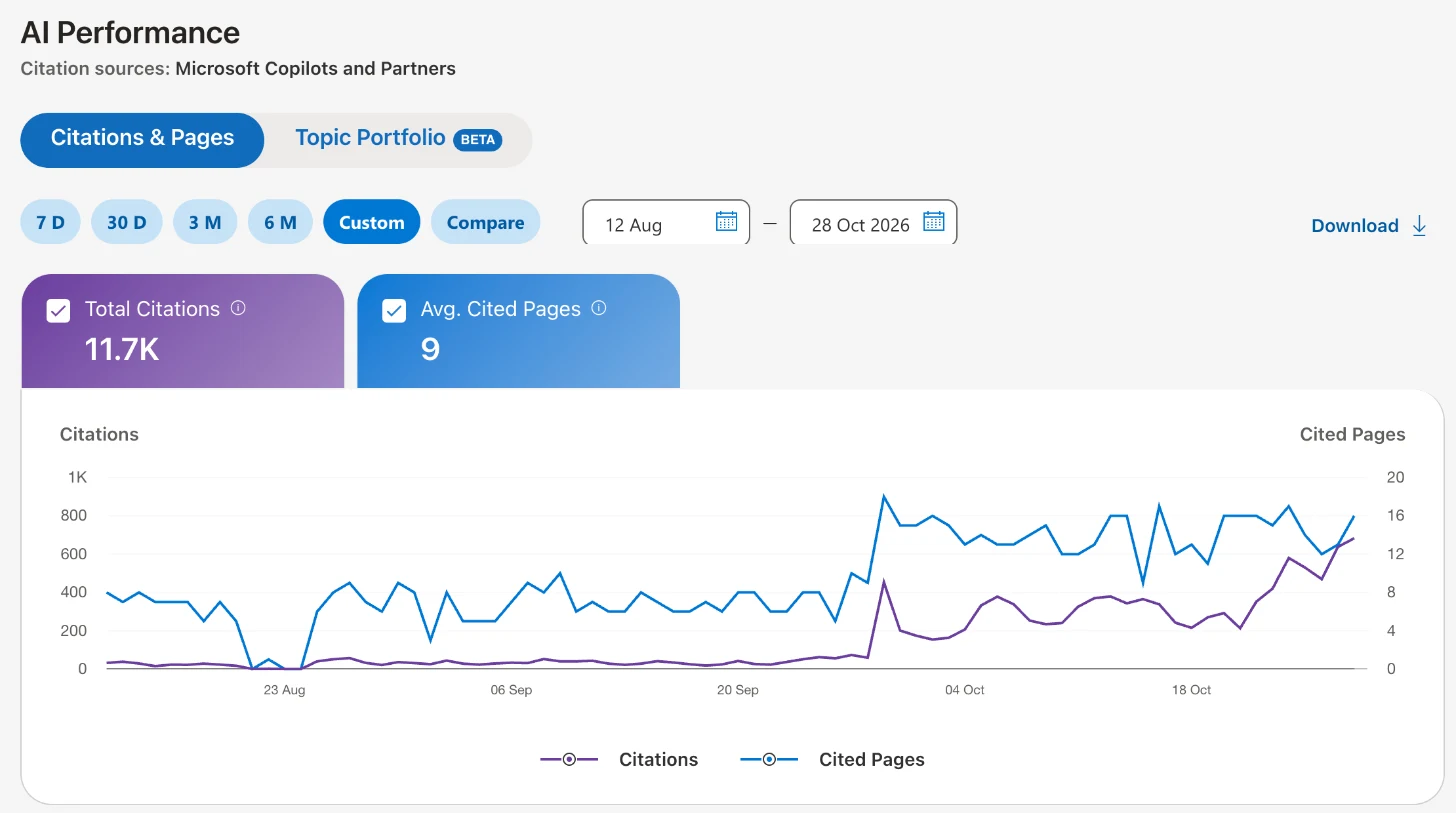
Microsoft opened it in public preview on February 10, 2026. Open your site, then AI Performance (marked Beta) in the left menu. The report names its sources at the top, Microsoft Copilots and Partners, and has two tabs: Citations & Pages and Topic Portfolio (Beta). Pick a range of 7 days, 30 days, 3 months or 6 months, or set your own.
What you see:
- Total citations. How many times your site was shown as a source in AI answers in the period you picked.
- Average cited pages. How many different pages of your site were cited per day, on average.
- Visibility over time. A chart of your citations, so you can see the trend.
- Pages. Each of your URLs with its citation count. Click one to see the grounding queries it was cited for.
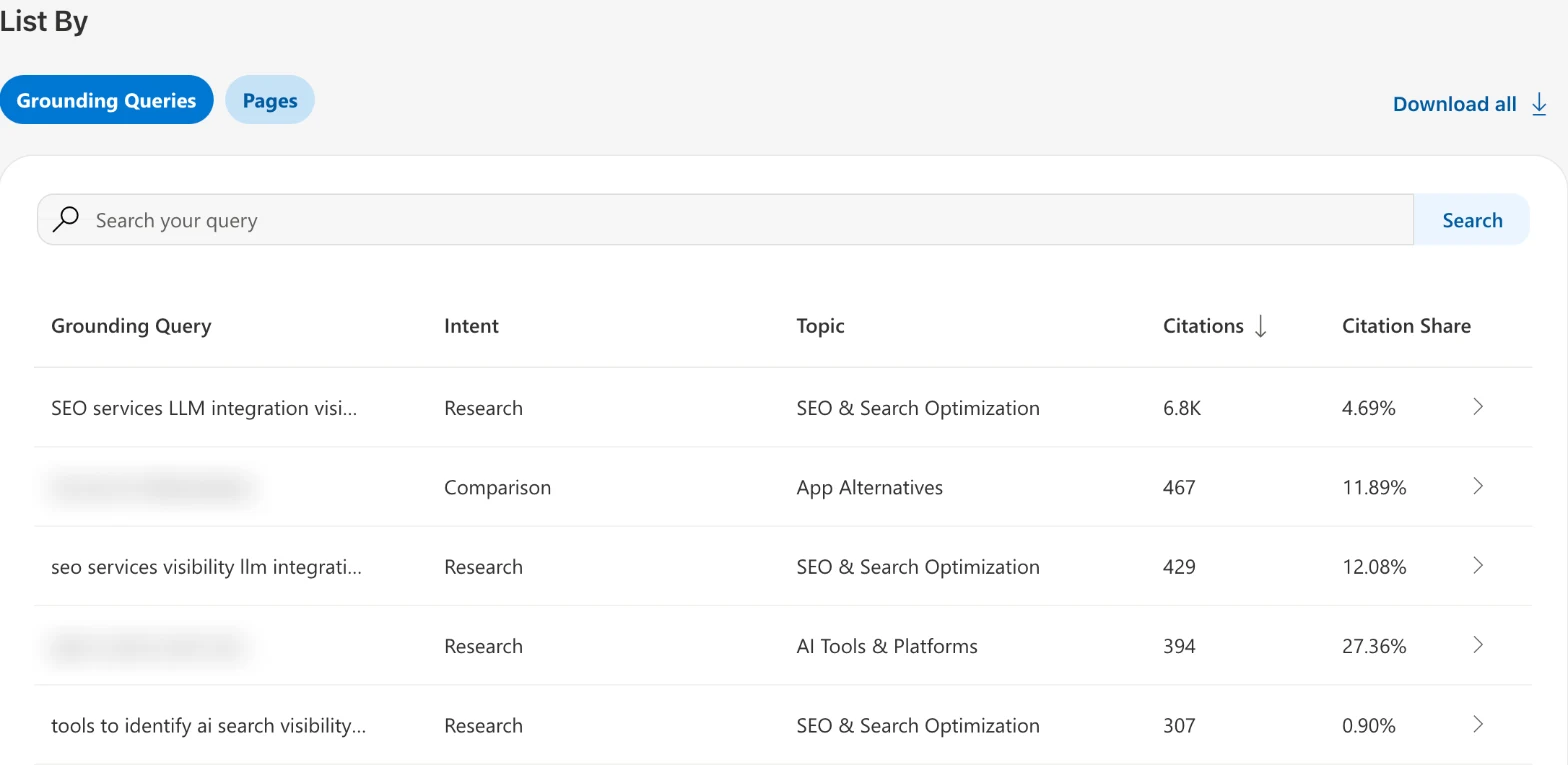
- Grounding queries. The key phrases the AI used to look up the content it cited. They are not the exact prompts people typed: the AI turns a long question into a shorter search phrase. Microsoft says this data is a sample. Click a grounding query to see which of your pages were cited for it.
In June 2026 Microsoft added four preview features:
- Intents groups your grounding queries by what the person wanted, such as informational, commercial, navigational or local.
- Topics groups related grounding queries into bigger subjects, so "solar panels" and "residential solar installation" land under one solar energy topic.
- Citation Share shows what percentage of all citations for a grounding query went to your site. It doesn't name the other sites.
- Compare puts an earlier period on top of the current one, for example the last 30 days against the 30 before.
Under the chart, List By switches between Grounding Queries and Pages. The grounding queries table shows each phrase with its intent, topic, citations and citation share:
What it doesn't show: clicks or visits from those answers, and any AI outside Microsoft's. ChatGPT, Perplexity and Google's AI Overviews are not in this report.
How to read your Copilot citations in Bing Webmaster Tools
- Start with the trend. Pick a long range and check whether total citations are rising or falling.
- Read the grounding queries. They show the phrases Copilot looks you up by. If they don't match what you sell, your pages are describing you differently than customers do.
- Check Citation Share on your most important phrases. A low share on a phrase that matters means other sites are cited for it more often.
- Find the pages doing the work. Pages with many citations are the ones Microsoft's AI trusts. Keep them current and copy what they do on the pages that aren't cited.
- Use Compare after a change. If you rewrote a page or published a new one, compare the weeks before and after.
Why Bing Webmaster Tools and your other dashboards show different AI numbers
Bing Webmaster Tools counts what Microsoft's AI showed. Analytics tools, LovedByAI included, can only count what reaches your website: an AI crawler reading a page, or a visitor arriving from an AI answer with a referrer attached. Many AI visits arrive with no referrer, so any tool outside Microsoft sees only part of what happened in Copilot.
That is why we recommend setting up the platforms' own tools for your real numbers: Bing Webmaster Tools for Copilot and Bing, Google Search Console for AI Overviews and AI Mode, and the ChatGPT Business Hub for ChatGPT. All three are free.
Screenshots: LovedByAI's own Bing Webmaster Tools account, November 12, 2026, with two queries that name other companies blurred. Sources: Bing Webmaster Blog, "Introducing AI Performance in Bing Webmaster Tools Public Preview", February 10, 2026; Bing Search Blog, "New AI Visibility Insights in Bing Webmaster Tools: Intents, Topics, Citation Share, Compare", June 16, 2026.