
To measure AI citation coverage, check whether the sources attached to AI answers support the claims about your business. Save answers from a fixed prompt set, log each factual claim in a spreadsheet, and divide fully supported claims by all claims scored.
Track how many answers contain supported claims, too. Keep citation support separate from factual accuracy, mentions, and referral traffic.
This guide shows you how to check sources, calculate scores, fix gaps on your WordPress pages, and repeat the same tests. LovedByAI creates AI-readable WordPress pages with JSON-LD and reports AI mentions and referral traffic. Those signals can help you choose pages to review, but each claim still needs a source check.
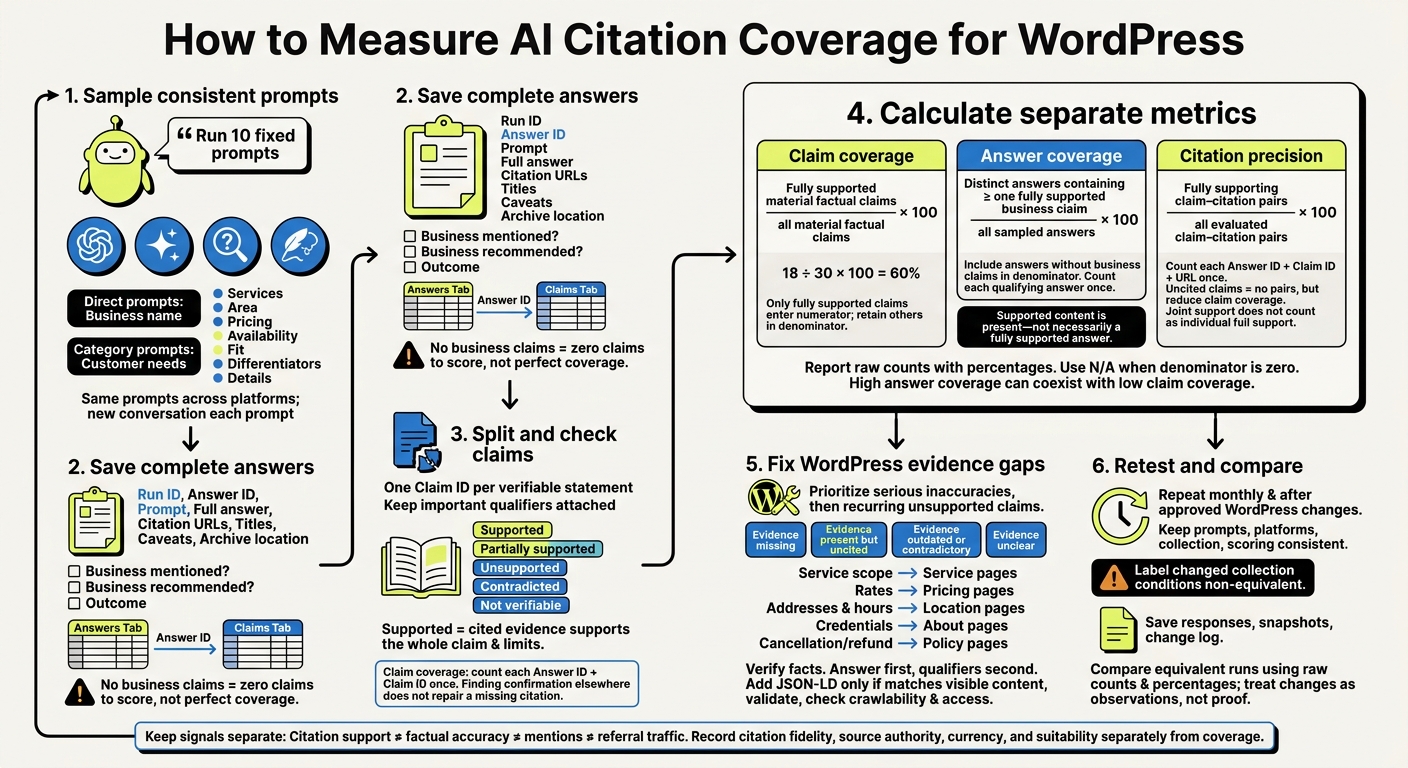
How to Measure AI Citation Coverage for WordPress
Sample AI Answers About Your Business
Run 10 fixed prompts on each platform your customers use most, such as ChatGPT, Gemini, Perplexity, and Claude. Give each platform its own spreadsheet tab or filtered view. This gives you a working sample, rather than a benchmark.
Create Direct and Category Prompts
Use the same prompt set on every platform and for every run. Include direct questions that name your business and category questions that describe a customer’s need without naming your business.
Cover services, service area, pricing, availability, customer fit, what sets your business apart, and basic business details. Ask directly about each fact.
Hypothetical business: Lone Star Pipe & Drain, an Austin-area plumbing company. Direct prompts: “Does hypothetical Lone Star Pipe & Drain serve Round Rock and Cedar Park?” “Does hypothetical Lone Star Pipe & Drain offer emergency plumbing after 6 p.m.?” “What is hypothetical Lone Star Pipe & Drain’s published service-call fee?” Category prompts: “Which Austin-area plumbers offer same-day water-heater repair?” “Recommend a plumber near Austin for a burst pipe, and explain the evidence.”
Save Answers and Collection Details
Give every response a stable answer ID and run ID. Before you score it, save the exact prompt, full answer, citation URLs, and any caveats, including “I don’t know” statements. Keep each citation’s title and the claim or sentence it appears to support. Record where you archived the response.
Add Business mentioned?, Business recommended?, and Outcome fields. If an answer leaves out your business, record that outcome. An answer with no claims about your business has zero claims to score. Don’t count it as perfect citation coverage.
Keep Sampling Conditions Consistent
Repeat the exact prompts monthly and after approved WordPress updates. This ensures your WordPress AI search optimization remains effective as models evolve. Start a new conversation for each prompt where practical, and create a new record for every repeat run.
Log any change in conditions and label that run non-equivalent. Each collection is a snapshot, so don’t attribute a change to your website update alone. Use these repeat runs as your scoring baseline.
Optimize your WordPress site for AI search
Find out what ChatGPT, Gemini, and Perplexity can and can't read on your site, and exactly what to fix.
Track Claims and Sources in a Spreadsheet
Turn each saved answer into claim rows, then score the evidence. Your sampled answers let you measure citation coverage one claim at a time.
Create two linked tabs: Answers for full responses and Claims for scoring individual statements. Connect them with Answer ID. This keeps answer collection separate from evidence review.
Split Answers Into Individual Claims
Break each answer into verifiable statements and give each one a Claim ID. Separate claims about services, prices, locations, hours, qualifications, policies, availability, outcomes, and comparisons.
Keep qualifiers with the facts they limit. For example, a price and its eligibility requirements belong together. Leave out purely subjective wording. Record repeated claims once per answer, but record them again when they appear in another answer.
Build the Claim-Tracking Template
Copy this structure into your Claims tab to record each verifiable claim and calculate coverage. Use three source types: Business website, Third-party source, and Unidentified.
The rows below are examples, not verified facts.
Answer ID Platform Prompt Claim ID Claim text Claim type Cited URL Source type Supporting passage Support status Source date Missing support Notes A-001 ChatGPT Does Acme offer weekend HVAC service? A-001-C01 Acme offers HVAC service on Saturdays. Hours/availability https://example.com/hoursBusiness website Saturday: 8:00 AM–2:00 PM Supported January 10, 2025 - Directly supports Saturday service. A-001 ChatGPT Does Acme offer weekend HVAC service? A-001-C02 Acme offers HVAC service on Sundays. Hours/availability - Unidentified - Unsupported - No source supplied or found. Do not infer Sunday service from Saturday hours. A-002 Perplexity How much is an AC tune-up? A-002-C01 The tune-up costs $149. Price https://example.com/pricingBusiness website AC tune-up: $149 Supported February 1, 2025 - Check whether tax or seasonal limits apply.
Record the exact cited URL, a short evidence passage, and the publication, revision, or access date when available. If a claim has multiple citations, add one row per URL using the same Answer ID and Claim ID. Count each Answer ID + Claim ID pair only once when calculating coverage.
Add dropdowns for claim type, source type, and support status. Freeze the header row and turn on filters.
Score each claim against its cited passage rather than the full answer.
Assign Support Statuses
- Supported: The cited evidence supports the whole claim, including its limits.
- Partially supported: The evidence supports only part of the claim or leaves an important qualifier unconfirmed.
- Unsupported: No usable citation is attached, or the citation does not support the claim.
- Contradicted: Accessible evidence conflicts with the claim.
- Not verifiable: You cannot inspect or assess the evidence.
Support status determines whether a claim counts toward coverage. Keep supported and partially supported claims separate. Unsupported claims show where evidence is missing.
Use Missing support to record missing qualifiers or citations. Put access issues, conflicts, and the review date in Notes. Keep factual correctness separate from citation support: finding confirmation elsewhere does not fix a missing attached citation.
Check Citations and Calculate Coverage
Use your spreadsheet’s claim rows to score each cited source against the exact claim text. Open every cited URL. Check whether it’s accessible, matches the claim, and fully supports its facts, dates, quantities, locations, and conditions.
Calculate Claim and Answer Coverage
Turn the scored rows into two summary metrics. Create one summary row for each distinct Answer ID + Claim ID, then combine the decisions across its cited URLs. Keep repeated claims separate when they appear in different answers.
Claim coverage = fully supported material factual claims ÷ all material factual claims × 100. Include Partially supported, Unsupported, Contradicted, Unclear, and Uncited claims in the denominator. Show the raw counts alongside the percentage:
18 ÷ 30 × 100 = 60%.
Answer coverage = distinct answers containing at least one fully supported business claim ÷ all sampled answers × 100. Take the denominator from your Answers tab so answers without business claims still count. Count each qualifying answer once. This measures whether supported content is present, not whether the whole answer is supported.
For both metrics, use =IF(denominator=0,"N/A",numerator/denominator) and format numeric results as percentages.
Report Citation Precision and Source Quality
Use the same scored rows to report precision and fidelity.
Citation precision = fully supporting claim–citation pairs ÷ all evaluated claim–citation pairs × 100. Count each distinct Answer ID + Claim ID + URL once. Uncited claims create no pairs, but they still reduce claim coverage.
If several citations support a claim only when read together, record that combined decision in the claim summary. Don’t mark each citation as fully supporting the claim on its own. Document this scoring rule, and report N/A if there are no evaluated pairs.
Citation fidelity measures how closely a passage matches the claim and its qualifiers. Record authority, currency, and suitability in separate fields.
Review Unclear Claims and Audit Limits
After calculating your totals, resolve uncertain rows before publishing the final percentages. Send those decisions to a second reviewer or set them aside for later review. Keep the original status, final decision, reviewer, review date, and reason for any change.
High answer coverage can coexist with low claim coverage. Claim totals can also shift when responses or claim boundaries change, so compare raw counts alongside percentages. Small samples describe only the sample. They don’t describe the platform as a whole. For broader context, see our WordPress AI SEO guides.
Fix WordPress Evidence Gaps and Retest
Map each unsupported claim to the page that should answer it. Fix serious inaccuracies before cosmetic changes. Use your spreadsheet to find the page behind each claim. Start with wrong prices, services, locations, availability, and policies. Then address unsupported claims that keep appearing.
Check the source WordPress page and label each gap as evidence missing, evidence present but uncited, evidence outdated or contradictory, or evidence unclear. Record the exact passage, URL, update date, recurrence count, and page owner. An answer leaving out a page isn't, by itself, a reason to rewrite it.
Match Evidence Gaps to WordPress Pages
Match service scope to service pages, rates to pricing pages, addresses and hours to location pages, credentials to About pages, and cancellation or refund terms to policy pages.
Verify the facts with the business owner. Put the answer first, followed by any qualifiers. Add JSON-LD to WordPress only when it matches the visible content. Then validate it and check crawlability and access restrictions.[3][4]
Fix the gaps on each page, then resample the same prompts. Site signals can point you toward weak pages, but use your spreadsheet to verify whether the claims have support.
Use LovedByAI for WordPress Maintenance
LovedByAI is an optional WordPress plugin. It creates AI-readable pages with JSON-LD and reports AI mentions and referral traffic from platforms such as ChatGPT, Gemini, Perplexity, and Claude.
Use those signals to find pages worth reviewing. Keep them separate from verified citation coverage. A mention or referral does not prove that a factual claim has supporting evidence.
Repeat the Audit After Approved Changes
After you publish the approved page fixes, rerun the same prompts under the same sampling rules. Keep platforms, collection conditions, and scoring rules consistent. Save complete responses and log any platform, interface, or model changes.
Audit date Platform Prompt group Total claims Supported claims Claim coverage Answer coverage 03/01/2026 ChatGPT Direct 20 12 60% 8/10 (80%) 03/15/2026 ChatGPT Direct 20 15 75% 9/10 (90%) 03/01/2026 Perplexity Category 24 14 58.3% 9/12 (75%) 03/15/2026 Perplexity Category 24 16 66.7% 10/12 (83.3%)
Break out results by pricing, services, location, availability, and policies. Keep a short change log with the publication date, URL, old and new wording, reviewer approval, schema changes, and sampling changes. Treat differences as observations rather than proof of causation. For more on how these signals impact visibility, see our LLM SEO guide.
Summary: Repeat Your Citation Audit
After scoring each sample, repeat the audit monthly. Compare only equivalent runs: keep the same scope and log any changes to sampling or scoring before comparing results.
Use your spreadsheet for monthly comparisons and save a snapshot each month. Keep the same formulas, and report claim coverage and answer coverage with raw counts beside each percentage. Report citation precision and source quality separately, and keep citation coverage separate from factual accuracy. Give mentions and referral traffic their own columns.
Once you’ve set the scores, use recurring gaps to guide WordPress page updates, then resample. Repeat the audit after each approved WordPress change.
FAQs
How many AI answers should I audit for reliable results?
Audit answers to 10 to 20 fixed prompts (test inputs) per check. Start with 10 priority customer questions, and record mentions and citations each time you run a prompt.
Rerun the same set monthly to track trends. Count each answer as one sample, since results vary week to week. Expand toward 20 prompts when you need more reliable coverage across platforms or conditions. [1][2]
What if AI keeps citing an outdated page?
AI may be using outdated information. Update the prices, availability, and service details on your live page, then update its publication or revision date. Changing the date alone isn’t enough. Check that the visible text and JSON-LD schema are current and match.
Record the changes in your audit worksheet. Then retest the same prompts to check whether AI cites the updated information.
How can I tell whether my WordPress updates improved citations?
Save a dated baseline, then rerun the same 10 to 20 prompts each month. For every answer, log the cited URL and the passages that support each factual claim.
Measure progress by citation rate: how often answers link to your site rather than simply mention it. Check that cited passages fully support the claims, including any eligibility, pricing, timing, and location conditions.
Track citations separately from AI referral sessions in your analytics, since attribution is incomplete.