Start by checking whether crawlers can reach your pages and whether those pages answer your customer’s question or if your site is invisible to AI search. A competitor’s mention is a clue to investigate, not proof that your business is less relevant.
Save the question, answer, and cited links. Then check your pages for missing service details, unclear headings, conflicting business facts, and claims without support. Turn each confirmed gap into a WordPress task with a page, an owner, and a way to check the fix.
LovedByAI is a WordPress plugin that runs AI readiness scans and tracks AI mentions and referral traffic. After updates, repeat the same questions and track mentions, citations, and visits separately. These fixes cannot guarantee AI citations.
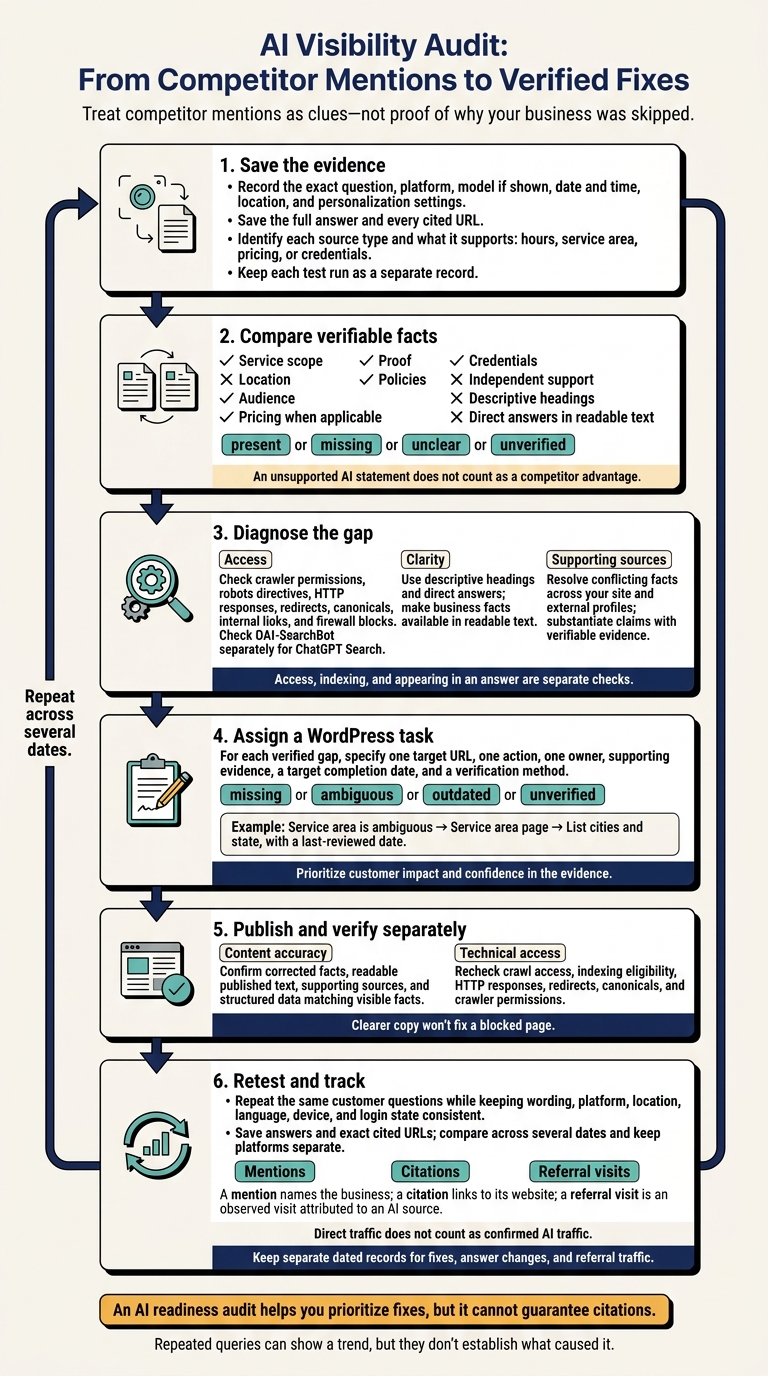
AI Visibility Audit: From Competitor Mentions to Verified Fixes
What Competitor Mentions Can Tell You
A business mention is different from a website citation. An AI answer can name a competitor without linking to its website. It can also cite your website as evidence without recommending your business.
Record those observations separately. Neither tells you why the AI selected a business. The records help you check whether the gap involves access, clarity, or missing support.
Record the Question, Answer, and Sources
Save the exact question, platform, model if shown, date and time, location, and personalization settings. Keep the full answer, every source link, the customer question, and each claim tied to a named business.
Open each source and label its type: business site, profile, directory, review platform, government page, or industry source. Record what it supports, such as hours, service area, pricing, or credentials. A business name alone tells you little.
Keep each run as a separate record because answers and sources change.
Compare Business Details and Page Clarity
Compare what the AI could verify on the competitor’s page with what it could verify on yours.
Use a GEO Information Gap checklist to record evidence, not ratings. Mark each fact as present, missing, unclear, or unverified. An unsupported AI statement does not count as a competitor advantage. This comparison helps turn a vague mention into a list of specific fixes.
| Detail to check | What the competitor answer includes | What your site currently provides |
|---|---|---|
| Service scope | Named services and limits; check the cited service page | Exact services and limits stated on your pages |
| Location | Cities or neighborhoods named; verify coverage | Address and service area stated in readable text |
| Audience | Customer types or eligibility described | A clear statement of who you serve |
| Pricing when applicable | Fees, ranges, or quote conditions; verify terms | Published prices, cost factors, or quote process |
| Proof | Reviews, projects, or results referenced | Specific evidence tied to a named source that supports your claims |
| Policies | Warranty, cancellation, or appointment terms mentioned | Relevant policy text and where customers can find it |
| Credentials | Licenses or certifications claimed; verify issuer and status | Published credentials that can be checked |
| Independent support | Linked profiles, directories, or industry pages | Sources that independently support your business facts |
| Descriptive headings | Check cited pages for service-specific headings | Headings that identify the topic rather than vague labels |
| Direct answers in readable text | Check whether cited pages explicitly answer the question | Answers available as text, rather than only inside images |
For each gap, record the customer question, observed claim, supporting URL, matching page on your site, and action needed. Ask the business owner to confirm pricing, credentials, policies, and service limits before you propose changes.
This gives your audit a fact-based worklist without guessing at hidden AI preferences. Next, separate access, clarity, and support issues before turning the list into WordPress updates.
Optimize your WordPress site for AI search
Find out what ChatGPT, Gemini, and Perplexity can and can't read on your site, and exactly what to fix.
Why AI Answers May Skip Your Site
Check access first, then clarity, then conflicting facts. Use the competitor example to pinpoint which of your pages has a problem with access, clarity, or supporting evidence.
Crawler Access and Indexing Problems
Start with access. Clear writing cannot help if crawlers cannot reach your page. Access, indexing, and and appearing in an answer are separate checks. A public page can still be skipped because it is blocked, mismatched, or outweighed by a stronger source.
Check robots.txt, page-level robots directives, HTTP headers, redirects, canonicals, internal links, firewall logs, and Settings → Reading → Search engine visibility.
Google says AI Overviews and AI Mode require an indexed page that can appear as a search snippet. Check nosnippet and max-snippet: 0. Eligibility does not guarantee selection.[1] For ChatGPT Search, check OAI-SearchBot separately using OpenAI’s crawler documentation.[2]
If access checks out, review the page’s clarity.
Unclear Headings and Missing Business Facts
Does your page answer the customer’s question in plain text? Keep slogans out of headings, and put key business facts in readable text rather than only in images or widgets.
Do not assume accordions are blocked. Check the rendered page and HTML to confirm the text is available without a failed script or required user action.
If your page is accessible and clear, check whether its facts conflict with other sources.
Conflicting Facts and Unsupported Claims
Compare the facts on your site, booking pages, Google Business Profile, and external profiles. Confirm the correct details with the owner before editing, then assign each correction an owner and review date.
Use verifiable records and independent evidence to support public claims. Treat conflicting details as audit clues, not verdicts. Record what needs fixing before you update the page. That record becomes your audit’s fix list. For more detailed workflows, see our WordPress AI SEO Guides.
Use an AI Readiness Audit to Plan WordPress Updates
Once you’ve separated access, clarity, and support issues, turn each gap into a task for a specific page.
Match Each Gap to a Page and Action
Assign each verified gap to one WordPress URL, one action, and one owner. Label it missing, ambiguous, outdated, or unverified. Keep confirmed defects separate from possible explanations. A missing service area is a gap you can verify, but it doesn’t prove why an AI answer left out your business.
Use the table below to turn audit findings into fixes. For each task, attach saved evidence, name an owner, and set a target completion date. Put customer impact and confidence in the evidence ahead of how easy the fix is.
| Observed gap | Evidence | Page to update | Recommended change | Verification method |
|---|---|---|---|---|
| Service area is ambiguous | Competitor answer names cities; site says only “serving the region” | Service area page | List cities and state, with a last-reviewed date | Check visible copy and Organization/LocalBusiness data; repeat the customer prompt separately |
| Pricing is unverified | Competitor page cites a published starting price; site gives no range or source | Pricing page | Add current starting price, conditions, effective date, and supporting policy | Verify page content and test whether crawlers can access it |
| Expertise is unclear | Site uses “expert” without credentials or examples | About or service page | Add verifiable certifications, experience, case studies, or customer proof | Confirm links, dates, and consistency across profiles |
Revise Headings, Answers, and Business Facts
Make each heading describe the question its section answers. Then give the direct answer in the opening sentences.
Update the facts customers use to make decisions first: services, coverage, availability, pricing conditions, and limitations. Apply approved corrections to external profiles, too. Use structured data only for visible facts. Google Search Central says its generative AI search features don’t require special schema markup.[3]
Check content accuracy and technical access separately. One check confirms that the published answer is accurate and supported. Another checks crawler access, indexing eligibility, and valid markup. Clearer copy won’t fix a blocked page, and an accessible page doesn’t prove its answer is useful.
Use LovedByAI for Audits and Tracking
Use your audit results to prioritize WordPress updates and track whether the same questions produce different answers.
LovedByAI is a WordPress plugin for small businesses. It runs AI readiness scans, creates AI-readable page views, and tracks AI mentions and referral traffic. Use its reports to build your page-level fix list and monitor results after updates.
Treat llms.txt as optional navigation. It doesn’t replace crawl access or indexing. An audit helps you plan changes, but it can’t control source selection or guarantee mentions.
After each update, rerun the same customer questions and compare the answers.
Check Fixes and Track AI Answers
After you publish the audit fixes, rerun the same questions. Check whether the answers, sources, and crawl status changed. This verifies what happened after you put the fixes in place.
Repeat the Same Customer Questions
Create a log entry for each question and test run, then compare the new answers with your original audit log. Keep the wording, platform, location, language, device, and login state the same.
Record the date and time, any business or competitor mentions, and the exact cited URLs. Save each answer so you can compare its sources as well as whether your business appeared.
Track mentions, citations, and referral visits separately. Direct traffic does not count as confirmed AI traffic.
Compare results across several dates rather than relying on a single before-and-after test. Keep each platform’s results separate, and note any changes to settings or personalization. Repeated queries can show a trend, but they don’t establish what caused it.
Next, check whether the page itself is accessible and readable.
Verify Access and Content Separately
Technical checks tell you whether crawlers can reach the page. Content checks tell you whether the page states the facts clearly.
Use Google Search Console’s URL Inspection and Test live URL to recheck access and indexing after your fixes. Review affected HTTP responses, redirects, canonical tags, crawler permissions, noindex directives, and CDN or firewall blocks. Check OAI-SearchBot rules separately for ChatGPT search access.[2]
Inspect the published page while logged out, checking both its HTML and rendered content. Make sure the corrected facts are readable and that JSON-LD matches them. Use Google’s Rich Results Test to validate supported markup.
Keep separate dated records for fixes, answer changes, and referral traffic. Leave unresolved checks marked as unresolved. A successful crawl check does not prove the page was used or cited.
Summary: Fix Access, Clarity, and Supporting Sources
Turn your audit findings into three priorities: access, clarity, and supporting sources. Treat competitor mentions as clues. Compare the facts and sources cited for competitors with your own pages. For each confirmed gap, create a WordPress task with one target URL, one owner, and one way to verify the fix.
Start with access and indexing barriers. Then clarify headings, add missing business details, and match your hours, contact details, and service areas across Google Business Profile and key listings. Replace unsupported claims with evidence.
After publishing the updates, retest the same questions and compare results. Track referral traffic alongside changes in AI answers.
An LLM SEO guide and audit helps you prioritize fixes, but it cannot guarantee citations. Your task is to make your information accurate, accessible, and well-supported. AI systems decide what to include.
FAQs
Which AI readiness fixes should I prioritize?
Start by removing crawler access blocks. Make sure your priority content is readable, rather than hidden or available only through JavaScript.
Put answers first under clear headings. Add any missing prices, requirements, timelines, or limits near the top so readers can find them easily.
Correct your business details, and keep your name, address, and phone number consistent across your site and relevant schema. Check that your JSON-LD matches the content visitors can see.
Then check internal links, record a baseline, and retest 4 to 6 weeks after your changes.
How long should I track AI answers after updates?
After making updates, wait 4 to 6 weeks before your next full audit. This gives AI tools time to recrawl your website and update their knowledge bases.
Use that window as a checkpoint rather than a firm deadline. Changes in AI answers often happen gradually. To track your visibility, recheck your pages quarterly and after major changes to your business facts, schema, or site templates.
What if AI keeps citing outdated business details?
Outdated business details likely come from mismatches across your website content, structured data, or external listings. Check your business facts against one approved internal record. Then update your headers, paragraphs, and footers to match.
Review your JSON-LD schema and remove conflicting or duplicate blocks. Make sure the markup matches your visible text. Check your Google Business Profile and other public directories, too. They should all show the same current business details.